The Free Website Method Review
Can You Build a Website Agency with AI and Local Business Leads

Starting a website design agency can be challenging. You need to find potential clients, understand their website problems, contact business owners, prepare proposals, and deliver websites. The Free Website Method is presented as a business model that uses AI-assisted research and outreach to help people find website design opportunities among local businesses.
The offer centers around SiteRevive, a platform designed to find local businesses with website improvement opportunities, verify public contact information, prepare website audit reports, and create personalized email drafts. It also includes access to an AI agency training program.
But how does this method work in practice? What does SiteRevive actually do, how much does it cost, and what work will you still need to handle yourself? In this The Free Website Method review, we’ll examine the advertised system, its workflow, potential benefits, limitations, and pricing.
The Free Website Method – Explore the Official Offer
Discover the AI-assisted website agency system and its included training program.

Lifetime access · Advertised founding offer: $1,497
What Is The Free Website Method?
The Free Website Method is marketed as a way to start a one-person website agency using AI-assisted lead research, website audits, personalized outreach, and website-building tools.
The central software behind the offer is SiteRevive. It is designed to help users find local businesses whose websites may need improvement and prepare evidence-based reports that can be shared with business owners.
The general business model is straightforward:
- Find local businesses with potential website problems.
- Review the website and identify specific improvement opportunities.
- Prepare a report showing the issues and why they matter.
- Use a personalized email draft to introduce your findings.
- If the business owner expresses interest, create a website concept using your preferred AI website-building tool.
- Discuss the project and, if agreed, provide website design and related services.
The offer also includes the AI Agency In A Box training program, which is intended to help users understand how to set up and operate this type of agency.
What Is SiteRevive?
SiteRevive is the software component of the offer. It focuses on finding local businesses, evaluating their websites, confirming public contact information, and preparing personalized outreach materials.
Instead of manually searching through business directories and reviewing every website from scratch, users can select a business niche and location and request a batch of potential leads.
The platform is designed to bring several activities together:
- Local business discovery
- Website opportunity qualification
- Website performance and quality checks
- Public contact verification
- Evidence-based website reports
- Personalized email drafts
- Lead management
- Website-building prompts for interested prospects
The system is designed to reduce the amount of manual research needed before contacting a potential client. It does not automatically send cold emails or publish websites on your behalf.
How Does The Free Website Method Work?
The advertised workflow consists of several stages, from finding a potential client to preparing a website concept after the business owner shows interest.
Step 1: Choose a Business Niche and Location
Start by selecting the type of local business you want to target and the U.S. state where you want to search. You can optionally narrow the search to a particular city.
Examples of possible niches include:
- Plumbers
- HVAC contractors
- Roofing companies
- Landscaping businesses
- Cleaning services
- Auto repair shops
- Local contractors
- Other service-based businesses
Choosing a niche helps you focus your research and develop a better understanding of the website needs common to that industry.
Step 2: Find Potential Website Clients
SiteRevive searches for local businesses based on your selected niche and location. You can request up to 25 results in a single search.
The system builds a pool of candidate businesses and evaluates which ones may have relevant website opportunities. The number of completed results can be lower than the number requested if there are not enough qualified businesses in the selected search area.
Step 3: Qualify the Business and Website
After finding potential businesses, SiteRevive evaluates their websites and checks for issues that may affect the visitor experience.
The advertised audit areas include:
- Brand credibility
- Visual quality
- Mobile user experience
- Trust and proof
- Conversion clarity
- Factual accuracy
The purpose is to identify specific website problems that can be explained to the business owner, rather than sending a generic message claiming that their website needs improvement.
Step 4: Generate an Evidence-Based Website Report
For qualified prospects, SiteRevive prepares a report describing the website issues it identified. The report is intended to show what was detected, why it matters, and how the business could improve its website.
This can give the business owner something more useful to review than an unsolicited sales message with no supporting information.
Step 5: Verify Public Contact Information
The platform checks the business’s official website for public contact information. It can look for named people and retain the source and context associated with the contact.
It also advertises email-domain checks, helping users review whether a public email address appears technically valid.
Contact verification is not a guarantee that an address belongs to the decision-maker or that an email will be delivered. You should review the source and recipient before using any contact information.
Step 6: Prepare a Personalized Email
SiteRevive prepares an email draft based on the business and its website findings. The user can review the draft and open it in Gmail or Outlook.
Importantly, SiteRevive does not send cold emails automatically. You remain responsible for reviewing the message and deciding whether to send it.
Step 7: Build a Website Concept After Interest
One distinctive part of the method is that it does not create speculative website mockups for every cold prospect.
When a business owner expresses genuine interest or requests a new website, SiteRevive provides a lead-specific website-building prompt. You can use it with your preferred AI website-building tool, such as Claude, Codex, Fable, or another suitable platform.
The generated concept should be reviewed before it is shared with the business owner. It should preserve verified business information and avoid invented reviews, credentials, prices, or claims.
Key Features of The Free Website Method
1. Local Business Lead Discovery
SiteRevive is designed to help users find local businesses based on a selected niche and geographic area.
This can reduce the need to manually search for businesses one by one. The user can choose a target number of results, with a maximum of 25 per search.
The system uses a qualification process, so a requested number of leads is a target rather than a guaranteed result.
2. Website Auditing and Qualification
The platform evaluates potential clients’ websites and looks for issues that could provide a reason for a redesign or improvement project.
Rather than relying only on a generic website score, the platform aims to produce specific findings that can be explained to the business owner.
3. Evidence-Based Reports
Each completed lead can include a clickable report showing the website issues identified during the audit.
This approach may help users explain the value of a potential redesign. It also gives the business owner a clearer understanding of the proposed improvements.
4. Public Contact Research
SiteRevive checks the business’s official website for public contact details and keeps information about where the contact was found.
This is intended to reduce reliance on guessed email addresses or unverified contact lists. Users should still inspect the source and confirm that the contact is appropriate for their outreach.
5. Personalized Email Drafts
The software prepares an email draft based on the prospect’s website and the findings in the report.
Users can open the draft in Gmail or Outlook, edit it, and decide whether to send it. The platform does not automatically send cold emails.
6. Lead Management Workspace
SiteRevive includes a workspace for managing leads, reports, contacts, prepared emails, replies, and booked calls.
This can help users keep their research and outreach materials organized rather than relying on scattered spreadsheets and documents.
7. Website-Building Prompts
When a prospect expresses interest, the platform can provide a prompt based on the business’s information and website audit.
The prompt is intended to help the user create a website concept with an external AI website-building tool. You remain responsible for reviewing the result and deciding how to present it.
8. Managed Research Infrastructure
The offer describes SiteRevive as a managed system. It connects and manages several services used for business discovery, website checks, contact research, reporting, and background processing.
This is intended to reduce the amount of technical setup required from the user. However, the website-building stage still requires access to your chosen AI tool.
Explore SiteRevive and the Included Training
See how the system combines lead research, website reports, and reviewed outreach drafts.
Review the full offer and terms before purchasing.
What Is Included in The Free Website Method?
The advertised founding offer combines the SiteRevive software with training and support resources.
| Included Item | Description |
|---|---|
| SiteRevive software | Lead discovery, qualification, website audits, reports, and email drafts |
| 600 requested-result credits per month | Monthly allowance for requesting results, subject to the platform’s qualification process |
| Website audit reports | Clickable reports showing evidence-backed website findings |
| Public contact verification | Contact research using information from official business websites |
| Personalized email drafts | Unsent drafts for review in Gmail or Outlook |
| Website-building prompts | Prompts for creating concepts after a prospect expresses interest |
| AI Agency In A Box | Training program covering the agency workflow |
| Eight guided modules | Structured lessons and guidance for setting up and operating the agency |
| Prompts and playbooks | Copy-and-paste resources for various agency tasks |
| Community and coaching | Advertised access to support, live coaching, and Q&A sessions |
| 1:1 setup call | Individual setup assistance included in the founding offer |
The exact availability and terms of training, support, and bonuses should be confirmed on the checkout page before purchasing.
How Much Does The Free Website Method Cost?
The supplied offer advertises a founding price of $1,497 as a one-time payment for lifetime access to SiteRevive and the included training program.
| Offer Detail | Advertised Information |
|---|---|
| Product | The Free Website Method / SiteRevive |
| Founding price | $1,497 |
| Payment type | One-time payment |
| Access | Lifetime access to the founding offer |
| Monthly allowance | 600 requested-result credits per calendar month |
| Maximum per search | 25 requested results |
| Training | AI Agency In A Box, eight guided modules |
| Support | Founding-member support and a 1:1 setup call |
| Refund guarantee | 30 days, according to the offer |
The sales page also describes a later $5,000 offer after the founding seats are gone. This is a seller-stated future price, not a guarantee of future availability or pricing.
Unused credits do not roll over. Actual completed results may be fewer than the number of credits used if the search area does not contain enough qualified businesses with complete evidence and verified public contacts.
What Could You Earn with This Business Model?
The Free Website Method promotes a business model in which users sell website projects and may offer ongoing website care packages to clients.
The sales page includes an illustrative revenue calculator. It shows how website project fees and recurring care-package fees could combine over time.
For example, the page presents a hypothetical scenario involving four website sales per month, an average website price of $2,500, and a monthly care-package price of $297.
These figures are examples used to demonstrate the model. They are not evidence of typical results or a promise that users will obtain clients at those prices.
Actual business revenue will depend on your ability to find interested prospects, sell projects, deliver satisfactory websites, retain clients, and cover your operating costs.
Potential Benefits of The Free Website Method
A Structured Lead Generation Workflow
The platform brings business discovery, qualification, reporting, and email preparation into one process. This may help users who find manual prospect research time-consuming.
Evidence-Based Outreach
Instead of sending a generic message, users can share a report explaining specific website issues. This gives the business owner something concrete to review.
Human-Controlled Email Sending
SiteRevive prepares email drafts but leaves the final decision to the user. This allows you to review the recipient and message before sending.
Website Concepts After Genuine Interest
The workflow avoids spending time building speculative mockups for every cold prospect. Instead, it reserves the website-building stage for prospects who show interest.
Managed Technical Infrastructure
The offer states that it manages the research services behind the platform, reducing the need for users to configure multiple APIs and services themselves.
Training and Support Resources
The included AI Agency In A Box program provides training modules, prompts, playbooks, and coaching resources. These may help users who are new to running a website agency.
Potential for Recurring Services
Website projects can sometimes lead to ongoing maintenance or care services. The business model encourages users to consider recurring services as part of their agency offering, although retaining clients is never guaranteed.
Potential Limitations
Before purchasing, consider the following limitations and responsibilities.
- High initial cost: The advertised $1,497 founding price is a significant upfront investment.
- Results are not guaranteed: The software cannot promise qualified leads, client replies, booked calls, or sales.
- Monthly credits are limited: The offer includes 600 requested-result credits per calendar month, not unlimited completed leads.
- Searches may return fewer results: Some niches and locations may not have enough qualified prospects to fill the requested target.
- You must review outreach: Emails are prepared as drafts. You are responsible for reviewing and sending them.
- You need website-building skills or tools: Interested prospects may require you to create a website concept and eventually deliver a real project.
- External AI tools may be needed: The offer says users bring their own Claude or ChatGPT subscription for the website-building stage.
- Client acquisition takes effort: A prepared report or email does not guarantee that a business owner will respond.
- Compliance remains your responsibility: You need to follow applicable email marketing, privacy, and business communication rules.
Is The Free Website Method Beginner-Friendly?
The platform is designed to simplify several technical and research tasks. Users do not need to configure the underlying research services themselves, and the workflow is organized into clear stages.
However, beginner-friendly software does not automatically make the entire business easy. You still need to understand how to communicate with potential clients, explain the value of a website redesign, prepare proposals, manage expectations, and deliver the work.
If you are new to website design, it may help to learn the basics of responsive design, website structure, mobile usability, and client communication before taking on paid projects.
The included training may provide guidance, but you should review its scope and make sure it matches your current experience and business goals.
Who Is The Free Website Method For?
It may be relevant for:
- People interested in starting a small website design agency.
- Freelancers looking for a more organized way to research local business prospects.
- Web designers who want to add a lead-research workflow to their existing services.
- Agency owners who want to explore AI-assisted prospect qualification and reporting.
- People who prefer reviewing and sending personalized outreach rather than using automated mass-email campaigns.
- Entrepreneurs who are prepared to learn client acquisition and website delivery.
It may be less suitable for:
- People who cannot afford the upfront purchase price.
- Anyone expecting guaranteed clients or passive income.
- Users who want the software to send emails automatically.
- People who do not want to communicate with clients or sell services.
- Users who expect a fully completed website to be delivered for every lead.
- People who are unwilling to review reports, email drafts, and website concepts.
The Free Website Method vs. Manual Prospecting
One way to understand the platform is to compare its workflow with the process of finding and contacting businesses manually.
| Task | Manual Process | SiteRevive Workflow |
|---|---|---|
| Find businesses | Search directories and maps manually | Search by niche and location |
| Review websites | Open and inspect each website | Run website qualification and audits |
| Identify issues | Record problems manually | Generate evidence-based reports |
| Find contacts | Search business websites individually | Research public contacts from official sites |
| Write outreach | Draft each email yourself | Prepare personalized drafts for review |
| Send emails | Review and send manually | Review and send through Gmail or Outlook |
| Build website concepts | Build manually or use separate AI tools | Use a lead-specific prompt after interest |
| Manage prospects | Use spreadsheets or a CRM | Use the included lead workspace |
The main difference is that SiteRevive organizes several research and preparation tasks into a single workflow. It does not eliminate the human work involved in selling and delivering website services.
Tips for Using The Free Website Method
- Start with a niche you understand. Familiarity with an industry can help you recognize meaningful website problems and communicate with business owners.
- Begin with a small search. Request a small number of leads first so you can inspect the reports and understand the workflow.
- Review the evidence. Do not rely solely on an automated report. Check the business website and make sure the findings are accurate.
- Personalize every message. Edit the prepared email to ensure that it is relevant, accurate, and appropriate for the recipient.
- Keep outreach compliant. Follow applicable email marketing laws and honor opt-out requests.
- Prepare a clear service offer. Decide what your website service includes, how you will price it, and what you can realistically deliver.
- Build a portfolio. If you are new to web design, prepare examples that demonstrate your skills before approaching potential clients.
- Track real outcomes. Measure replies, meetings, proposals, sales, and client retention rather than focusing only on the number of leads found.
- Calculate your costs. Include software, AI subscriptions, hosting, design tools, taxes, and the time required to deliver projects.
Frequently Asked Questions
1. What is The Free Website Method?
It is a business model and training offer centered around SiteRevive, a platform designed to find local businesses with website improvement opportunities and prepare reports and personalized outreach drafts.
2. What is SiteRevive?
SiteRevive is the software component of the offer. It helps users discover and qualify local businesses, audit websites, verify public contacts, prepare reports, and create email drafts.
3. Does SiteRevive send emails automatically?
No. SiteRevive prepares email drafts and opens them in Gmail or Outlook for the user to review. You decide whether to send each message.
4. How many leads can I find each month?
The advertised founding plan includes 600 requested-result credits per calendar month, with up to 25 requested results per search. Completed results may be fewer if there are not enough qualified prospects in the selected area.
5. Does every search return the number of leads I request?
No. The requested number is a target, not a guarantee. The platform states that it will stop rather than lower its qualification standards when it cannot find enough suitable businesses with complete evidence and verified public contacts.
6. Do I need an API key?
The offer states that SiteRevive connects and manages the research services behind the workflow. You may still need your own subscription to an AI website-building tool when creating a website concept for an interested prospect.
7. Do I need to know how to build websites?
You need to be able to deliver the service you sell. AI tools may help you create a website concept, but you remain responsible for reviewing the design, communicating with clients, and completing the agreed project.
8. What is included in AI Agency In A Box?
The offer describes an eight-module training program with lessons, prompts, playbooks, coaching, Q&A, and community support. Confirm the exact training and access terms on the official checkout page.
9. How much does The Free Website Method cost?
The advertised founding offer is $1,497 as a one-time payment for lifetime access. The offer also states that a later price may be $5,000 after the founding seats are gone. Check the checkout page for current availability and terms.
10. Is there a money-back guarantee?
Yes. The offer advertises a 30-day money-back guarantee. Review the terms at checkout and follow the seller’s instructions if you need to request a refund.
11. Can I make recurring income with this method?
The business model includes the possibility of selling ongoing website care packages to clients. However, recurring revenue depends on acquiring clients, delivering value, and retaining them. It is not guaranteed.
12. Does The Free Website Method guarantee clients or sales?
No. The software can help with research and outreach preparation, but it cannot guarantee replies, booked calls, website projects, or income.
Final Verdict: Is The Free Website Method Worth Considering?
The Free Website Method is built around a clear service-business workflow: find local businesses, identify website problems, prepare useful reports, contact business owners, and create website concepts when there is genuine interest.
Its central software, SiteRevive, combines several research and preparation tasks in one workspace. The included training program is intended to help users understand how to turn that workflow into a website agency.
However, the offer requires a substantial upfront investment of $1,497. It also requires users to do the essential work of reviewing prospects, communicating with business owners, selling services, and delivering websites. The monthly lead credits are limited, and the system does not guarantee that searches will produce a particular number of qualified prospects.
For someone who already has website-building skills or is prepared to develop them, the workflow may be relevant to their business plans. For someone expecting an automated, hands-off income system, the actual requirements may be very different from their expectations.
Before purchasing, carefully review the included software, training, credit allowance, refund terms, and any additional costs for external AI tools. Consider whether the workflow fits your skills, budget, and business goals.
Explore The Free Website Method
Review the official offer, SiteRevive features, and included AI agency training.
Advertised founding price: $1,497 · 30-day money-back guarantee
(PLR) The Free Website Method All-Inclusive Bundle Deal
The (PLR) The Free Website Method All-Inclusive Bundle gives you the complete platform plus all four upgrades in one special one-time package.

Along with the core talking-head video creator, you unlock 70+ languages, 30 AI voices, 1080p output, longer videos, priority rendering, 4,500 total credits, the AI Creator Suite, 300+ DFY avatars, and the Agency Edition for creating client accounts and reselling the software.
This bundle delivers a much more complete setup for creating realistic AI spokesperson videos that can promote products, explain offers, attract traffic, and support sales campaigns across major social platforms. It also includes a commercial license, zero monthly fees, and a 30-day money-back guarantee.

Add my code MSAI50 to get $50 off the (PLR) The Free Website Method All-Inclusive Bundle.
(PLR) The Free Website Method Review – The Upgrades
This launch offers several optional upgrades for users who want more languages, more powerful creative tools, additional avatars, or agency-level capabilities.
Upgrade 01: (PLR) The Free Website Method Pro Edition
Price: $67 (one-time payment)
>>>Click Here To Grab This Upgrade
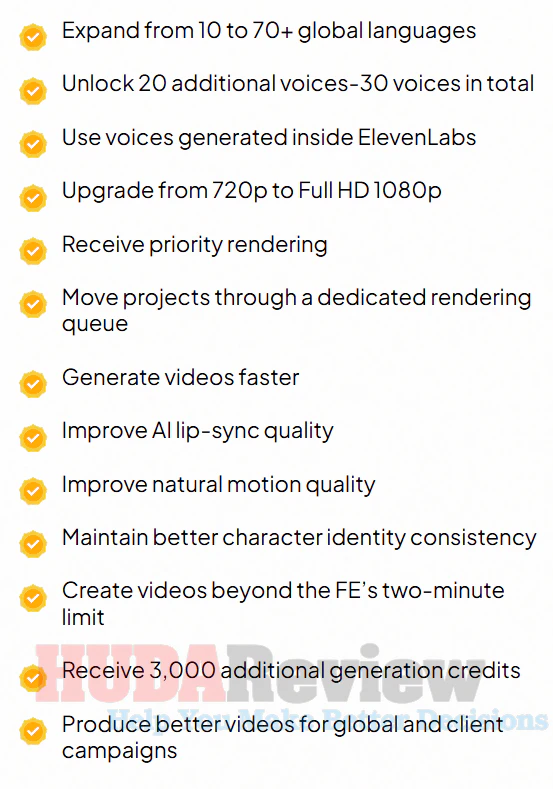
Pro Edition expands the core platform with more languages, additional voices, ElevenLabs voice support, Full HD 1080p output, priority rendering, longer videos, improved performance quality, and 6,000 extra credits.
It is the upgrade for users who want more capacity and stronger output for regular marketing or client projects.
Here’s what you will unlock with this upgrade:
Upgrade 02: Creative Suite Edition
Price: $67 (one-time payment)
>>>Click Here To Grab This Upgrade
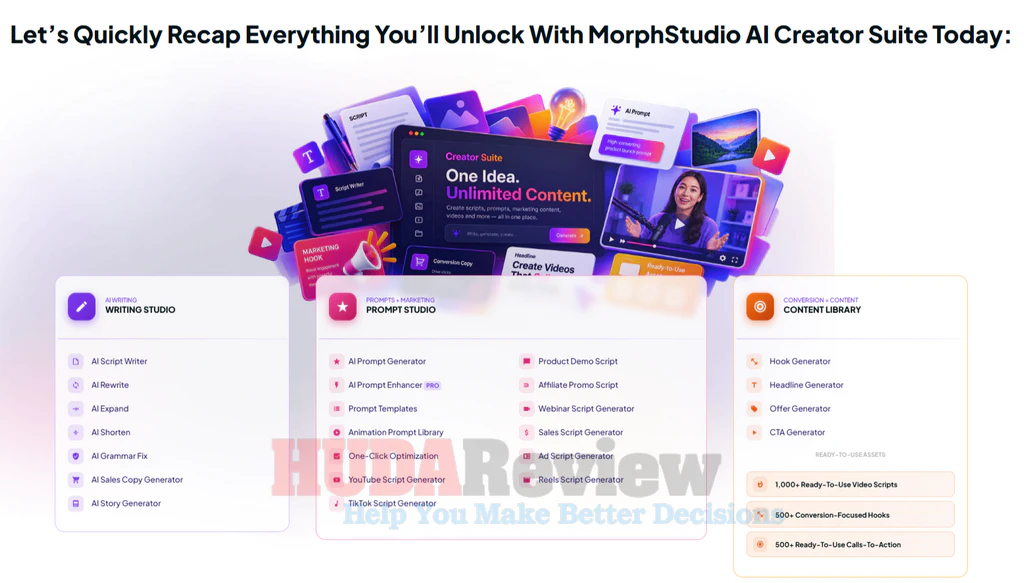
The Creative Suite strengthens the content-creation side of (PLR) The Free Website Method by helping you generate scripts, hooks, headlines, CTAs, and performance prompts for different campaigns.
It also includes 2,000+ DFY assets to help you create promotional content faster without starting from scratch.
Upgrade 03: DFY Avatars Collection
Price: $97 (one-time payment)
>>>Click Here To Grab This Upgrade
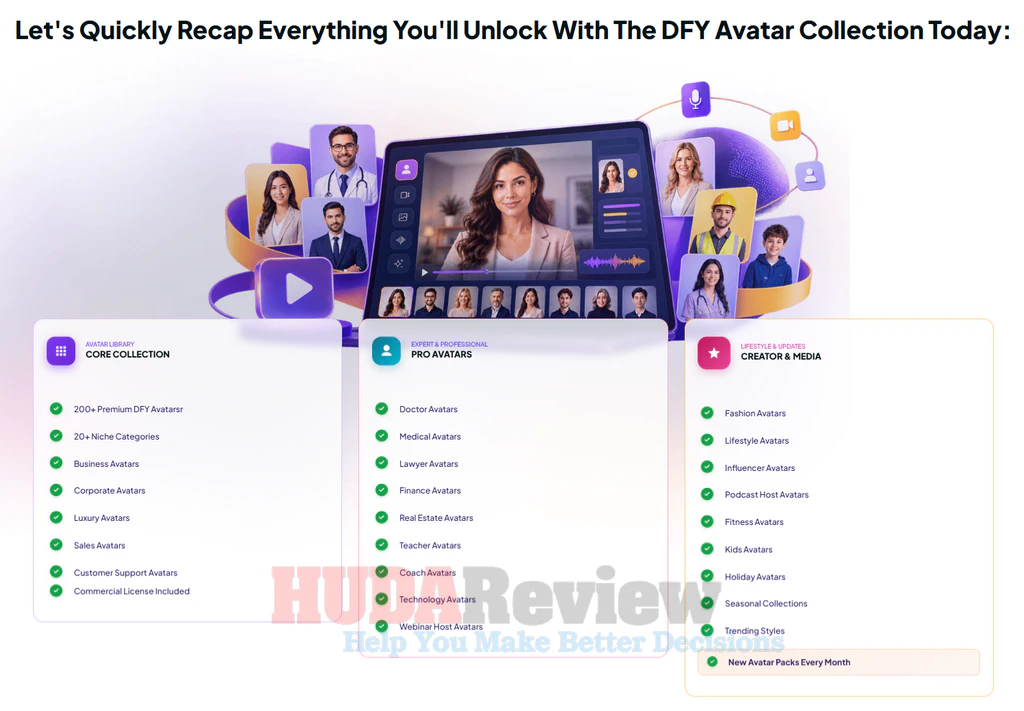
This upgrade gives you access to 300+ premium done-for-you avatars across 20 categories, covering niches such as business, medical, finance, technology, real estate, coaching, fashion, lifestyle, fitness, sales, webinars, podcasts, and more.
Upgrade 04: (PLR) The Free Website Method Agency Upgrade
Price: $247 (one-time payment)
>>>Click Here To Grab This Upgrade
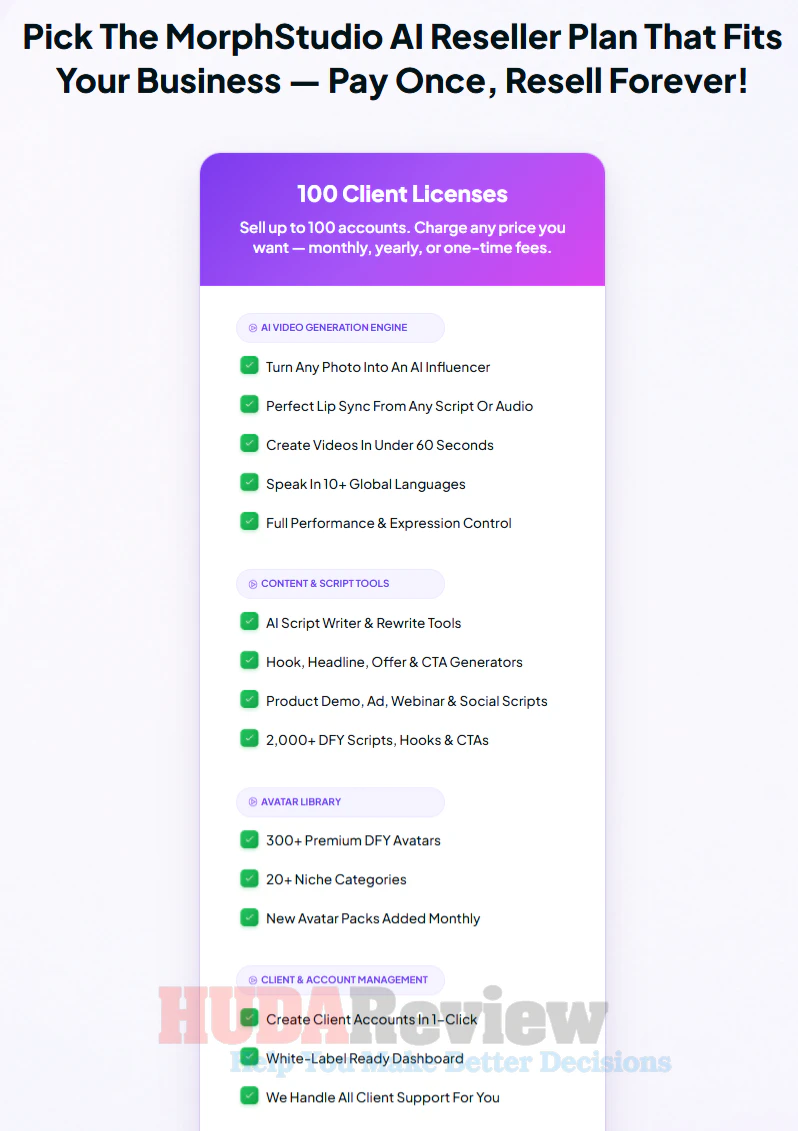
The Agency Upgrade is designed for users who want to turn (PLR) The Free Website Method into a client or reseller business.
It includes the ability to create up to 50 client accounts, resell the software under your own operation, keep 100% of sales, and use included sales, proposal, contract, pricing, and onboarding assets.
Who Is (PLR) The Free Website Method Best For?
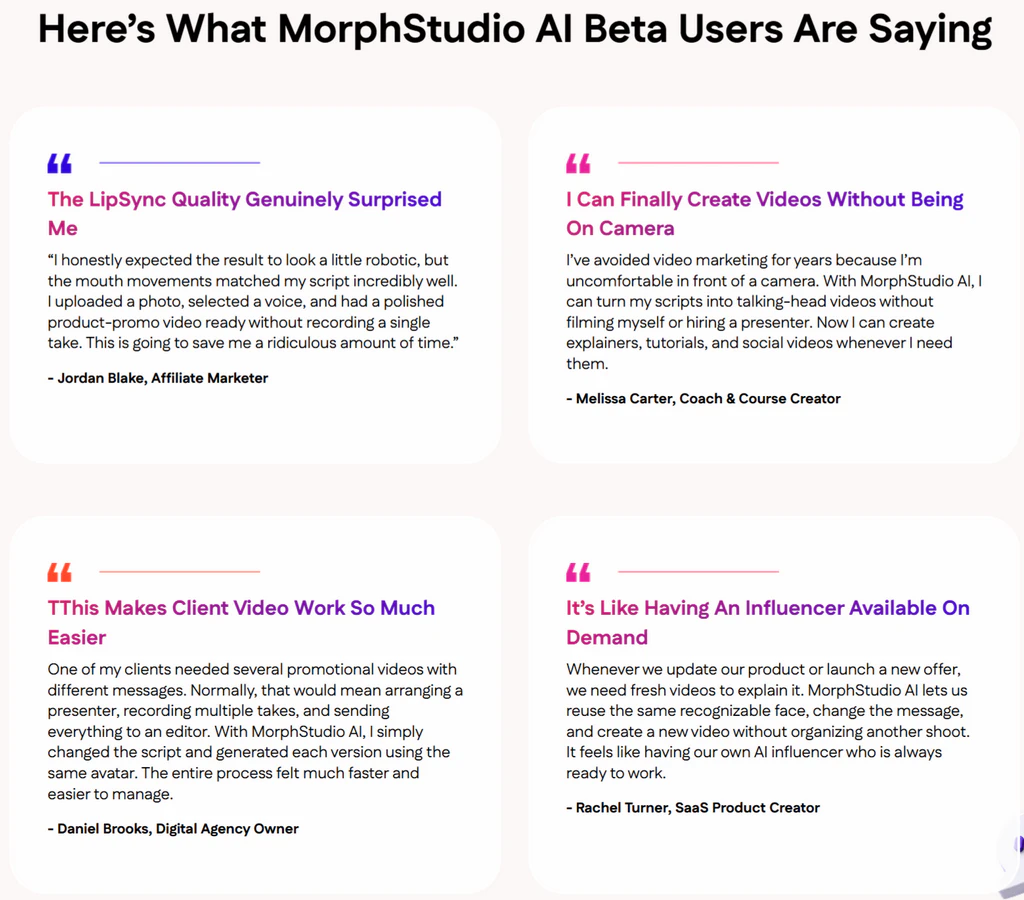
(PLR) The Free Website Method fits people who want to create talking-head videos more quickly:
- Affiliate marketers who want spokesperson videos for product reviews, promotions, bonuses, and traffic campaigns.
- Social media creators producing content for TikTok, Instagram Reels, YouTube Shorts, Facebook, and other platforms.
- Small business owners who need promotional videos, product explainers, announcements, and branded content.
- Freelancers and agencies offering AI video creation, social media content, or marketing services to clients.
- Course creators and coaches who want presenter-style lessons, training videos, introductions, and educational content.
- Ecommerce sellers creating product presentations, ad creatives, and sales-focused videos.
- Faceless content creators who prefer to use AI avatars rather than appear on camera.
- Digital marketers who need fresh video assets for landing pages, funnels, ads, email campaigns, and promotions.
- Local business marketers creating videos for restaurants, real estate agents, salons, gyms, clinics, and other service businesses.
- Beginners looking for a more straightforward way to create talking-head videos from scripts, audio, and images.
It may be less suitable for people who want only traditional live-action filming, advanced cinematic editing with full manual control, or who rarely create video content.
What I Like And A Few Small Limitations
PROS:
- Easy for beginners to start using.
- Helps reduce the need for on-camera recording.
- Saves time compared with traditional video production.
- Useful for both personal marketing and client work.
- Makes it easier to create content more consistently.
- Works well for faceless marketing strategies.
- Supports a wide range of online business niches.
- Gives marketers more ways to present offers visually.
- Can help turn simple scripts into more engaging content.
- Practical for social media, promotions, and sales campaigns.
- Commercial use creates extra monetization potential.
- One-time pricing makes long-term budgeting easier.
- 30-day money-back guarantee policy.
CONS:
- Your final result depends on the quality of the script, avatar, and instructions you provide.
So, Is (PLR) The Free Website Method Worth It?
(PLR) The Free Website Method reduces the time, effort, and production work normally involved in creating presenter-style videos.
This is a product worth considering because it offers a flexible creation process, strong commercial potential, and a one-time access model at launch.
Thanks for reading my (PLR) The Free Website Method review, and I hope this breakdown helps you make the right choice for your needs.
Frequently Asked Questions
Q: Can I use the videos on YouTube, TikTok, Instagram, and Facebook?
Yes. You can create videos suitable for major social platforms and adapt the output for different publishing formats.
Q: Can I generate a video from existing audio?
Yes. Upload your own audio file and let the system animate the selected avatar around the spoken content.
Q: How long can front-end videos be?
The front-end supports talking-head videos up to two minutes long. Longer video creation is available through the Pro upgrade.
Q: What video quality does the front-end provide?
The standard version exports videos in 720p MP4 format, while the Pro upgrade adds Full HD 1080p output.
Q: Can I control how the presenter delivers my message?
Yes. Performance prompts let you guide the avatar’s mood, expression, delivery style, and overall presentation.
Q: Do I have to use a built-in character?
No. You can choose an included avatar or upload your own compatible photo and turn it into a digital presenter.
Q: Can I preview a voice before creating the video?
Yes. Voice controls allow you to select and preview available voices before starting the final generation.
Q: Does video rendering use my computer resources?
No. Rendering is cloud-based, so the main processing takes place online rather than relying heavily on your local computer.
Q: Can the same avatar be used across multiple campaigns?
Yes. You can reuse a selected avatar with different scripts, voices, prompts, and marketing messages to maintain a recognizable visual presence across your content.
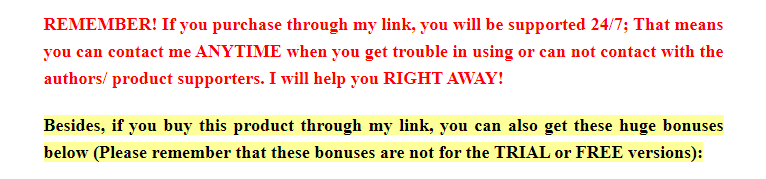



Our HudaReview team offers valuable bonuses to customers who purchase (PLR) The Free Website Method through our website.
Yes. You can get all the bonuses below if you purchase this product through our (PLR) The Free Website Method review post.
Super Bonus Package 01


The Ultimate Collection of High-Quality PLR Packages For Your Online Business

01st Mega Pack:
10 Beautiful Themes For Different Business Types

02nd Mega Pack:
Graphics Elements For Versatile Usage

03rd Mega Pack:
The Video Tools

04th Mega Pack:
The Social Media Marketing Suite
05th Mega Pack:
The Social Traffic Apps

06th Mega Pack:
The Health, Diet, and Lifestyle Ebooks With PLR

07th Mega Pack:
The PLR Products With Personal Development Content
V.I.P AI SOFTWARE BONUS PACKAGES

Exclusive bonus packages for any Upsell or Bundle Purchase
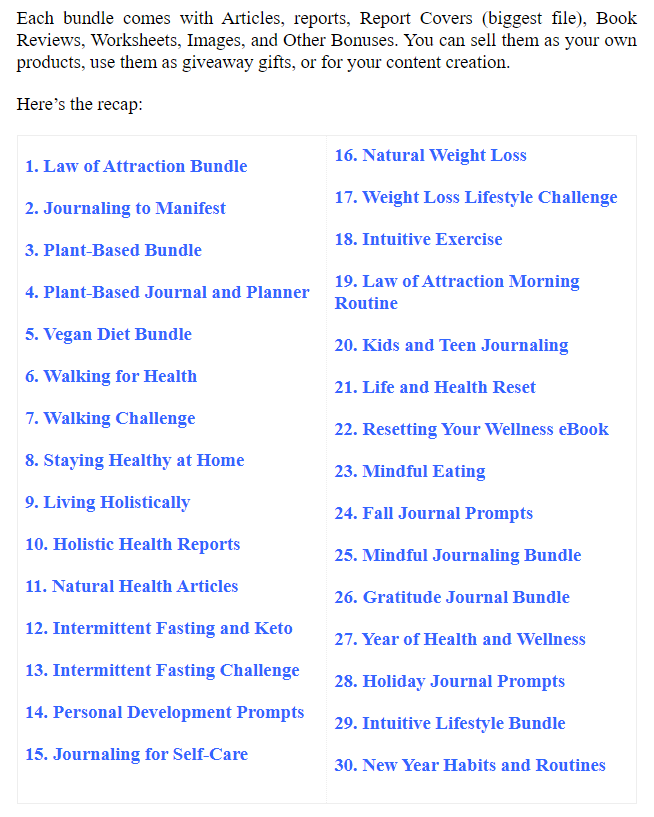
Moreover, if you purchase at least 1 (PLR) The Free Website Method Upsell or the all-in-one (PLR) The Free Website Method Bundle offer, you will get all the bonus packages below:
1/ FAST-ACTION BONUS PACKAGE 01
2/ FAST-ACTION BONUS PACKAGE 02
3/ FAST-ACTION BONUS PACKAGE 03
4/ FAST-ACTION BONUS PACKAGE 04
5/ FAST-ACTION BONUS PACKAGE 05
6/ FAST-ACTION BONUS PACKAGE 06
7/ FAST-ACTION BONUS PACKAGE 07
8/ FAST-ACTION BONUS PACKAGE 08
9/ FAST-ACTION BONUS PACKAGE 09
10/ FAST-ACTION BONUS PACKAGE 10
***3 STEPS TO CLAIM THESE BONUSES***
Step 1: Purchase the The Free Website Method platform on my website:
Step 2: After completing the transaction, forward the receipt to my email at hudareviewbonus@gmail.com
Final step: You will receive the bonuses within 24 hours.
Once again, thank you for reading my The Free Website Method review to the end. Send my best wishes to you and your family.