
AffiliTube AI Review 2026: Can This AI Plugin Turn YouTube Videos Into Amazon Affiliate Posts?
AffiliTube AI Review
Automate Video Content & Amazon Monetization
Affiliate websites often look straightforward from the outside. Pick a niche, publish useful content, recommend relevant products, add affiliate links, and start attracting visitors.
The workload becomes much more obvious once you start doing everything yourself.
Every new post can involve keyword research, finding a suitable content angle, writing the article, sourcing media, formatting the page, choosing related Amazon products, inserting tracking links, and preparing everything for publication. Keeping that process going across dozens or hundreds of posts takes considerable time.
AffiliTube AI offers a faster route by combining YouTube content, AI-written articles, Amazon product recommendations, affiliate link placement, images, and WordPress publishing into a single workflow.
The core concept immediately caught my attention because it doesn’t ask you to create videos yourself. You search for existing YouTube videos related to your niche, choose the ones you want, and let the plugin turn them into monetized WordPress posts.
In this AffiliTube AI review, I’ll take a close look at how the software works, what you get, the key features, pricing, advantages, limitations, and the type of marketer who can get the most value from it.
What Is AffiliTube AI Review – A Closer Look at the Product
AffiliTube AI is an AI-powered WordPress plugin that turns relevant YouTube videos into monetized affiliate posts.
You start with a keyword or niche topic. The software searches YouTube and returns matching videos directly inside WordPress. After you choose a video, AffiliTube AI creates an original supporting article via your OpenAI API connection, embeds the selected video, sets the thumbnail as the featured image, and links relevant Amazon products to the post.
The monetization element forms a major part of the workflow. Amazon products can appear below the video, along with product information and your affiliate tracking details, giving readers a direct path from informational content to related products.
You also avoid the usual Amazon Product Advertising API approval requirement for this particular product-search process. AffiliTube AI provides its own product-data system and currently includes 200 credits with the account. According to the product FAQ, one keyword product search consumes one credit.
The result is a WordPress post that combines three useful components:
- Relevant video content
- Original AI-generated written content
- Commercial Amazon product recommendations
That combination gives affiliate publishers a repeatable content model that they can apply across many niches.

AffiliTube AI Review: Quick Overview

| Creator | Kurt Chrisler / WP Marketer Tools |
| Product Type | AI Affiliate Video Site WordPress Plugin |
| Main Purpose | Create monetized WordPress posts around YouTube videos |
| The Official Page | >>>Click Here To Access |
| AI Integration | OpenAI API |
| Amazon PA API Required | No |
| Launch Pricing | $17 – one-time payment. |
| Coupon Code | Add my code “ATVIP4” to get $4 Off any item in the funnel. |
| Refund Policy | 30 days for unresolved technical/setup issues |
| Skill Level | Beginner-friendly |
| Support | Vendor Support Desk: https://www.wpmarketertools.com/help-desk/
HudaReview Support: mailto: hudareviewbonus@gmail.com |
Who Created AffiliTube AI?

AffiliTube AI was created by Kurt Chrisler, the founder of WP Marketer Tools.
Kurt has been developing WordPress-based marketing software for many years, with a strong focus on affiliate marketing, content creation, automation, and traffic generation. Through WP Marketer Tools, he has released a large collection of products designed to help marketers build and monetize websites more efficiently.
His software portfolio includes tools such as AffiliNinja, AffiliEngine AI, AI TubeSite, AutoTube AI, Blogr AI, SiteNinja AI, and several other WordPress-focused applications. This background gives him solid experience in the same areas that AffiliTube AI covers: affiliate sites, automated content creation, YouTube integration, and online monetization.
WP Marketer Tools states that it has developed more than 30 software products and served over 50,000 customers, giving AffiliTube AI the advantage of coming from a vendor with an established history in the WordPress marketing space.
From my perspective, Kurt’s experience is particularly well suited to this product. AffiliTube AI reflects the type of practical software his company has focused on for years: reducing repetitive website tasks and giving affiliate marketers a faster way to publish monetized content.

Add my code “ATVIP4” to get $4 Off any item in the funnel.
Key Features: What Do You Actually Get?
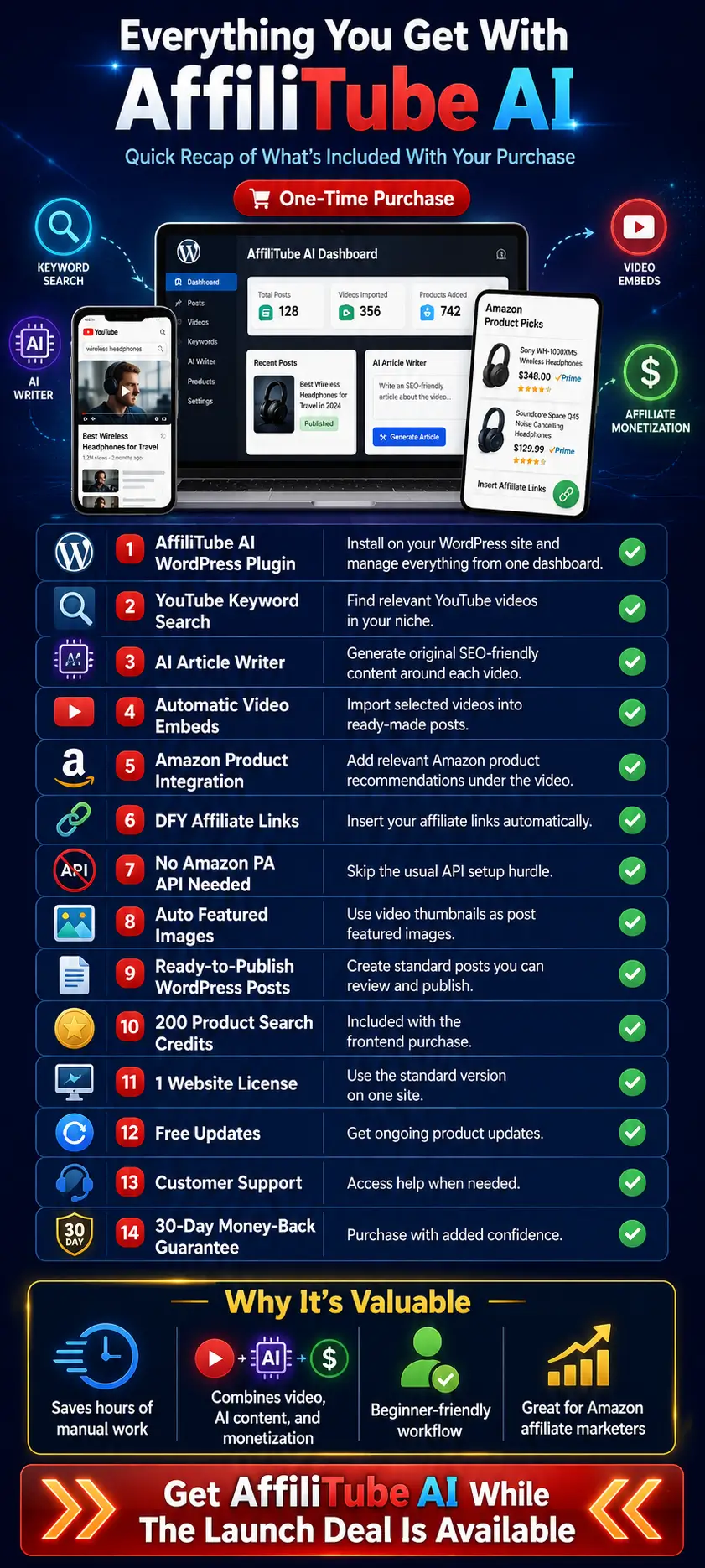
AffiliTube AI brings the core tasks of creating and monetizing video-based affiliate posts into a single WordPress workflow. The software covers content discovery, article creation, video embedding, product placement, affiliate tracking, images, and publishing.
Here is a closer look at what you get inside the platform.
✅ YouTube Keyword Search:
Enter a keyword related to your niche and search for suitable YouTube videos directly from WordPress.
The software returns matching videos with thumbnails, allowing you to quickly choose content that fits your website without repeatedly jumping between WordPress and YouTube.
✅ AI Article Writer:
After you select a video, AffiliTube AI uses your connected OpenAI account to generate an original article on the topic.
The generated content comes with headings and clean formatting, giving you a more complete post than a basic embedded video page. You can review and improve the draft before publishing it.
✅ Automatic Video Embedding:
There is no need to copy YouTube URLs, grab embed codes, or manually position video players inside each article.
Choose the video you want, and AffiliTube AI handles the embedding process as part of the post creation workflow.
✅ Automatic Amazon Product Integration:
AffiliTube AI can place relevant Amazon products underneath your selected video.
These product sections can include useful information such as the product image, rating, and a View on Amazon button, creating a direct monetization opportunity within the content.
✅ DFY Amazon Affiliate Links:
Enter your Amazon affiliate details once, and the plugin can attach your tracking information to the products it adds.
This saves you from creating and inserting affiliate links manually for every product and every new post.
✅ No Amazon PA API Required:
One particularly useful feature is the ability to add Amazon products without gaining access to the Amazon Product Advertising API.
AffiliTube AI uses its own product-data system, which removes a common hurdle for newer Amazon affiliates. The frontend currently includes 200 product-search credits, giving you enough capacity to start adding products across multiple posts.
✅ Auto Image Import:
The software automatically imports the selected video’s thumbnail and sets it as the featured image for your WordPress post.
That removes another repetitive step from the publishing process and helps every article start with a relevant visual already in place.
✅ Ready-To-Use WordPress Posts:
AffiliTube AI creates standard WordPress posts, so your content remains easy to edit, organize, optimize, and customize.
You can continue using your preferred theme, page builder, SEO plugin, categories, internal links, CTAs, and other WordPress features around the generated content.
✅ Draft Review Before Publishing:
The software lets you review your imported content before making it public.
I consider this an important advantage because AI can save significant writing time, while human review still helps improve accuracy, readability, keyword targeting, product relevance, and overall content quality.
✅ Fast Import And Publishing Workflow:
Once you choose a suitable video, AffiliTube AI handles most of the production process in sequence.
It can create the article, embed the video, import the image, insert relevant Amazon products, attach your affiliate information, and prepare the post for publication.
That means one content idea can move from video discovery to a monetized WordPress draft with far fewer manual steps.
✅ Beginner-Friendly Setup:
You do not need advanced technical knowledge to work with the plugin.
The main setup involves installing AffiliTube AI on WordPress, activating your license, connecting the required accounts, and entering your affiliate details. After that, the everyday workflow mainly involves searching, selecting, reviewing, and publishing.
✅ Multiple Monetization Opportunities Per Post:
Each post can combine useful video content, AI-written supporting text, and Amazon affiliate recommendations.
This gives you more than one way to engage visitors on the same page. The video can attract and retain attention, the written article adds search-friendly context, and the product section creates a clear route toward an affiliate click.
My Take On The Feature Set:
What I like most about AffiliTube AI is how the features work together.
A YouTube search feature alone would not save much time. An AI writer alone would still leave you handling videos, images, products, tracking links, and WordPress formatting yourself.
AffiliTube AI connects these individual jobs into one repeatable content-production process.
For affiliate marketers planning to publish frequently, that combination can make a much bigger difference than any single feature alone.
AffiliTube AI App – Step-by-Step User Guide
The demo begins with AffiliTube AI already installed inside a WordPress site. The dashboard itself shows the setup sequence you should complete before creating posts.
Install and activate the AffiliTube AI WordPress plugin on the site you want to use.
Open AffiliTube AI → Settings and add the OpenAI and YouTube keys shown in the dashboard checklist.
Activate your AffiliTube AI license to make Amazon product data and credits available.
Have your Amazon Associates tracking tag and marketplace domain ready before configuring product monetization.
Plan a niche keyword that can produce useful YouTube videos and relevant Amazon products.
TIP: The dashboard indicates that imported items are created as drafts. Use that review stage to check the AI article, the embedded video, the Amazon products, and your affiliate disclosure before publishing.
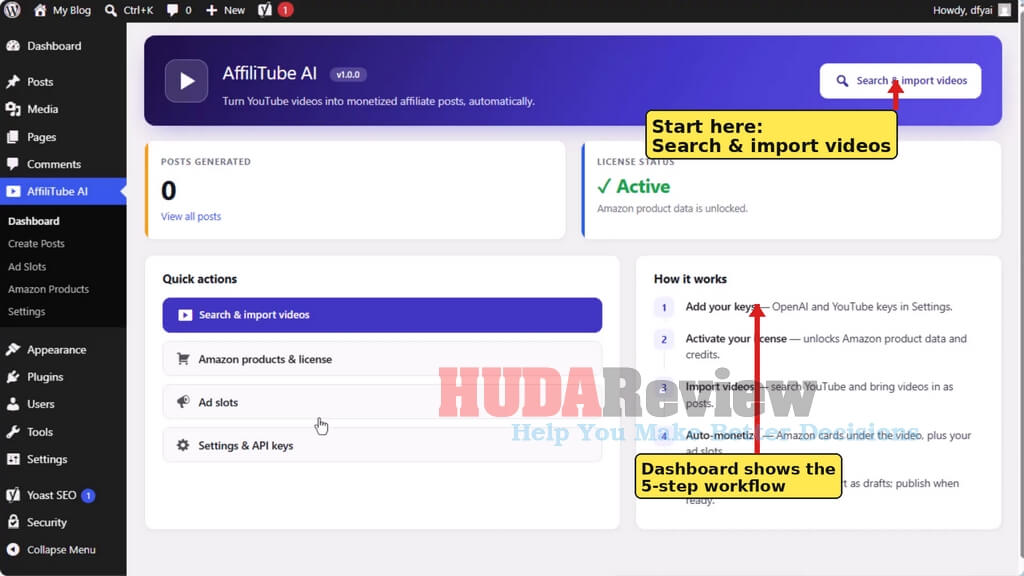
Open the AffiliTube AI Dashboard and Confirm Setup:
From your WordPress admin area, open AffiliTube AI from the left-hand menu. The dashboard gives you a quick status view and direct access to the main modules: Dashboard, Create Posts, Ad Slots, Amazon Products, and Settings.
Check the License Status panel. In the demo, it shows Active, which means Amazon product data is unlocked.
Review the How it works panel. It outlines the complete process: add API keys, activate the license, import videos, auto-monetize, then review and publish.
Use Search & import videos when you are ready to begin creating content.
You can also use the Quick Actions area to jump directly to Amazon product settings, ad slots, or API key settings.
Search YouTube by Niche Keyword:
Go to AffiliTube AI → Create Posts. The search screen contains a keyword field and a Search videos button. Enter a topic that closely matches your website niche and the products you may eventually recommend.
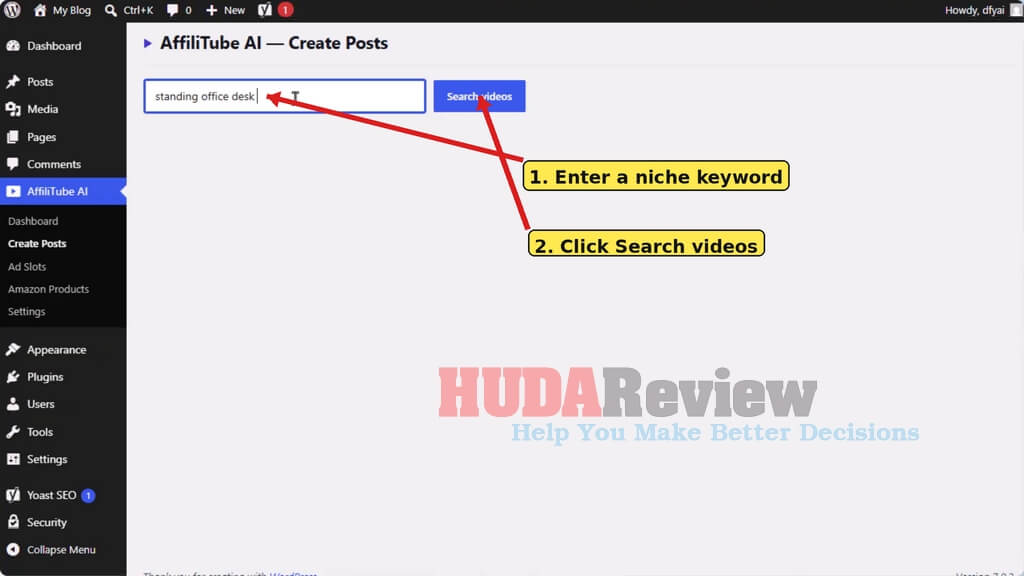
Type the keyword into the search box. The demo uses “standing office desk.”
Click Search videos.
Wait for AffiliTube AI to return matching YouTube videos as visual cards.
TIP: Use specific commercial or problem-solving topics. A focused keyword makes it easier to find a relevant video and match the post with useful Amazon products.
Review the Video Results:
AffiliTube AI displays search results with the video thumbnail, title, channel/creator information, and an Import this video button. Scan the results before importing anything.
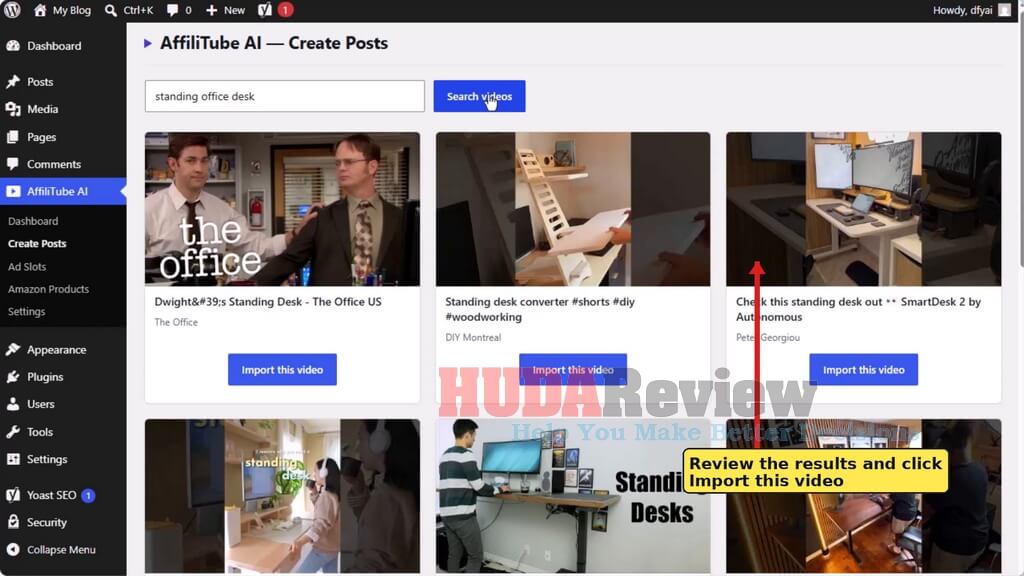
Prefer videos that directly answer the search intent of your planned article.
Check the thumbnail and title for relevance to your niche.
Avoid importing unrelated videos simply to increase post volume.
Click Import this video on the result you want to turn into a WordPress post.
Import the Video and Let AffiliTube AI Build the Post:
After you click Import this video, the button becomes unavailable while the plugin works. The demo shows an “Importing…” status on the selected card. This is the stage where AffiliTube AI assembles the WordPress post around the chosen video.
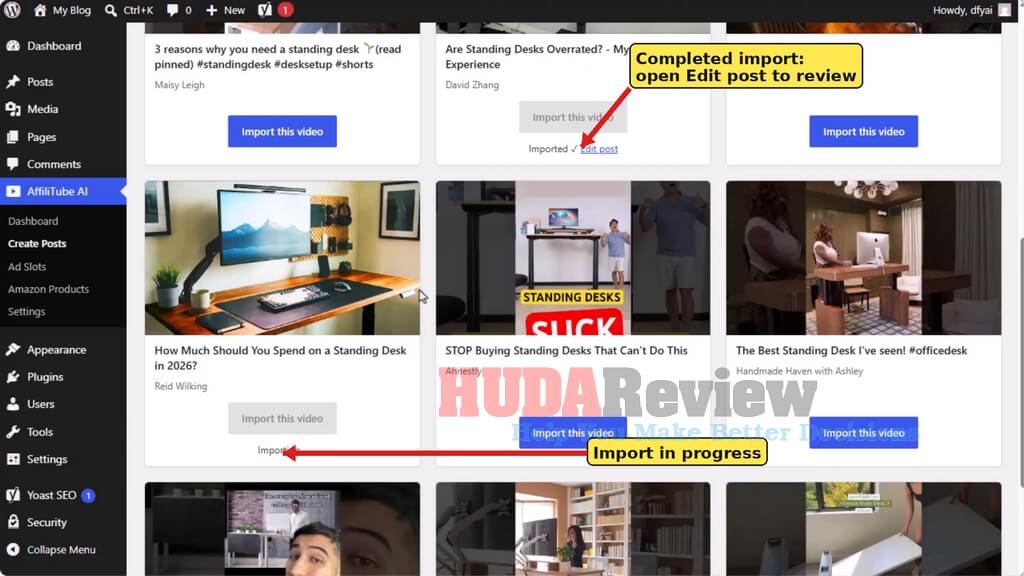
Wait until the selected card changes from Importing… to Imported.
Use the Edit post link that appears after completion to review the generated draft in WordPress.
Repeat the import action for additional videos you want to turn into posts.
The demo imports several videos from the same standing-desk topic, showing how one keyword can generate multiple related content ideas.
TIP: Do not publish the draft without checking it. AI can create the initial article quickly, but you should still review accuracy, wording, product relevance, links, disclosures, and overall usefulness.
Check the Newly Generated Posts on Your Site:
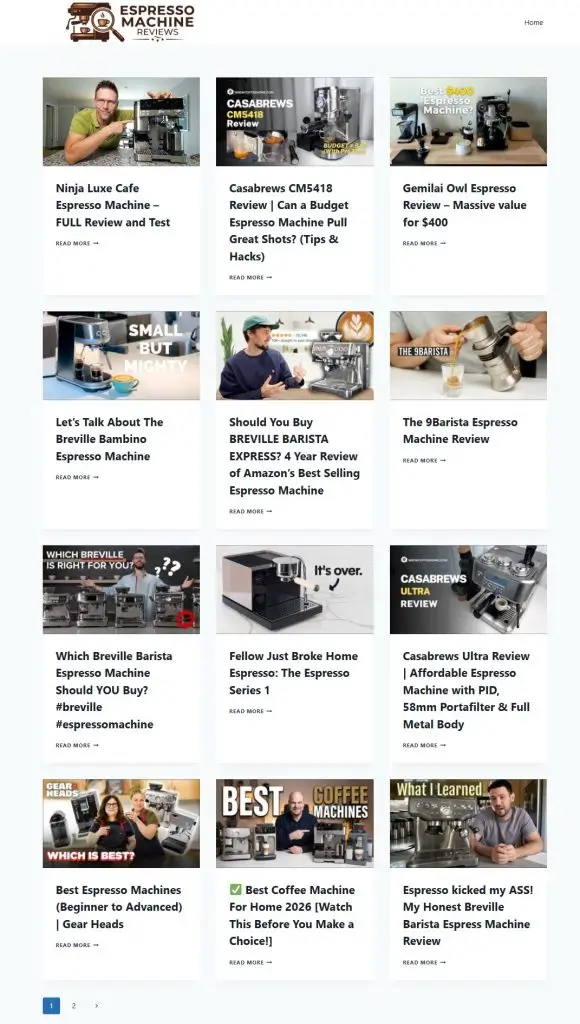
Once the imported drafts have been reviewed and published, they appear as regular WordPress posts on the site. The demo shows multiple video-based articles displayed in the site’s post grid, each using the video image as the featured visual.
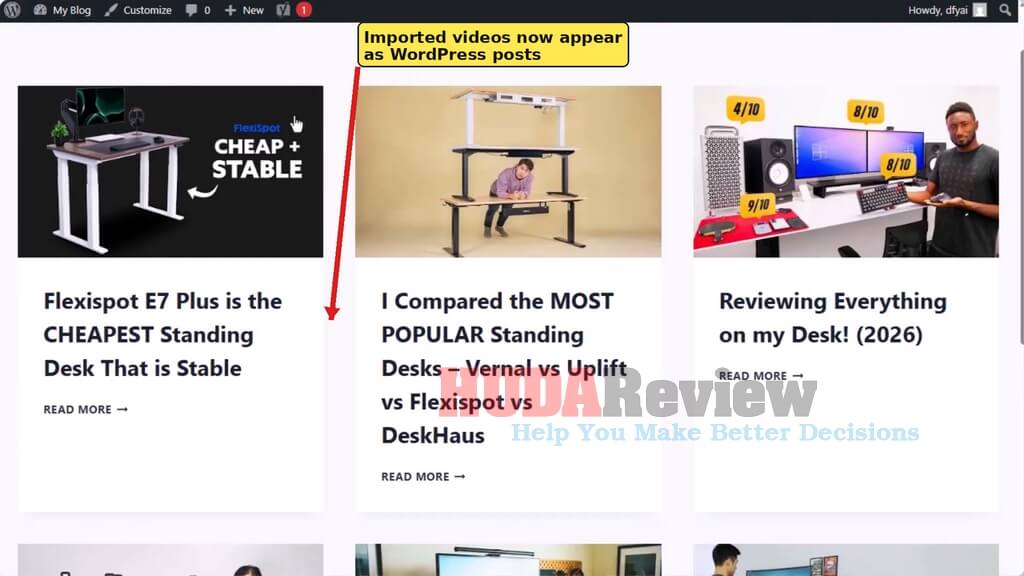
Confirm that the post title looks readable and relevant. Check that the featured image fits the content. Open the post and inspect the complete layout before sending traffic to it.
Verify the Embedded YouTube Video:
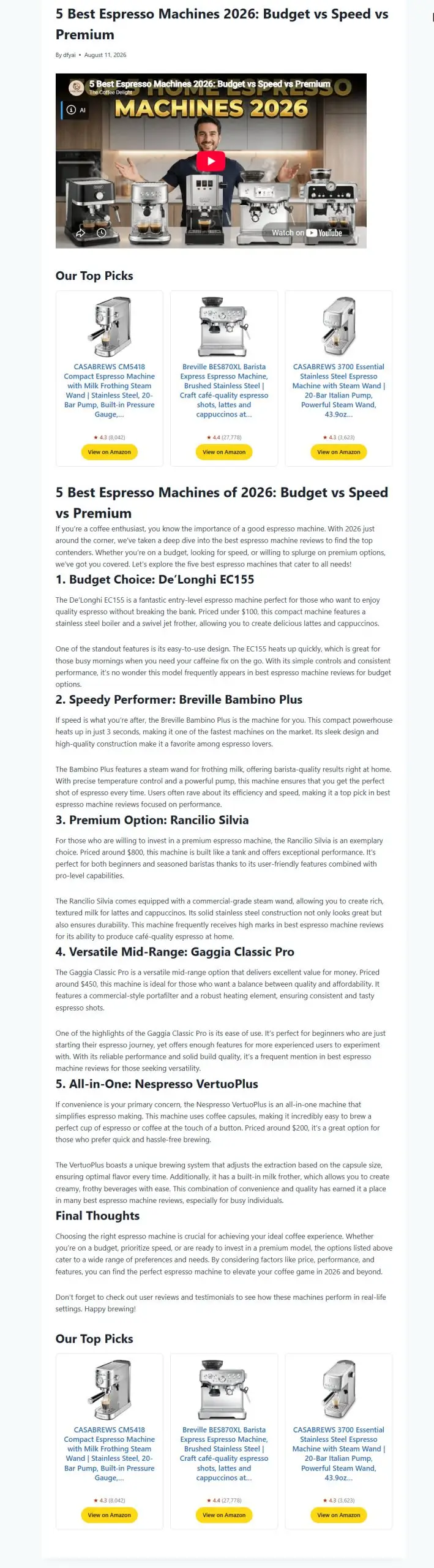
Open one of the generated posts. Near the top of the article, the demo shows the selected YouTube video embedded directly beneath the post title and publishing information.
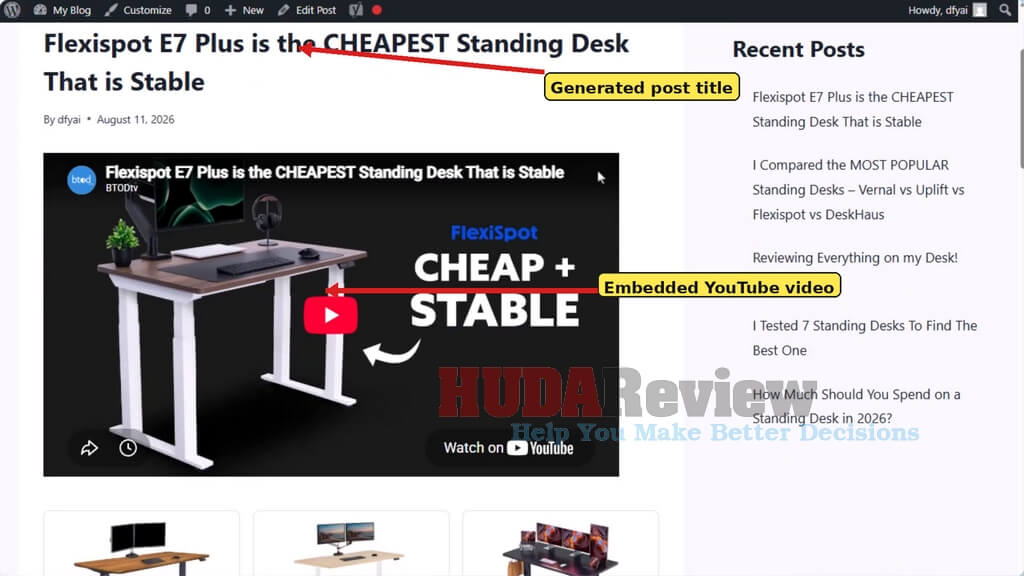
Confirm that the correct video appears. Make sure the player loads properly on the front end. Check the title and surrounding layout for mobile-friendly readability.
Because these are normal WordPress posts, you can continue editing the title, body content, categories, internal links, SEO fields, and calls to action with your regular WordPress workflow.
Verify the Amazon Product Block and Affiliate CTAs:
Directly beneath the video, the demo shows a row of Amazon product cards. Each card contains a product image, product name, rating information, and a View on Amazon button.
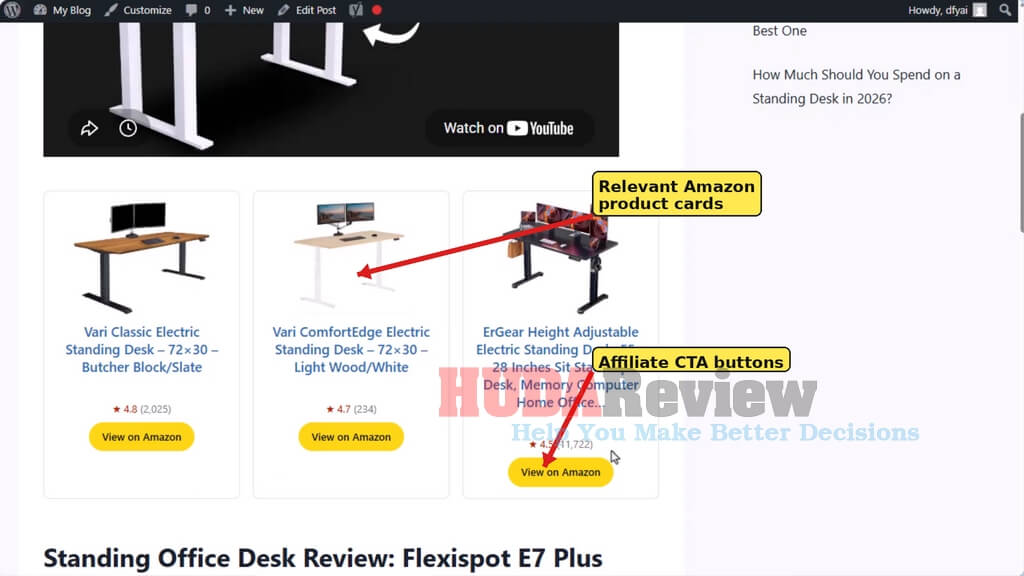
Check that the suggested products are closely related to the video topic. Review the product names and images for obvious mismatches.
Test the View on Amazon buttons and confirm that your affiliate tracking information is present before publishing.
TIP: Relevance matters more than filling every available product slot. A tightly matched product block creates a more natural path from the video/article topic to the Amazon recommendation.
Review the AI-Written Article:
Scroll below the video and product area to inspect the article generated around the selected video. In the demo, AffiliTube AI creates a structured article with a main heading, an introductory paragraph, subheadings, and supporting paragraphs.
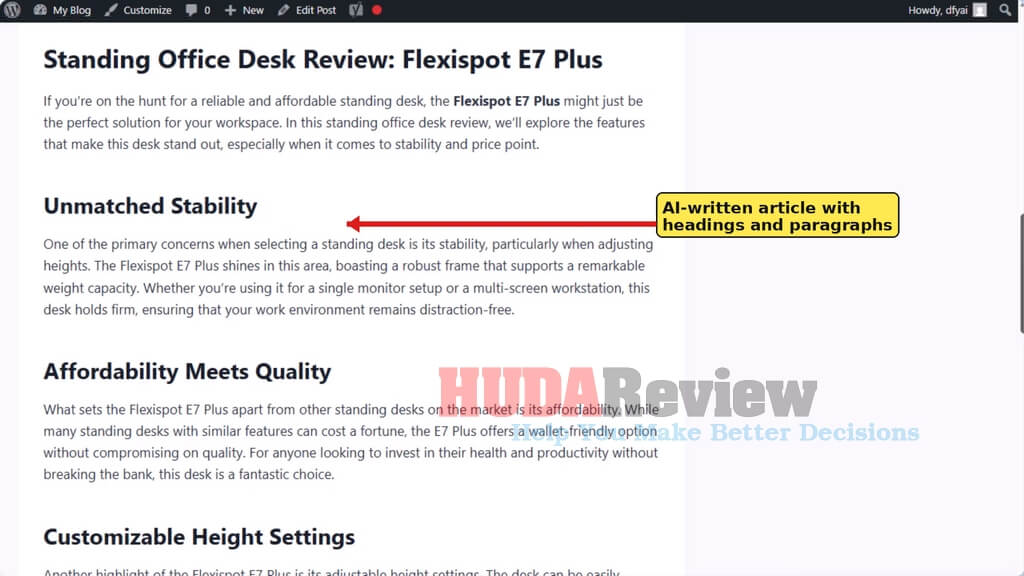
Fact-check statements before publication. Remove generic or repetitive wording and add your own editorial perspective where useful.
Improve the introduction to better match the page’s search intent. Add internal links to related content on your site.
Check headings, paragraph spacing, grammar, and keyword use. Confirm that the article provides enough value beyond the embedded video.
Configure Ad Slots:
AffiliTube AI includes a dedicated Ad Slots area for inserting advertising or tracking code at different positions. Open AffiliTube AI → Ad Slots to configure the placements you want to use.
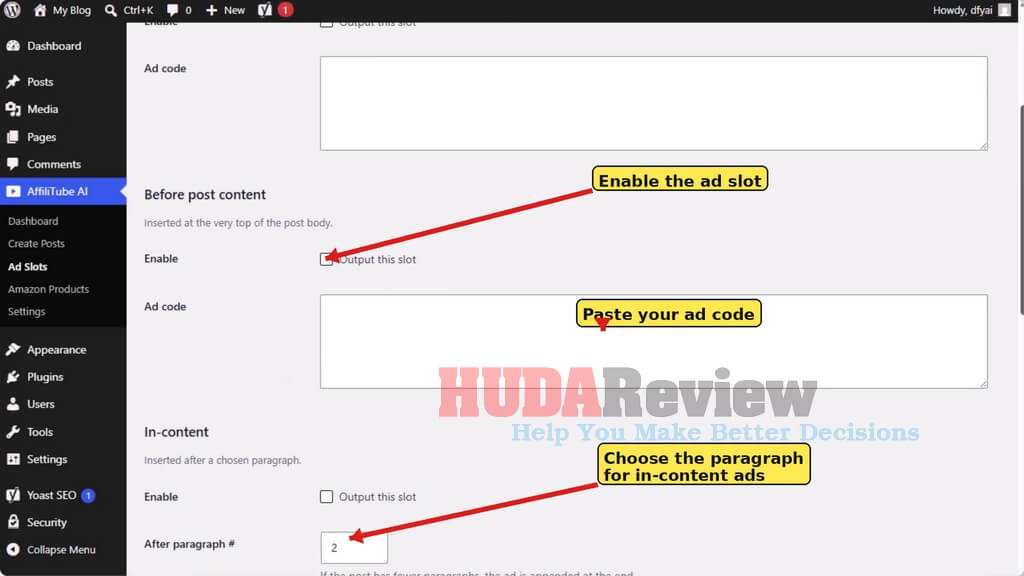
Enable the slot you want to output. Paste your ad code into the corresponding Ad code field.
For an in-content placement, choose the paragraph number after which the ad should appear. The demo shows paragraph 2 as an example.
The interface also provides placements before the post body, after the post body, and in the footer. Use only the placements that fit your site design and monetization strategy.
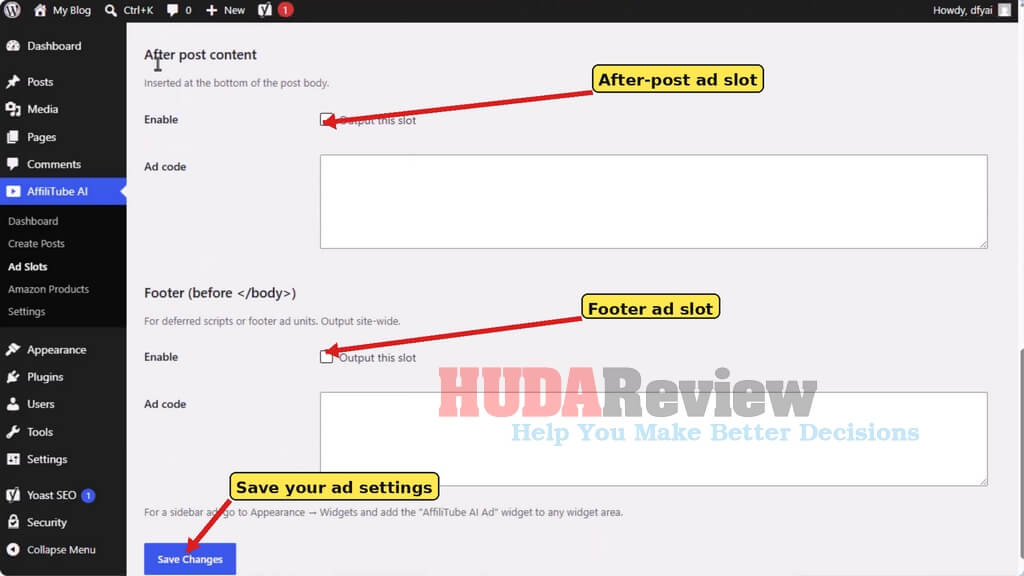
Enable After post content to show an ad at the bottom of the post body. Enable Footer when you need a footer ad unit or deferred script in that slot.
Click Save Changes after completing the configuration.
TIP: The Ad Slots screen also notes that sidebar ads can be handled through Appearance → Widgets using the AffiliTube AI Ad widget.
Configure Amazon Product Monetization:
Open AffiliTube AI → Amazon Products to control the affiliate settings used when product cards are added to imported posts.
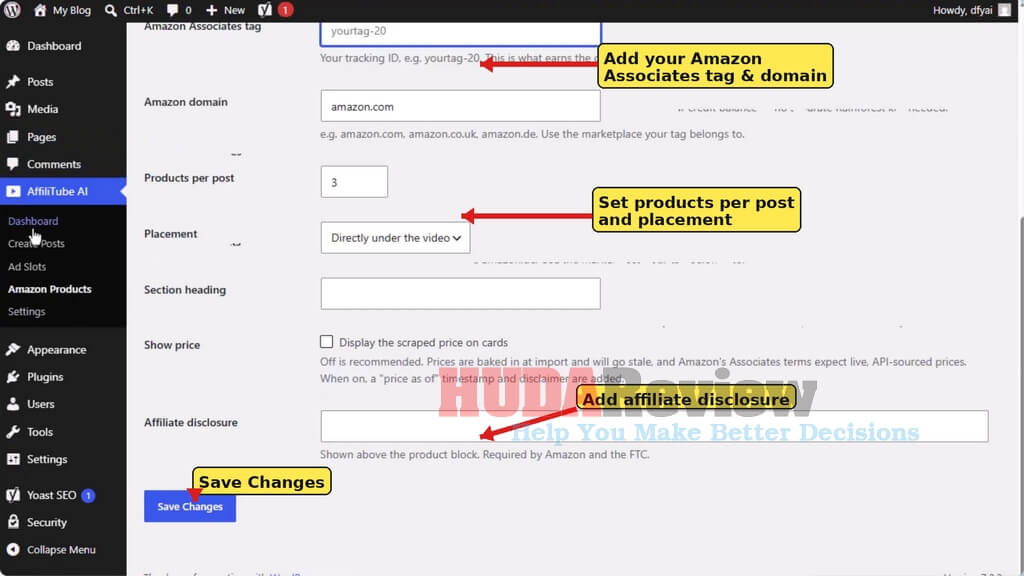
Enter your Amazon Associates tracking tag. The interface explains that this tracking ID is what earns the commission.
Choose the Amazon domain that belongs to your marketplace, such as amazon.com or the appropriate regional domain.
Set Products per post. The demo shows 3 products.
Choose the Placement. The demo is shown directly under the video; the interface also shows an option to place the product block at the end of the post.
Optionally enter a Section heading for the product block.
Decide whether to display scraped prices. The plugin interface recommends keeping this off because prices can become stale after import.
Add your Affiliate disclosure. The interface notes that the disclosure is shown above the product block and is required by Amazon and the FTC.
Click Save Changes.
Review, Publish, and Repeat:
AffiliTube AI is designed around a repeatable publishing cycle. Once the settings are ready, you can search for another keyword, import relevant videos, review the drafts, and publish the best posts.
- Search for a tightly focused topic.
- Choose a relevant YouTube video.
- Import it and wait for the Imported status.
- Open the edit post and review the draft.
- Confirm the embedded video and Amazon product cards.
- Edit and improve the AI article.
- Check affiliate links and disclosure.
- Publish only after the post passes your final review.
For more details, please watch the demo video below:
DEMO VIDEO

Your Own Complete Amazon Video Commission Site in Just Minutes!
My Own Honest Thoughts About AffiliTube AI
The strongest part of AffiliTube AI, in my opinion, is how many separate affiliate-site tasks it combines into a single publishing workflow.
Think about the traditional process.
You identify a topic.
Then you search for a useful video.
Next comes article research.
After that, you write or outsource the content, create the WordPress post, format the article, find a suitable image, embed the video, research Amazon products, generate tracking links, add product boxes, and finally prepare the page for publication.
One post may not feel overwhelming.
Fifty posts certainly can.
AffiliTube AI reduces much of that production work to choosing a topic and selecting suitable videos.
I also like the strategy behind combining informational video content with commercial product recommendations.
Visitors often search for tutorials, demonstrations, comparisons, tips, reviews, and problem-solving content before making purchasing decisions. A useful video can keep them engaged, while supporting written content provides more context for the page. Relevant Amazon recommendations then introduce a natural path to monetization.
The software also avoids forcing users to become video creators.
You don’t need a camera, microphone, editing software, presentation skills, voiceover work, or a YouTube production schedule. Your job centers on content selection, niche strategy, reviewing the generated posts, and driving traffic.
That makes the approach far more accessible for website owners who prefer blogging and affiliate marketing over appearing on camera.
There is one point I want to emphasize, though.
Automation does not automatically produce traffic or commissions.
AffiliTube AI can accelerate content production and the setup of monetization. It cannot guarantee Google rankings, visitors, clicks, or Amazon sales. The product’s own earnings disclaimer also states that results vary and that no income outcome is guaranteed.
The strongest strategy involves using automation as a production engine while you continue making smart decisions about niche selection, keyword targeting, content quality, internal linking, promotion, and conversion optimization.
That is where I see the real value.
Commission-Generating Video Reviews Created in Just Seconds:
Why I Think The Video + Article + Amazon Model Has Potential
Most affiliate marketers already understand how to write product reviews.
Video adds another layer.
A good YouTube video can demonstrate a problem, show a product category in action, explain a technique, or help a visitor understand the topic faster than text alone.
The accompanying article gives you room for SEO-oriented information and related keyword coverage.
Amazon products create the commercial component.
Together, one post can serve several purposes:
Capture search traffic → educate the visitor → increase engagement → introduce relevant products → send interested buyers to Amazon.
Amazon Associates officially allows publishers and content creators with qualifying sites to recommend products and earn commissions from qualifying purchases.
The income still depends on your traffic quality, niche, product selection, conversion rates, competition, and many other factors.
AffiliTube AI mainly helps you create more monetizable opportunities without spending as much time preparing each individual post.
How Much Does It Cost?
FE: AffiliTube AI Pricing: Get In Before The Price Increases
AffiliTube AI is currently available for $17 as a one-time payment, making the launch offer especially attractive considering how much of the affiliate content process it can handle.
From finding YouTube videos and creating AI-written articles to adding Amazon products, affiliate links, images, and preparing WordPress posts, you get a complete content-to-monetization workflow without another monthly software subscription.
The current $17 price is an early-bird offer and will increase soon, so grabbing access during the launch period gives you the best value. Your purchase also comes with a 30-day money-back guarantee, giving you time to get started and ensure the software meets your needs.
For anyone serious about producing Amazon affiliate content faster, I think the current one-time deal is well worth considering before the price moves up.

Add my code “ATVIP4” to get $4 Off any item in the funnel.
AffiliTube AI Review – The OTO Options
AffiliTube AI also comes with several optional upgrades that expand what you can do beyond the frontend version, so let’s take a closer look at each OTO and see what extra value it adds.
OTO 1: AffiliTube AI Unlimited Edition
Price: $47 (one-time payment)
>>>Click Here To Access This OTO
Add my code “upsell10” to get $10 Off.
Unlimited Edition removes the one-site restriction and gives you the freedom to build as many AffiliTube AI websites as you want across multiple niches.
This upgrade makes much more sense for marketers who plan to grow beyond a single affiliate site, test different markets, or develop a portfolio of monetized properties over time. You also receive 100 additional credits, allowing you to import up to 100 more Amazon products and expand your content faster.
For anyone serious about scaling the AffiliTube AI model, this is the upgrade I would consider first because it opens the door to multiple niche sites without repeatedly worrying about website limits. The page currently lists the upgrade at $47, with a $37 limited-time discount available.
OTO 2: AffiliTube AI Developers License Edition
Price: $27 (one-time payment)
>>>Click Here To Access This OTO
Add my code “ATVIP4” to get $4 Off.
The Developer’s License turns the software into a potential client-service and website-flipping opportunity. With this upgrade, you can use AffiliTube AI to build affiliate sites for clients, create sites to sell, list completed websites on marketplaces such as Flippa, or offer affiliate-site creation as a paid service.
This upgrade makes strong sense for anyone who wants to go beyond building sites for personal use and start monetizing their AffiliTube AI skills through client work and website sales.
It gives the software a broader commercial angle, allowing you to create valuable digital assets for other businesses or entrepreneurs and charge for the work you deliver.
OTO 3: AffiliTube AI Done For You Edition
Price: $97 (one-time payment)
>>>Click Here To Access This OTO
Add my code “upsell20” to get $20 Off.
DFY Edition is the hands-off upgrade for customers who want to get their affiliate site online without handling the setup work themselves. The team will build your site, configure everything, and add the initial content, giving you a much faster path from purchasing AffiliTube AI to having a ready-to-use website.
This upgrade is especially appealing to beginners, busy marketers, or anyone who would rather focus on traffic and monetization than on setting up the technical foundation. The offer is normally $97, but a limited-time discounted price of $77 is currently shown on the upgrade page.
OTO 4: AffiliTube AI Reseller License Edition
Price: $197 (one-time payment)
>>>Click Here To Access This OTO
Add my code “upsell50” to get $50 Off.
Reseller License gives you the right to sell AffiliTube AI yourself and keep 100% of every sale you generate. You also receive access to the existing sales pages, complete sales funnel, and professional sales video, while the AffiliTube AI team handles customer support, maintenance, technical upgrades, and hosting for you.
This upgrade creates a much bigger monetization opportunity for marketers who want to sell software without developing or supporting their own product. Only 25 reseller licenses are being offered, and the page currently lists the license at $197, a one-time price reduced from the stated $397 regular price.
OTO 5: iMarketers Hosting
Price: $49.95 – $69.95 (per year)
>>>Click Here To Access This OTO
iMarketers Hosting gives AffiliTube AI users a ready-made hosting environment for getting their WordPress affiliate site online without dealing with complicated server setup.
The service includes free setup, free WordPress installation, cPanel access, unlimited bandwidth, unmetered disk space, personal support, and no contracts, while the Unlimited plan also supports unlimited add-on domains.
This upgrade is a convenient choice for beginners or marketers who still need reliable hosting for their AffiliTube AI sites. WP Marketer Tools is currently offering a limited-time 50% customer discount, making it especially worth considering if you want the software and hosting handled within the same ecosystem.
Can You Really Make Money With AffiliTube AI?
AffiliTube AI provides the infrastructure for creating monetized content, but the software alone cannot guarantee income.
Your earning potential comes from the business model surrounding it.
Here are several practical paths.
🔥 Build A Focused Amazon Niche Site.
Choose a commercially active niche and publish video-supported articles around problems, tutorials, comparisons, and product-related topics.
Each relevant page can recommend Amazon products connected to that subject.
A home fitness site, for example, could cover workout techniques and connect those articles to equipment such as resistance bands, benches, dumbbells, recovery products, or accessories.
🔥 Target Long-Tail Search Topics.
Large keywords attract heavy competition.
Longer, more specific searches can give smaller affiliate sites more realistic content opportunities.
AffiliTube AI can help you produce supporting posts across many narrow topics while keeping the workflow manageable.
The main goal should remain quality and topical relevance, not publishing hundreds of near-identical pages.
🔥 Create Video-Based Product Education Content.
Some visitors need education before reaching a purchasing decision.
Tutorials, demonstrations, troubleshooting videos, comparisons, and practical guides can attract people who already care about a product category.
Relevant Amazon recommendations then give interested visitors somewhere to continue their buying journey.
🔥 Expand An Existing Affiliate Site Faster.
Established websites may gain even more practical value from this software.
You already have a niche, categories, internal links, an audience, and perhaps search authority.
AffiliTube AI can help fill additional content gaps without forcing you to create every post manually.
That use case appeals to me more than simply generating a huge number of random articles.

Who Is AffiliTube AI Best For?
Perfect for:
- Amazon affiliate marketers who want to create monetized content around relevant YouTube videos.
- WordPress site owners looking to speed up article creation, video embedding, product placement, and affiliate link insertion.
- Beginners who want a more guided way to build affiliate posts without handling every task manually.
- Niche bloggers who publish product-related tutorials, reviews, comparisons, and informational content.
- Affiliate marketers who do not want to create their own videos but still want video content on their websites.
- Content publishers who want to produce more posts without writing every article from scratch.
- SEO marketers are building long-tail content around niche-specific topics.
- Website owners already using Amazon Associates who want a faster way to connect relevant products with their content.
- Marketers managing multiple content ideas who need a more efficient publishing workflow.
- Anyone who wants to combine YouTube, AI-written content, and Amazon monetization inside WordPress.
AffiliTube AI is not ideal for:
- People who do not use WordPress, since the software works as a WordPress plugin.
- Users expecting guaranteed traffic, rankings, or commissions without doing any additional marketing work.
- Publishers unwilling to review AI-generated content before publishing it.
- Anyone who does not plan to use Amazon affiliate marketing or product-based monetization.
- Users who do not want to connect an OpenAI API account for article generation.
- People looking for a completely hands-off business with no niche research, content review, SEO, or traffic generation required.
Pros And Cons
Pros:
- ✅ Turns relevant YouTube videos into complete WordPress posts.
- ✅ Creates original supporting articles using OpenAI.
- ✅ Automatically embeds selected videos.
- ✅ Imports video thumbnails as featured images.
- ✅ Adds relevant Amazon product recommendations.
- ✅ Inserts affiliate tracking information.
- ✅ Doesn’t require Amazon PA API approval.
- ✅ Includes 200 Amazon product-search credits.
- ✅ Uses standard WordPress posts.
- ✅ Works with existing WordPress themes and SEO plugins according to the developer.
- ✅ Reduces repetitive article-production tasks.
- ✅ Doesn’t require video creation or editing skills.
- ✅ Beginner-friendly workflow.
- ✅ Allows content review before publication.
Cons:
- ❌ Standard frontend access currently covers one website.
- ❌ Unlimited sites require an upgrade.
- ❌ OpenAI API usage creates a separate ongoing usage cost.
- ❌ AI-generated content still deserves human review and improvement.
- ❌ The software handles content production, but does not guarantee traffic or rankings.
AffiliTube AI Review Conclusion: Is It Worth Getting?
Overall, AffiliTube AI offers a practical way to speed up the creation of monetized WordPress content by combining YouTube videos, AI-written articles, Amazon products, affiliate links, and images into a single workflow.
I especially like how much repetitive work it can remove for affiliate marketers who want to publish consistently without writing every article or formatting every post manually.
You still need to choose good niches, review the generated content, and work on traffic, but the software can handle much of the content-production process for you.
For Amazon affiliates, bloggers, and WordPress site owners looking for a faster way to create video-based affiliate posts, AffiliTube AI is well worth checking out while the launch offer is available.



VIP AI TOOL BONUS PACKAGE 01













Moreover, if you purchase at least 1 OTO/Upsell, you will get all the bonus packages below:
New Bonus Package #5:
Amazing WordPress Plugins With PLR
New Bonus Package #4:
Materials To Grow Your Online Business
New Bonus Package #3:
New Bonus Package #2:
New Bonus Package #1:
***3 STEPS TO CLAIM THESE BONUSES***
Step 1: Buy the AffiliTube AI app on my website:

Add my code “ATVIP4” to get $4 Off any item in the funnel.
Step 2: After completing the transaction, forward the receipt to my email at hudareviewbonus@gmail.com
Final step 3: You will receive the bonuses within 24 hours.
Thank you so much for reading my AffiliTube AI Review. Send my best wishes to you and your family.

David Williams
Hello all of you!
I’m David Williams, leader of a team dedicated to evaluating technology products. Our team consists of 5 members, each member has strengths in each field such as Plugin, Theme, SEO and Software … So we could make the most accurate reviews and comments according to our personal experience.
We only review and provide really good products and bring benefits to our customers. Especially with the beginners in their field, we guarantee these products that we evaluate will bring high efficiency for your work. If you want to find inefficient products, this is not the place for you, we never promote the product which is not quality and not bring efficiency to customers.





Leave a Reply