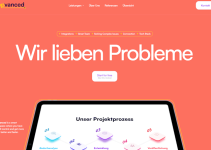
In this Fiverr Zeeshan Sikander review, we’ll examine a UI/UX design service offered through Zenkoders. The gig focuses on Figma design for websites, web applications, dashboards, and mobile apps.
We’ll look at the advertised packages, design deliverables, potential advantages, limitations, and what you should confirm before placing an order. Whether you’re planning a startup MVP, refreshing an existing interface, or preparing a SaaS dashboard for development, this review will help you evaluate the service.
Quick Overview
| Service Provider | Zeeshan Sikander / Zenkoders |
|---|---|
| Marketplace | Fiverr |
| Main Service | UI/UX design for websites, dashboards, web apps, and mobile apps |
| Design Tool | Figma, with other design formats mentioned in the gig |
| Advertised Packages | Basic: $150; Standard: $500; Premium: $1,500 |
| Advertised Delivery | 7, 10, and 14 days respectively |
| Best For | Startups, SaaS founders, app developers, and businesses planning a website or product interface |
| Important Note | The listed prices and deliverables may change. Confirm the live offer before ordering. |
What Is Zeeshan Sikander’s UI/UX Design Service?

The Fiverr gig is presented as a UI/UX design service for websites, mobile applications, dashboards, and web applications. The provider operates under the Zenkoders agency name and offers design work using Figma and other design formats listed in the gig.
UI stands for user interface, which covers the visual elements users interact with. UX stands for user experience, which concerns how people move through a product, understand its features, and accomplish their goals.
These two disciplines work together. A dashboard may look modern but still be difficult to use if its navigation is confusing. A mobile app may have attractive screens but frustrate users if important actions are difficult to find.
A UI/UX design project can help define the structure and visual direction of a product before developers build it. The final scope might include wireframes, high-fidelity screens, a clickable prototype, and editable design files, depending on the package you select.
It is important to understand that UI/UX design is not automatically the same as app development. Unless development is explicitly included in your order, you should expect a design deliverable rather than a finished, working application.
Who Is Zenkoders?
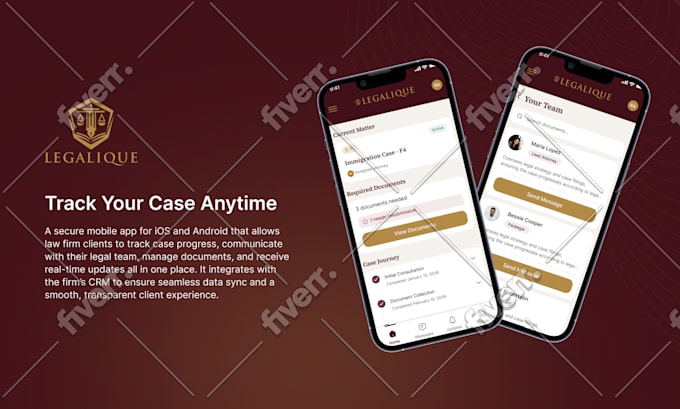
Zenkoders is the agency associated with the Fiverr seller profile. The reviewed listing identifies the agency as Top Rated and displays Fiverr Pro-related credentials.
The gig has shown more than 100 customer reviews and a rating around 4.9–5.0 out of 5 in the listing snapshots reviewed for this article. Ratings and review counts can change over time, so check the current Fiverr page before making a decision.
Customer feedback can help you understand communication, delivery quality, and how a provider handles ongoing projects. Still, ratings alone cannot tell you whether a designer is the right fit for your specific app or business.
Before hiring, review the agency’s relevant portfolio. Look for examples that resemble your intended product, such as SaaS dashboards, analytics interfaces, mobile apps, or multi-page business websites.
Key Features and Services
1. Figma UI/UX Design
Figma is a widely used design tool for creating website layouts, application screens, prototypes, and reusable interface components.
A Figma-based workflow lets you review the visual design before development starts. You can discuss layouts, adjust navigation, refine typography, and agree on the user flow before developers turn the design into a working product.
This can be particularly useful for startups that want to validate the visual direction of a product before committing more time and money to implementation.
2. Website UI/UX Design
Website UI/UX design involves more than selecting colors and arranging images. A good design should make the site’s purpose clear, organize information logically, and help visitors find the next step.
Depending on the project, the design may cover a homepage, service pages, product pages, landing pages, navigation, forms, and other interface elements.
Before ordering, specify which pages are required and whether you need desktop-only designs or responsive layouts for mobile and tablet screens.
3. SaaS Dashboard Design
SaaS dashboard design is especially relevant for software companies, analytics platforms, customer portals, and business applications.
Dashboards often contain navigation menus, data tables, charts, filters, settings, account information, and complex workflows. Their interfaces must help users find information quickly without overwhelming them.
A well-planned dashboard may include a consistent visual hierarchy, reusable components, understandable labels, clear data presentation, and sensible empty, loading, and error states.
If your project is a SaaS product, ask whether the package covers the complete user journey or only a set number of screens. A few polished screens may not be sufficient to represent a complete application.
4. Mobile App UI/UX Design

Mobile app design requires attention to smaller screens, touch interactions, readable text, and navigation patterns that work well on phones.
The gig offers design for mobile app screens. Depending on your requirements, you may need designs for onboarding, registration, login, the main dashboard, profile settings, search, checkout, notifications, or other features.
Before starting, clarify whether the design covers iOS, Android, or a platform-neutral interface. Also confirm whether the package includes only the specified screens or additional states and flows.
5. Wireframes and User Flows
Wireframes provide a simplified view of the page structure before the final visual styling is applied. They can help you determine what information belongs on each screen and how users move from one step to another.
User flows can be particularly valuable for apps with multiple steps, such as registration, onboarding, booking, purchasing, or managing an account.
The advertised packages mention wireframes, but the exact scope should be confirmed. Ask whether user research, user flows, personas, and competitive analysis are included if you need a more comprehensive UX process.
6. Clickable Prototypes
A prototype can connect screens into a simulated experience. Instead of reviewing separate static images, you can click through the main journey and see how the interface is expected to behave.
This can help founders, stakeholders, and developers understand the intended experience before implementation.
A prototype is not necessarily a functioning application. It may simulate navigation without real authentication, databases, payments, or backend logic. Confirm what the prototype is designed to demonstrate.
7. Editable Source Files
The reviewed package listing includes source files. For a Figma project, editable source files can make it easier for your team to review and update the design after delivery.
Before ordering, confirm the format of the final files, how components and pages will be organized, and whether the handoff includes any notes or specifications that developers need.
Do not assume that source design files include production-ready code or ownership rights to every third-party asset. Clarify licensing and handover requirements when they matter to your project.
8. Custom Design Assets
The package comparison lists different numbers of custom assets across the tiers. These may help establish a consistent visual style, but the exact assets should be agreed upon before work starts.
For example, your project may need icons, illustrations, interface graphics, or other visual elements. Ask which assets are included, whether they are custom-created, and whether any third-party licenses are required.
Fiverr Zeeshan Sikander Pricing and Packages
The reviewed Fiverr listing displays three UI/UX design packages. The following table summarizes the advertised prices and package details shown on the listing. Prices and terms may change, so verify the current offer before ordering.
| Package | Price | Advertised Scope | Delivery |
|---|---|---|---|
| Basic | $150 | One mobile or web screen, such as a hero page; one custom asset; responsive design, wireframe, prototype, and source file listed | 7 days |
| Standard | $500 | Five mobile screens or desktop pages; two custom assets; source design deliverables listed | 10 days |
| Premium | $1,500 | Ten mobile screens or desktop pages; three custom assets; source design deliverables listed | 14 days |
Note: The exact combination of features, screen counts, revision limits, and delivery terms should be verified on the live gig. The seller notes that complex projects may require a different quote.
Which Package Should You Choose?
Basic — $150: This may suit a small design task or an initial screen concept. It can be a reasonable starting point if you want to review the designer’s approach before planning a larger project. However, a single screen is not enough to represent most complete apps or dashboards.
Standard — $500: This may be more suitable for a small website design or an early app concept involving several screens. Confirm whether your screens are simple or complex and whether the included scope covers the user journey you need.
Premium — $1,500: This package may be relevant when you need a larger set of screens for a website, dashboard, or mobile application. Ten screens can still be insufficient for a complex product, so define the scope before placing an order.
Is the Price Worth It?

The value depends on the complexity of your product and the quality of the deliverables. A small landing page and a multi-screen SaaS dashboard require very different amounts of planning and design work.
Compare the package price with the number of screens, wireframes, prototype interactions, custom assets, source files, and revisions you will receive. Also consider whether the design will be easy for developers to implement.
The gig lists hourly hiring at $30 per hour in the reviewed snapshot. This may be worth discussing if you need ongoing design support, but confirm the current rate, minimum engagement, and scope directly with the agency.
For a larger product, request a project-specific quote rather than assuming the package price will cover every feature.
Pros and Cons
Pros
- Specialized UI/UX focus: The gig is designed around website, dashboard, web app, and mobile app interfaces.
- Figma-based workflow: Design files and prototypes can be reviewed before development begins.
- Multiple project sizes: The advertised tiers cover one screen, five screens, or ten screens.
- Wireframes and prototypes listed: These can help communicate structure and intended interactions.
- Editable source files: Source files can support design review and future iteration.
- Established Fiverr presence: The reviewed listing displays a strong rating, over 100 reviews, and Top Rated/Fiverr Pro-related credentials.
- Potential for ongoing collaboration: The agency also advertises hourly hiring, which may be relevant for longer projects.
Cons
- Design is not development: A Figma file or clickable prototype does not automatically include a working app or website.
- Higher tiers can be costly: The $500 and $1,500 packages may be significant expenses for early-stage founders.
- Screen limits matter: Complex products may require more screens than a package includes.
- Revisions vary: The reviewed comparison lists no revisions for Basic, four for Standard, and six for Premium. Verify the current terms.
- Scope can change the price: The seller notes that complexity affects the final quote.
- Technical implementation is separate unless specified: Developers may still need to build and test the interface after design delivery.
Who Should Hire This UI/UX Design Service?
1. SaaS Founders
If you are building a SaaS product, you may need a dashboard, settings pages, onboarding, account management, or other interface screens. A Figma design can help you define the user experience before development.
For a SaaS project, ask for examples of dashboards and complex web applications rather than relying only on landing page samples.
2. Mobile App Startups
Founders planning an iOS or Android app may benefit from mapping the key screens and navigation before hiring developers.
Make sure the project brief explains the app’s main user journey. For example, an appointment app may require onboarding, search, booking, payment, confirmation, and account screens.
3. Business Website Owners
Businesses that need a new website or a redesign can use UI/UX design to improve the content hierarchy, navigation, visual consistency, and mobile experience.
If you need a working website rather than design files, ask whether implementation is available and obtain a separate quote if necessary.
4. Agencies and Developers
Development agencies sometimes need design support for client projects. A structured Figma file can provide developers with a visual specification and reduce ambiguity during implementation.
Confirm whether the delivered design includes reusable components, responsive states, and any documentation required by your development team.
5. Entrepreneurs Building an MVP
A minimum viable product does not need every possible feature, but its core user journey should be clear. UI/UX design can help identify the essential screens and present the product concept to stakeholders.
For an MVP, define the minimum set of screens required to demonstrate the main functionality. Avoid paying for a large design scope before you know which features are essential.
Who May Want Another Option?

If you only need a simple logo, a few social media graphics, or a basic template, a dedicated graphic design service may be more suitable.
If you need complete app development, backend engineering, database design, deployment, or ongoing technical maintenance, make sure those services are explicitly included. Do not assume that a UI/UX gig will build a production-ready application.
How to Evaluate the Design Portfolio
Before hiring a UI/UX designer, review the work itself. A high rating is useful, but the best choice is a designer whose experience matches your product’s needs.
- Visual hierarchy: Can users quickly identify the most important information?
- Navigation: Are menus, tabs, and actions easy to understand?
- Consistency: Do typography, buttons, spacing, and colors follow a clear system?
- Responsive design: Are mobile and desktop layouts handled appropriately?
- Complex states: For dashboards and apps, are loading, empty, success, and error states considered?
- Prototype quality: Does the prototype demonstrate the important user flows?
- Developer handoff: Are files organized so a developer can understand the design?
- Relevant experience: Has the designer worked on products similar to yours?
If possible, ask the agency to show examples that are close to your project type. Designing a marketing landing page is different from designing an analytics dashboard or a mobile banking workflow.
Questions to Ask Before Ordering
- How many screens are included in the package I am considering?
- Are desktop and mobile layouts both included?
- Will I receive editable Figma source files?
- Does the package include wireframes, user flows, and a clickable prototype?
- Are user research and competitor analysis included, or are they separate services?
- How many revisions are included, and what counts as a revision?
- Will the design include empty, loading, error, and success states where needed?
- Does the price cover design only, or is development also available?
- What is the expected delivery schedule for my actual requirements?
- Can the agency provide examples of similar projects?
- Are any custom assets or third-party resources subject to separate licensing?
- How will the files be handed over to my development team?
Clear answers to these questions can help you compare providers fairly and avoid misunderstandings about the final deliverables.
How to Hire Zeeshan Sikander on Fiverr
- Open the gig: Use the button below to view the current offer.
- Choose your project type: Decide whether you need website screens, a SaaS dashboard, or mobile app UI/UX.
- Prepare a brief: Explain your audience, product goals, main features, preferred style, and required screens.
- Review the package: Compare the latest prices, revision limits, delivery estimates, and included files.
- Contact the agency: Discuss any complex workflows or requirements that do not fit neatly into the listed package.
- Confirm the scope: Agree on the number of screens, deliverables, revisions, timeline, and final price before paying.
- Review the delivery: Check the designs against your brief and make sure the agreed files are provided.
Frequently Asked Questions
1. Who is Zeeshan Sikander on Fiverr?
Zeeshan Sikander is associated with Zenkoders, an agency offering UI/UX design and related development services. The reviewed gig focuses on website, dashboard, web app, and mobile app design.
2. How much does the UI/UX design service cost?
The reviewed listing displays Basic at $150, Standard at $500, and Premium at $1,500. These prices and package details may change, so confirm the current offer before ordering.
3. Does the service include Figma files?
The reviewed package comparison lists source files. Confirm the exact format, editability, file organization, and handover details for your selected package.
4. Can Zenkoders design a SaaS dashboard?
The gig advertises design for dashboards and web applications. If your project is a SaaS product, ask for relevant portfolio examples and confirm how many screens and user flows are included.
5. Does the gig include mobile app design?
Yes, mobile app UI/UX design is part of the advertised service. Confirm whether your project requires iOS, Android, or both, and whether platform-specific layouts are included.
6. Will I receive a working app after the design is completed?
Not automatically. UI/UX design generally produces design files and possibly a prototype. Functional app development, backend systems, databases, and deployment should be confirmed separately.
7. Is this service suitable for an MVP?
It may be suitable if you need to define the essential screens and user journey before development. Prepare a prioritized feature list and confirm that the package covers the minimum screens required for your MVP.
8. Does good UI/UX design guarantee more sales?
No. Good design can support usability and communication, but business results depend on many factors, including product quality, pricing, audience, marketing, competition, and implementation.
9. How long does the design take?
The reviewed package listing shows delivery estimates of 7, 10, and 14 days for Basic, Standard, and Premium. More complex projects may require a customized schedule, so confirm the timeline with the agency.
Final Verdict: Is Zeeshan Sikander Worth Hiring?
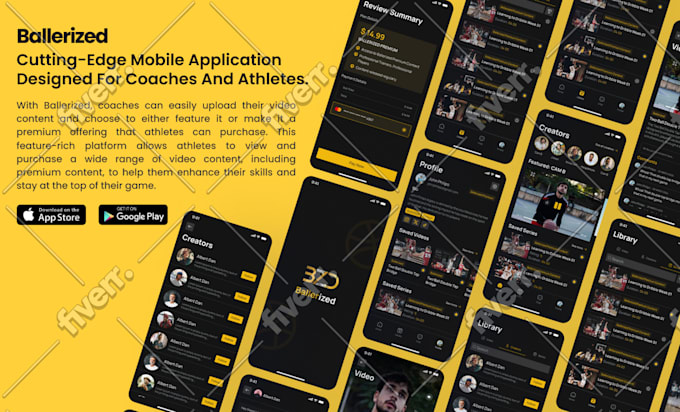
Zeeshan Sikander’s Zenkoders UI/UX design service is worth considering if you need Figma-based interface design for a website, SaaS dashboard, web application, or mobile app.
The main advantages are the range of interface types supported, the listed wireframe and prototype deliverables, editable design files, and an established Fiverr profile with substantial customer feedback.
The most important considerations are the number of screens included, the depth of the UX process, revision limits, and whether your project requires design only or full development. A small package may be suitable for a limited task, but a complex product usually needs a carefully defined scope.
Our recommendation: Review the agency’s relevant portfolio, prepare a clear brief, and confirm the complete deliverables before placing an order. If the agency can demonstrate experience with a product similar to yours and the quote matches your requirements, it may be a useful option to compare with other UI/UX designers.
“`