ProductSpark AI Review
From Blank Page To Digital Product Idea, Prompt, and Creation Plan
Creating a digital product sounds easy when AI can write ebooks, guides, templates, reports, checklists, courses, and almost anything else on demand. Yet one problem still stops many aspiring sellers before they produce their first page: they do not know what product to create or how to give AI the right instructions.
Opening ChatGPT and typing “give me a digital product idea” usually creates another problem.
The suggestions often feel broad, predictable, or disconnected from your experience level. You can spend another hour refining prompts, jumping between ideas, and trying to turn one of them into something people might actually want.
ProductSpark AI approaches this early stage from a much more structured angle.
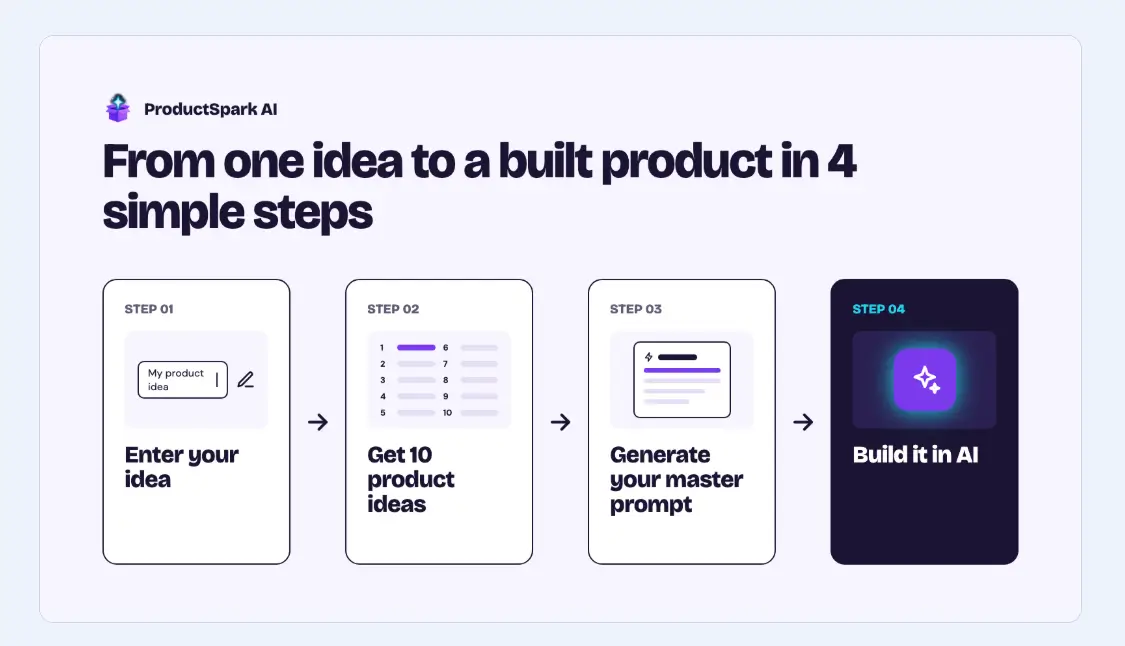
You tell the software what kind of product you want, your niche, your goal, your experience level, and how much complexity you can handle. ProductSpark AI then produces 10 targeted digital product concepts and turns your selected idea into a detailed master prompt that you can run through ChatGPT, Claude, Gemini, or another major AI assistant.
That makes the platform particularly interesting for beginners, affiliate marketers, digital sellers, creators, and anyone sitting on the idea of launching a product but struggling to turn that intention into something concrete.
Let’s move on to the next part of my ProductSpark AI review today, with all the information you need right now!
ProductSpark AI Review – Quick Overview

| Product Name | ProductSpark AI |
| Creator | David Mills |
| Product Type | AI-Assisted Digital Product Idea & Creation System |
| Official Page | >>Click Here |
| Front-End Price | $9.95 one-time during launch |
| Monthly Fee | No |
| Credit System | No credits |
| External AI Required | Yes – ChatGPT, Claude, Gemini, or another major LLM |
| Account Required | No traditional account; license-key activation |
| Data Storage | Locally in your browser/device |
| Refund Period | 14-day money-back guarantee! |
| Support | Vendor Support: https://bizgrowthcourses.com/contact/
HudaReview Support: mailto: hudareviewbonus@gmail.com |
What Is ProductSpark AI?
ProductSpark AI is an AI-assisted digital product planning and creation tool that helps you move from a general idea to a specific product concept and a ready-to-use prompt for creation.
You start by choosing factors such as your preferred product format, niche, goal, skill level, and desired complexity. The software analyzes those selections and gives you 10 digital product ideas matched to your inputs.
After choosing the concept you like, ProductSpark AI creates a detailed Master Prompt that tells an external AI platform exactly how to develop the product. You can copy that prompt into ChatGPT, Claude, Gemini, or another compatible AI assistant and continue creating the actual deliverable.
Who Created ProductSpark AI?

ProductSpark AI was created by David Mills, the founder of LearnWire, a well-known platform focused on software, AI tools, affiliate marketing, and online business opportunities.
David has worked full-time in online marketing since 2020 and has built LearnWire into a YouTube channel with more than 20,000 subscribers.
Over the years, he has generated over $700,000 in affiliate commissions and driven millions of dollars in software sales through platforms such as WarriorPlus, JVZoo, and AppSumo.
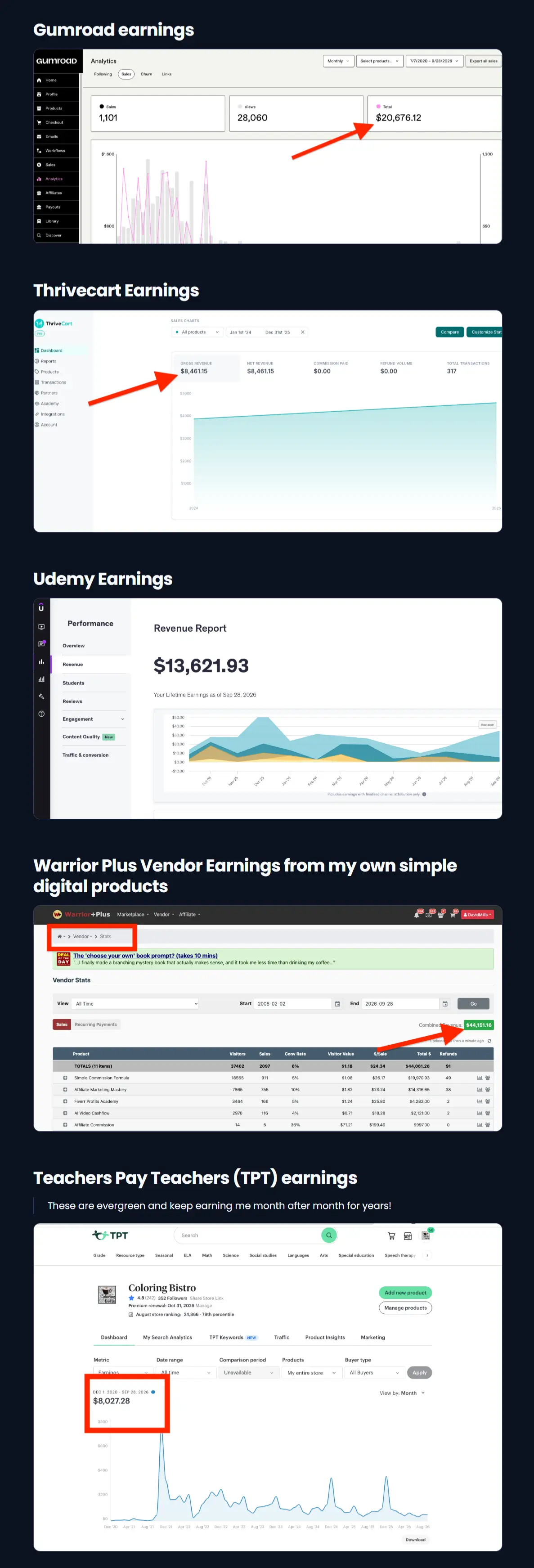
He also has firsthand experience creating and selling digital products through marketplaces and platforms including Gumroad, ThriveCart, Udemy, WarriorPlus, Etsy, and Teachers Pay Teachers.
That practical experience directly informs ProductSpark AI, which turns his digital product creation process into a guided system that helps users move from an initial idea to a product they can actually start building.
Why ProductSpark AI Makes Sense Right Now
Access to AI no longer creates the biggest obstacle.
ChatGPT, Claude, Gemini, and competing platforms already provide users with remarkable content-generation capabilities. The difficult part often comes before the generation begins.
You still need to decide:
- What should you create?
- Who would buy it?
- How advanced should the product become?
- What angle should you use?
- What sections belong inside it?
- In what order should you create everything?
- What prompt will produce a professional result?
A vague AI request usually returns a vague answer.
ProductSpark AI tackles those decisions first. It gives your AI session a clear direction before you start generating pages of content.
The software does not attempt to replace your favorite LLM. It prepares the concept, structure, and instructions so you can use that LLM more effectively.
This distinction becomes one of the most important things to understand before buying ProductSpark AI.
Click the button below to access the main sales page:

Key Features And Benefits
ProductSpark AI keeps the product-creation process practical by helping you move from an initial idea to a clear concept, then providing the prompts you need to start creating it with your favorite AI tool.
[+] Generate 10 Product Ideas At Once:
Enter your preferred product format, niche, goal, skill level, and complexity, and ProductSpark AI generates 10 targeted ideas for you to compare.
This gives you several possible directions from a single setup, making it easier to choose an idea that matches your experience and the type of audience you want to serve.
[+] Match Ideas To Your Skill Level:
Not every digital product suits every creator.
ProductSpark AI lets you select your current skill level and preferred complexity before generating ideas. This helps keep the suggestions realistic and reduces the chance of choosing a project that becomes too difficult or time-consuming to complete.
[+] Discover Evergreen Niches:
No niche in mind yet?
ProductSpark AI can suggest an evergreen market for you, giving you a practical starting point rather than forcing you to brainstorm from scratch.
[+] Create Detailed Master Prompts:
Once you select an idea, ProductSpark AI turns it into a ready-to-use Master Prompt.
You can copy that prompt and paste it into ChatGPT, Claude, Gemini, or another major AI assistant to begin building the actual product. This removes much of the guesswork involved in writing detailed prompts manually.
[+] Follow A Step-By-Step Creation Process:
ProductSpark AI goes beyond giving you a product concept.
The generated prompts guide you through the creation process step by step, helping you understand what to work on first, what comes next, and how to keep progressing until the product is complete.
[+] Create Multiple Types Of Digital Products:
You can use the system for many common digital-product formats, including ebooks, guides, checklists, templates, planners, mini-courses, prompt packs, reports, and more.
This gives you plenty of flexibility to create products for different niches, audiences, marketplaces, and business models.
[+] Build Custom Affiliate Bonuses:
Affiliate marketers also get a useful extra option.
ProductSpark AI can help you create custom affiliate bonus products for the offers you promote. You can develop unique guides, checklists, templates, prompt packs, or supporting resources that give buyers an additional reason to purchase through your affiliate link.
[+] Generate Simpler Or More Premium Ideas:
Your first batch does not lock you into one direction.
You can generate a completely new set of ideas or ask ProductSpark AI to make the suggestions simpler or more premium. Earlier batches remain available, so you can experiment without losing concepts you may want to revisit later.
[+] Save And Organize Every Project:
Ideas, selected concepts, and prompts stay organized inside the Saved Projects area.
Each project keeps its own information, helping you avoid scattered notes, forgotten chat histories, and repeated regeneration. You can return later and continue working from where you stopped.
[+] One-Click Prompt Copying:
ProductSpark AI lets you copy generated prompts directly to your clipboard.
This small convenience speeds up the workflow considerably, especially when you create multiple products and frequently switch between ProductSpark AI and your preferred LLM.
[+] Works With Major AI Platforms:
You are not tied to one AI provider.
The Master Prompts can work with ChatGPT, Claude, Gemini, and other capable AI chatbots, so you can use the platform you already prefer or test prompts across several models.
[+] Local Data Storage:
Your projects, ideas, selections, and prompts stay stored locally in your browser on your own device.
This keeps your work organized without relying on a central ProductSpark AI database for project storage.
[+] No Traditional Account Setup:
You do not need to create another username and password.
Enter your purchase license key on the device you are using to access the application. This makes the initial setup fast and straightforward.
[+] No Credit System:
ProductSpark AI does not operate on a traditional AI credit model.
You can continue using the app under its fair-use terms without constantly monitoring your credit balance or purchasing additional generation packs.
Overall, the greatest benefit comes from how these features connect. ProductSpark AI helps you choose a realistic product idea, turn it into detailed instructions, and follow a structured path toward completion, while leaving the actual content generation to the AI platform you already use.
What AI Platforms Work With ProductSpark AI?
ProductSpark AI generates the prompts, while an external AI model produces the actual product content.
Compatible choices include major chat-based LLMs such as:
- ChatGPT
- Claude
- Gemini
- Other capable AI assistants
The product documentation says a free account can work, though more capable paid AI plans may yield better results.
This setup also gives you flexibility.
You are not locked into one AI model. You can test the same Master Prompt across different systems and choose the output you prefer.
What Can You Create With ProductSpark AI?
There are plenty of practical applications.
👉 Digital Sellers:
Create product concepts for Gumroad, Payhip, WarriorPlus, JVZoo, Etsy, ThriveCart, Udemy, your own website, and similar marketplaces or platforms.
The official FAQ lists these channels among the places where users can sell finished products.
👉 Affiliate Marketers:
Create custom bonuses related to the products you promote.
👉 Coaches And Consultants:
Turn your knowledge into checklists, workbooks, guides, templates, and training resources.
👉 Freelancers:
Develop niche digital assets for clients or use the workflow to expand your service packages.
👉 Content Creators:
Convert existing knowledge into downloadable products that complement a blog, YouTube channel, newsletter, or social audience.
👉 Beginners:
Use the guided workflow to avoid starting from an empty chat window with no idea how to structure the project.
About Usage Details and My Opinions
ProductSpark AI Review – Step-by-Step Tutorial
Let me show you how to use this tool step by step:
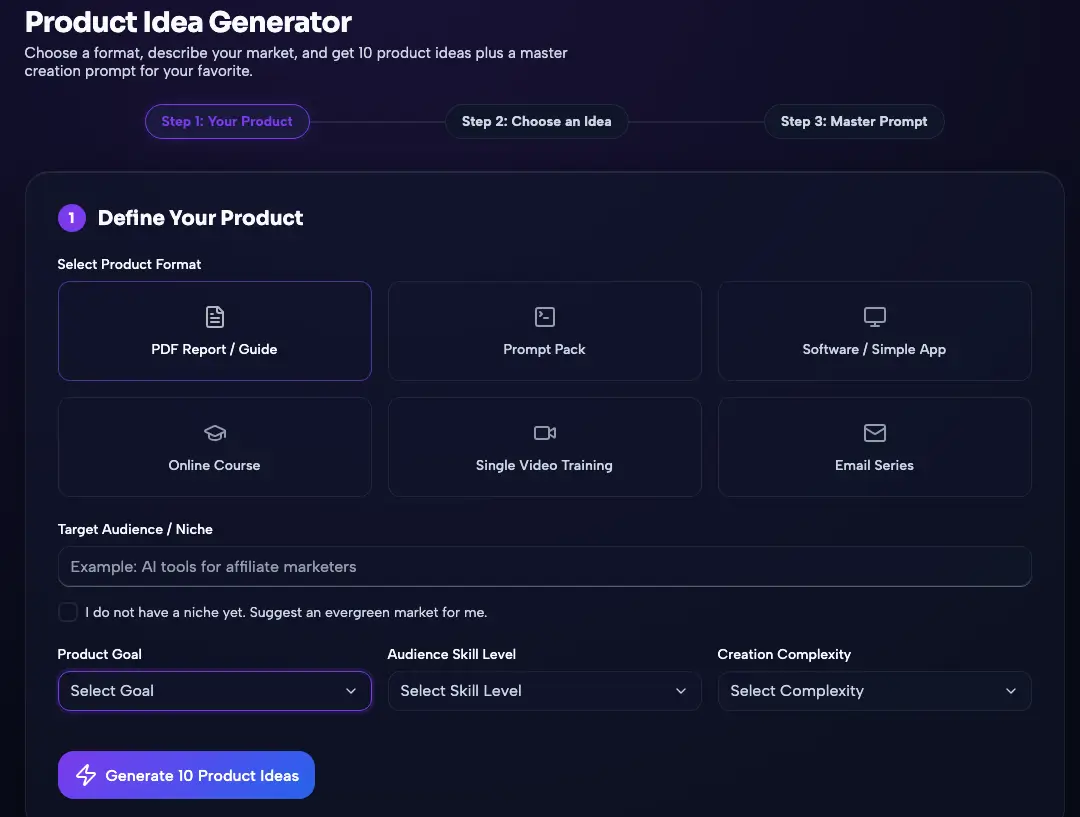
Define the Product Format and Market:
Open the Generator area and stay on Step 1: Your Product.
Select a product format. The demo workflow includes PDF Report / Guide, Prompt Pack, Software / Simple App, Online Course, Single Video Training, and Email Series.
Use Target Audience / Niche to describe the market you want to serve. A focused description gives the idea generator more useful context.
When you do not have a niche yet, tick the option that asks ProductSpark AI to suggest an evergreen market.
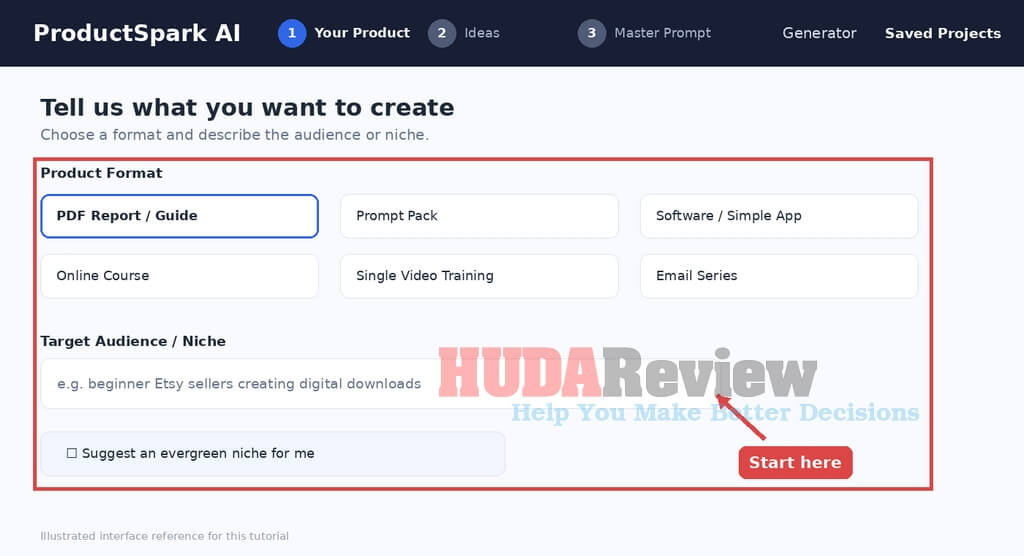
Tip: Choose a format that matches a deliverable you can realistically finish. A PDF guide or prompt pack can be much faster to complete than a course or software concept.
Choose the Product Goal:
- Open the Product Goal dropdown.
- Select the purpose that best matches the project: Product to Sell, Lead Magnet, Affiliate Bonus, Low-Ticket Offer, Product Upgrade, or Client Deliverable.
- Use the goal to give ProductSpark AI clearer context about how the final product will be used and what kind of outcome it should support.
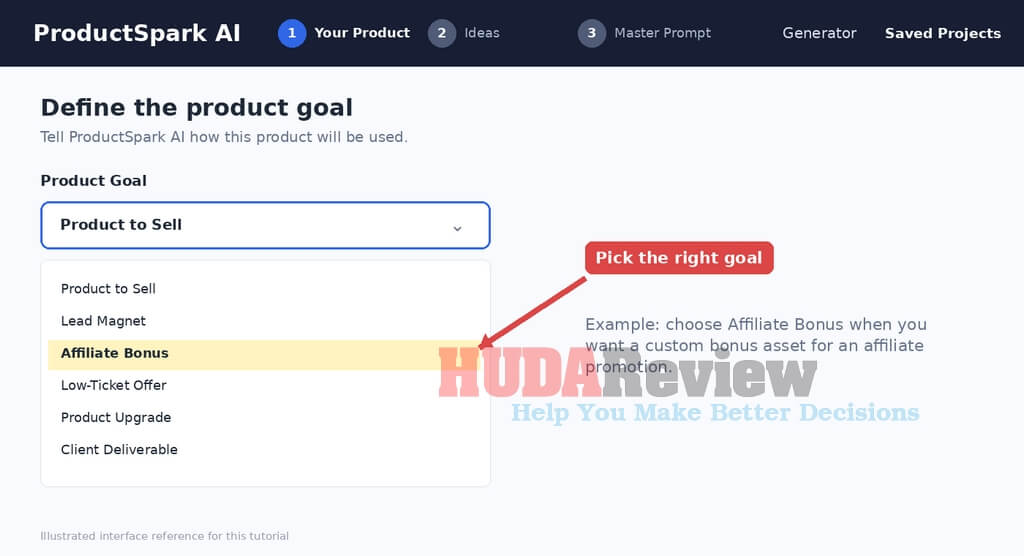
Tip: Affiliate marketers can use Affiliate Bonus for a custom promotional bonus concept, while service providers can use Client Deliverable for client-focused assets.
Set the Audience Skill Level:
Open Audience Skill Level.
Choose Beginner, Intermediate, Advanced, or Let AI Decide.
Use this setting to control how much prior knowledge the intended customer should have. Beginner products should explain fundamentals more clearly, while advanced concepts can assume more experience.
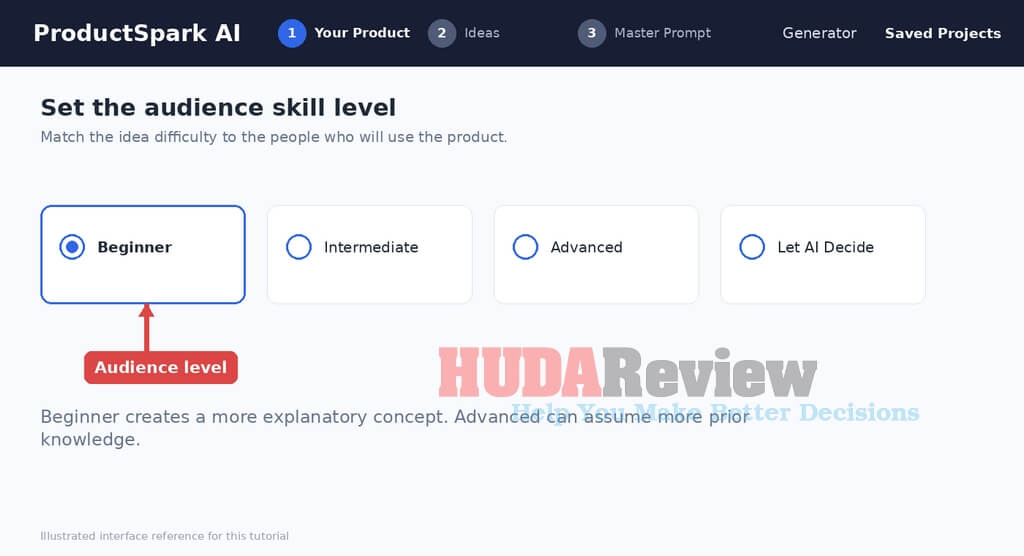
Tip: Keep the skill level aligned with the people you expect to use the finished asset; this setting describes the audience, not your own experience level.
Select Creation Complexity and Generate Ideas:
Open Creation Complexity.
Choose Fast and Easy for a lighter product, Balanced for a middle-ground build, or Premium and Detailed for a more involved concept.
Check the inputs one more time, then click Generate 10 Product Ideas.
Wait for ProductSpark AI to move into the ideas stage and display the generated batch.
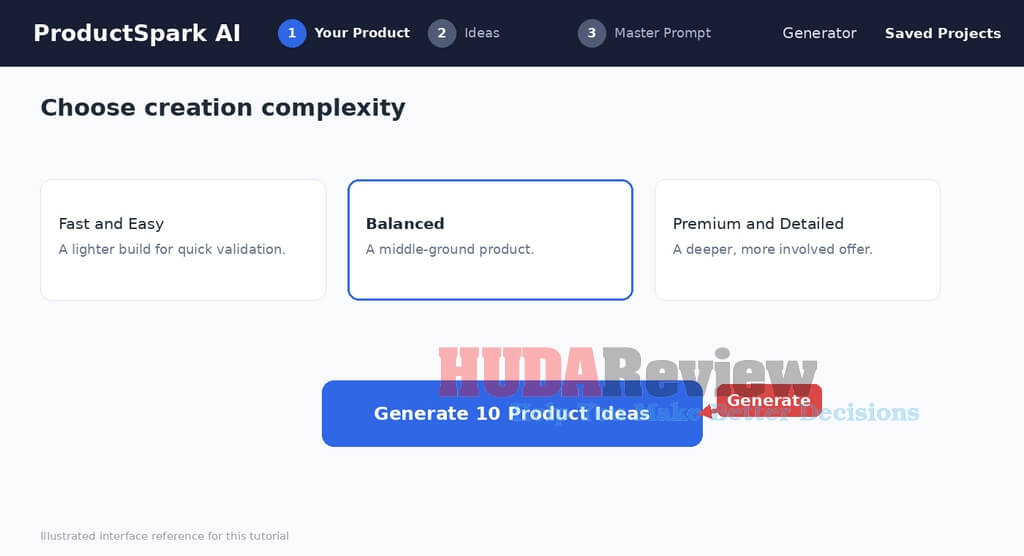
Tip: Pick a complexity level you can actually execute. A smaller finished product is usually more useful than an ambitious idea that never gets completed.
Review and Refine the Generated Ideas:
Compare the generated concepts card by card instead of automatically choosing the first result.
Review each title together with details such as the target buyer, main outcome, and why the angle may work.
Use Generate 10 New Ideas when you want another batch.
Use Make Ideas Simpler or Make Ideas More Premium to change the level while keeping the same project direction.
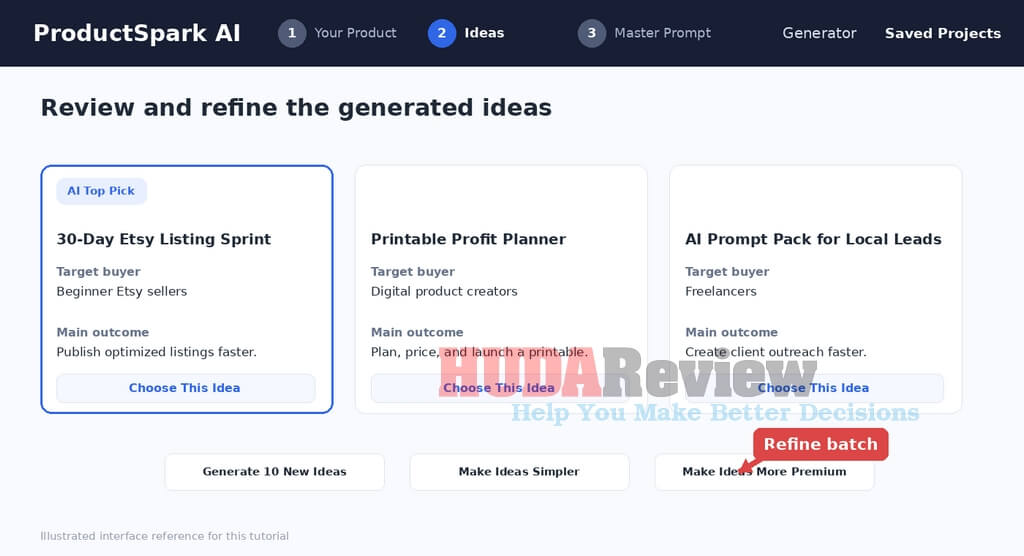
Tip: An AI Top Pick label can be a useful recommendation, but compare it with the other cards against your real audience and business goal before deciding.
Choose the Product Idea You Want to Build:
Read the title, target-buyer description, main outcome, and supporting rationale on each promising card.
When you find the concept you want, click Choose This Idea at the bottom of that card.
ProductSpark AI then advances to Step 3: Master Prompt and prepares a structured creation instruction for the selected idea.
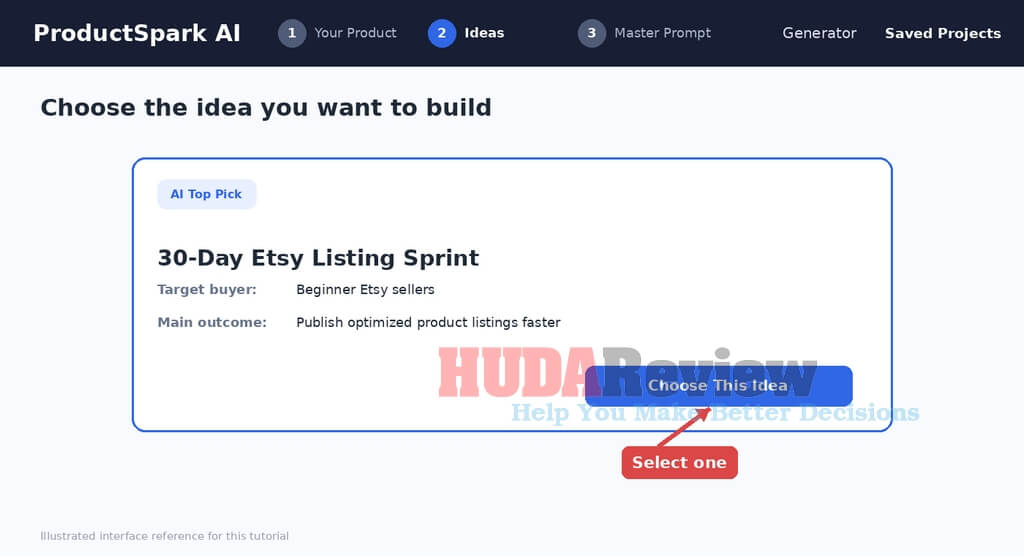
Tip: You can keep good alternatives for later. Choosing one idea for the current build does not mean the other concepts have no value.
Review the Product Creation Master Prompt:
Confirm the selected product title and the settings carried over from the idea stage.
Read the Product Details Summary and creation instructions before sending them to another AI tool.
Check the ordered stages, product-positioning instructions, buyer information, desired outcome, and creation guidance.
Click Copy Master Prompt to place the complete prompt on your clipboard.
Use Generate Alternate Prompt for another version, or Back to Ideas if you want to change concepts.
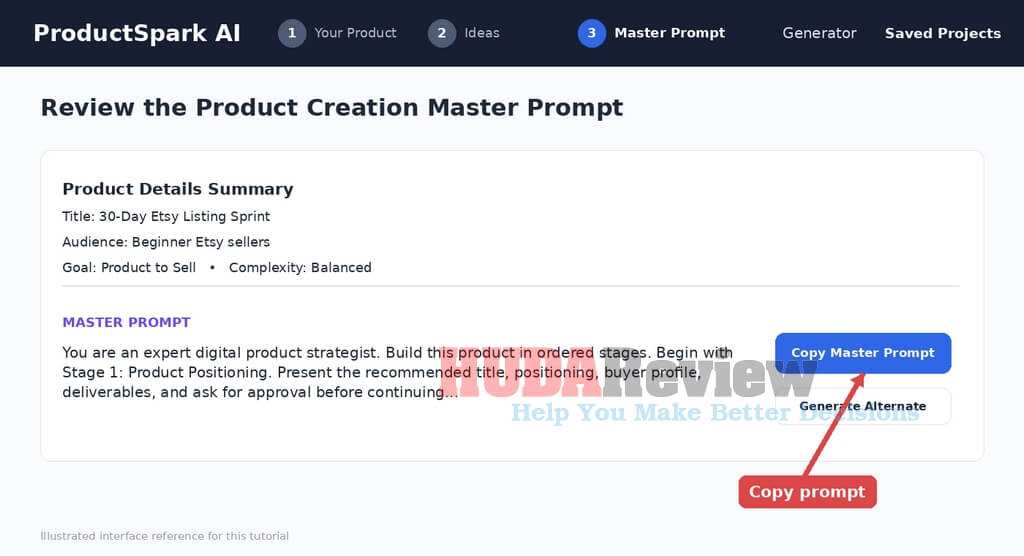
Tip: Read the prompt at least once. This is your best chance to change any requirement that doesn’t match your intended product before another AI starts generating content.
Paste the Master Prompt Into Your AI Assistant:
Open the AI assistant you want to use, such as ChatGPT, Claude, Gemini, or another capable LLM.
Paste the entire Master Prompt into a new conversation.
Send the prompt without removing the later instructions, because the structure gives the model context about the product, target customer, deliverables, and order of work.
Follow the instruction to begin with Stage 1 and review or approve that stage before moving forward.
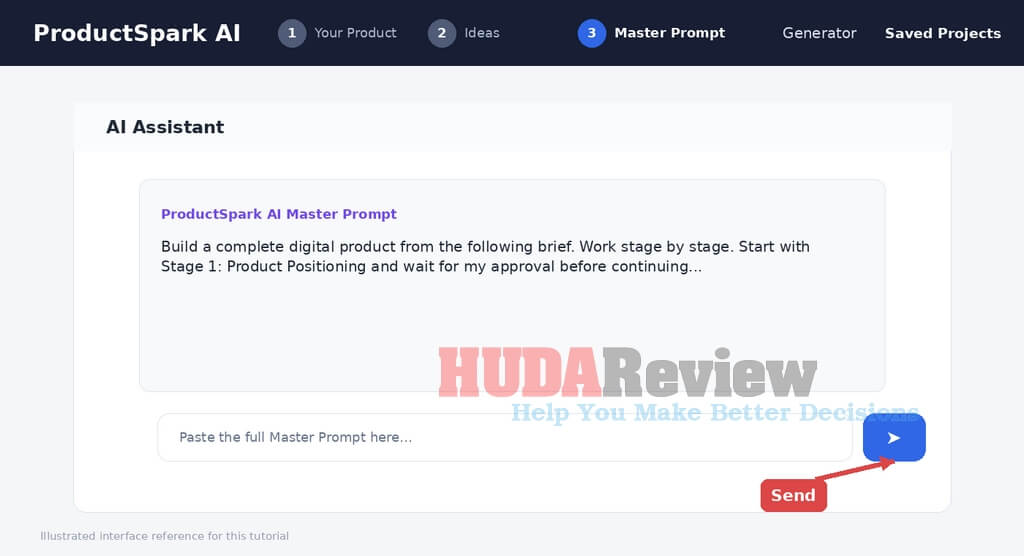
Tip: A fresh chat usually keeps the project cleaner because the model does not mix the new product instructions with unrelated earlier conversations.
Review the AI Output and Continue Stage by Stage:
Read the first generated stage rather than accepting the full output automatically.
Review the proposed product positioning, recommended title, alternate subtitle options, ideal customer profile, and any other stage-specific content.
Approve strong sections, request revisions where needed, and then continue to the next stage of the Master Prompt.
Repeat the review process until the external AI has completed the parts required for your chosen product format.
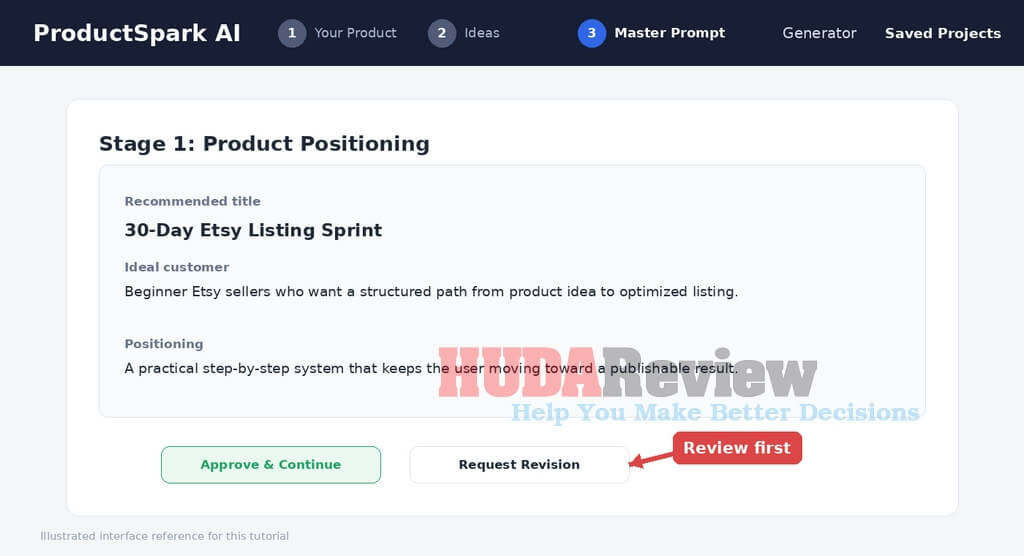
Tip: ProductSpark AI is the planning and prompting layer. You still control quality, accuracy, editing, and the final packaging of the product.
Reopen Work From Saved Projects:
Return to ProductSpark AI and click Saved Projects in the upper-right area.
Use the category tabs to locate Idea Generator projects or other saved assets.
Open a project card to return to its ideas and saved prompt instead of generating the project again.
Because the workflow stores projects locally on the device, keep browser storage in mind when changing browsers or computers.
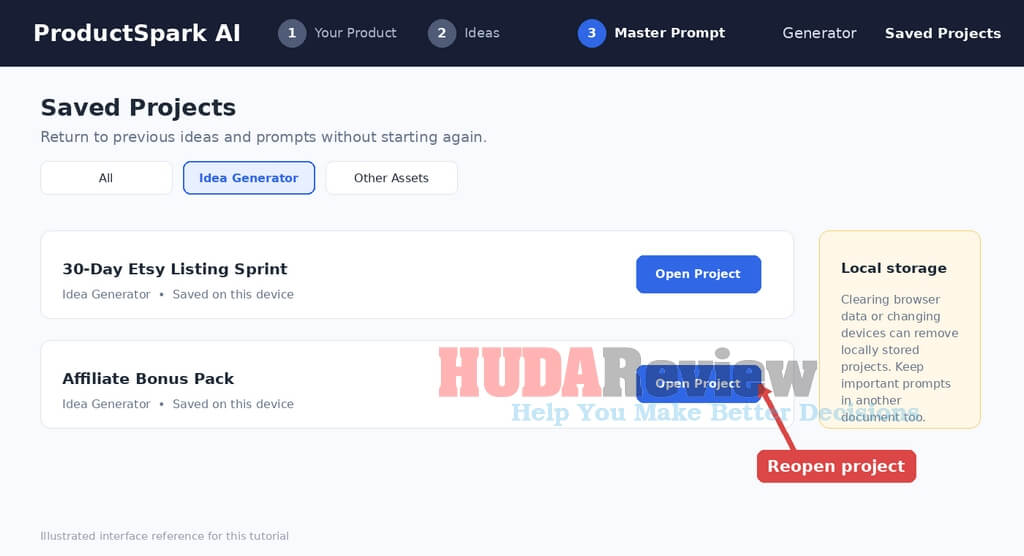
Tip: Clearing browser data can remove locally stored projects. Keep important Master Prompts in an additional document or workspace when they matter to an active business project.
Workflow: Define → Generate → Compare → Choose → Copy → Build → Review → Save.
ProductSpark AI organizes the early decision-making and prompt-building stage, while your external AI assistant handles the actual content generation. Keeping those two roles clear makes the workflow easier to manage and gives you more control over the finished digital product.
| Planning
ProductSpark AI |
Creation
Your AI Assistant |
Quality Control
You |
For more details, please watch the demo video below:
DEMO VIDEO

My Own Honest Thoughts About ProductSpark AI
The biggest strength I see here has little to do with AI generating content.
We already have excellent AI models for that.
The real benefit comes from giving those models better direction.
People often blame ChatGPT for generic results when the original instruction consists of a single vague sentence. ProductSpark AI tries to solve that problem before content generation begins.
I particularly like three parts of the system.
First, the 10-idea format encourages comparison. You do not have to accept the first product concept that comes to mind.
Second, matching ideas to your skill level and preferred level of complexity makes the workflow more approachable for newcomers.
Third, the Master Prompt and ordered creation process turn an idea into something actionable. That gives ProductSpark AI more utility than a basic idea generator.
Affiliate bonus creation also adds another useful angle. An affiliate could use the software repeatedly across new promotions, making the front end relevant even for someone who has no immediate plan to launch a standalone digital product business.
There are still some boundaries to understand.
ProductSpark AI does not independently create every final asset. It prepares the idea and structured AI instructions, then relies on ChatGPT, Claude, Gemini, or a similar platform for the generation stage.
Video courses require additional production. Graphics may require another design tool depending on the product you choose. You should also validate the market yourself before treating an AI-generated concept as proven demand.
Those limitations do not undermine the core purpose. They simply define where ProductSpark AI fits into the overall workflow.
For someone who already knows exactly what to make and has advanced prompt-engineering skills, the front end may feel less essential.
For a beginner staring at a blank screen, an affiliate needing fresh bonuses, or a creator who wants to launch products more regularly, I can see considerably more value.
How Much Does It Cost?
FE: ProductSpark AI Pricing
At the time of this review, ProductSpark AI is available for just $9.95 as a one-time payment, making it a very affordable way to get a structured system for finding digital product ideas, generating Master Prompts, and moving faster from concept to creation.
For that price, I think the front-end offer provides excellent value, especially for beginners, affiliate marketers, and digital sellers who often waste time figuring out what to create or how to prompt AI effectively.
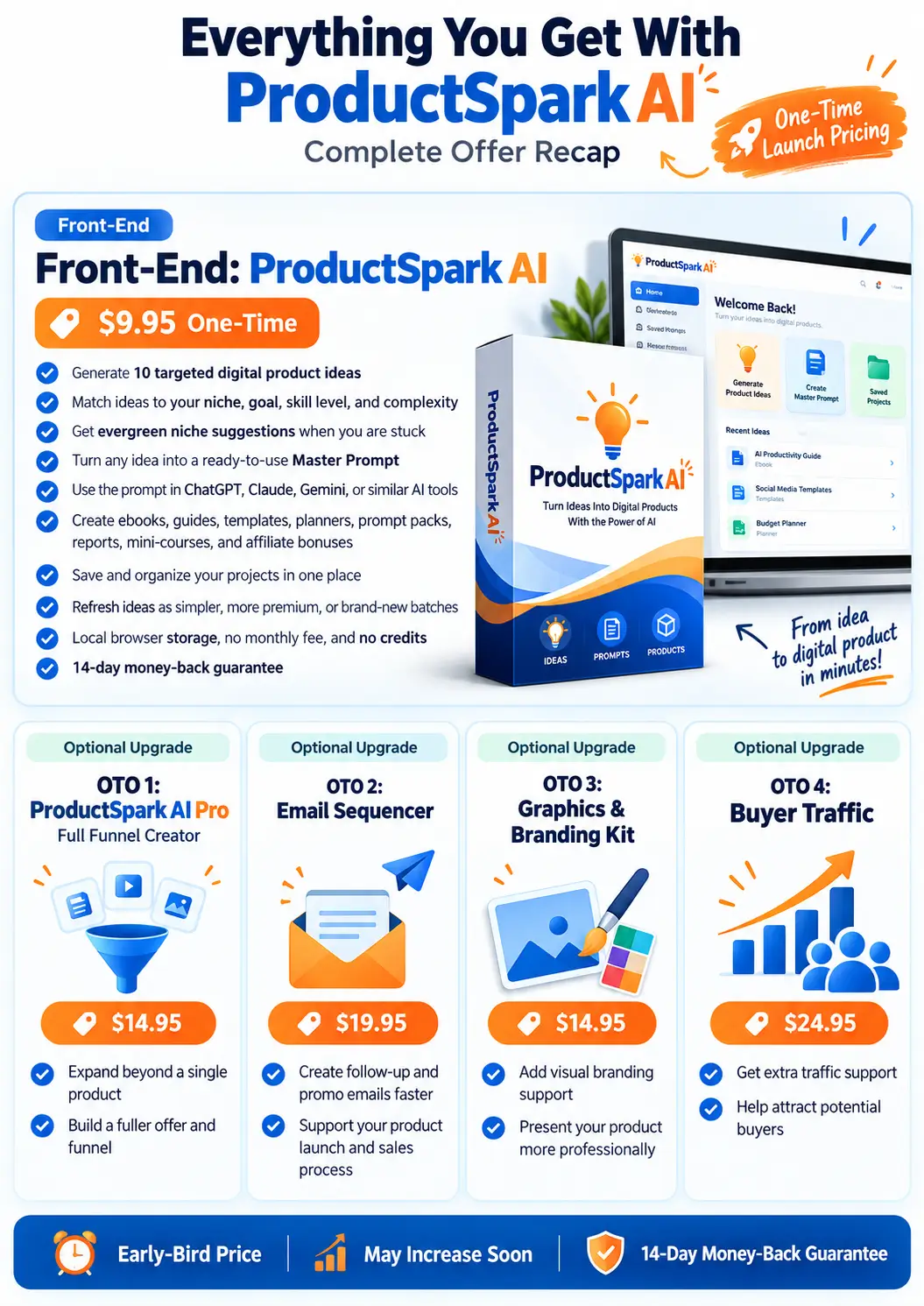
Keep in mind that $9.95 is the early-bird launch price, so it may increase as the promotion moves forward. Grabbing it early gives you the best chance to lock in the lowest available price.
You also get a 14-day money-back guarantee, which gives you enough time to test the software, generate some ideas, and see how well the workflow fits your needs.

Let’s recap everything that you will get:

ProductSpark AI Review – The OTOs And Upgrades
After getting started with the front-end, you can also explore several optional OTO upgrades that expand ProductSpark AI with additional tools to create, present, promote, and sell your digital products more effectively.
OTO 1: ProductSpark AI Pro – Full Funnel Creator
Price: $14.95 (one-time payment)
This upgrade goes beyond creating a standalone digital product to develop a more complete product funnel.
The Pro version will make more sense for users who want to go beyond a single core deliverable and build a broader offering around it.
OTO 2: ProductSpark AI Email Sequencer
Price: $19.95 (one-time payment)
The second upgrade adds an email-focused component to the system.
It targets the follow-up and promotional aspects of launching your finished product, providing sellers with additional support after the creation stage.
OTO 3: ProductSpark AI Graphics & Branding Kit
Price: $14.95 (one-time payment)
This upgrade addresses the visual side of bringing a product to market.
It complements the content-creation workflow with branding and graphics resources to present the finished offer more professionally.
OTO 4: ProductSpark AI Buyer Traffic
Price: $24.95 (one-time payment)
The final upgrade moves into traffic generation and customer acquisition.
This becomes more relevant once your product and promotional materials are ready and you need to start attracting prospective buyers.
Can You Really Make Money With ProductSpark AI?
ProductSpark AI can help create assets that have commercial potential, but software alone cannot guarantee sales.
The opportunity comes from what you do with the finished product.
One approach involves identifying a focused audience problem and creating a small solution around it. A short guide solving one specific issue may hold more commercial value than a huge ebook covering everything about a broad topic.
Another option is to use marketplaces such as Gumroad, Etsy, Payhip, or similar platforms. You can create targeted products and gradually build a catalog rather than relying on a single large launch.
Affiliate marketers have another interesting path. A custom bonus can strengthen an existing campaign, particularly when it addresses an implementation issue with the main offer.
You can also package digital-product creation as a client service. Local businesses, coaches, creators, and online brands often need lead magnets, guides, templates, reports, and downloadable resources.
ProductSpark AI speeds up the planning and prompting side of those projects.
Still, I would perform basic market research before investing significant effort into any concept. Based on the available feature information, ProductSpark AI focuses on idea generation and product-creation guidance, not on in-depth keyword research, competitor analysis, or validated marketplace demand data.
That distinction keeps expectations realistic.
Who Should Get ProductSpark AI?
ProductSpark AI suits several types of users particularly well.
- Beginners entering digital product creation can use the guided setup to move beyond the blank-page stage.
- Affiliate marketers gain a repeatable method for producing new campaign bonuses.
- Digital product sellers can use it to expand their catalog and explore new niches or formats.
- Coaches and consultants can turn expertise into smaller downloadable resources.
- Creators and bloggers can develop products around an existing audience.
- Freelancers and agencies can use the workflow to plan digital assets for clients.
- Experienced marketers short on ideas may also find value in using the software as a brainstorming and prompt-development assistant.
Who May Not Need It?
ProductSpark AI may offer less value to advanced prompt engineers who already maintain their own proven product-development prompt libraries.
It also will not replace specialist market-research platforms for people who need detailed search-volume data, marketplace competition metrics, or deep competitor intelligence before selecting a product.
Users looking for a system that independently produces a polished video course, hosts it, processes payments, and handles the entire business from one dashboard should also understand that ProductSpark AI serves a narrower purpose.
Its main job revolves around product discovery, planning, prompting, and guided creation.
Pros And Cons
PROS:
- Very affordable $9.95 front-end launch price.
- Generates 10 ideas from your selected criteria.
- Matches concepts to your experience level.
- Offers simpler and premium idea variations
- Generates ready-to-use Master Prompts.
- Provides an ordered creation process.
- Works with ChatGPT, Claude, Gemini, and other LLMs.
- Supports numerous digital-product formats.
- Useful affiliate bonus option.
- Saves projects and earlier idea batches.
- Stores data locally in the browser.
- No standard username/password account setup.
- No recurring front-end subscription.
- No credit system.
- 14-day refund period.
CONS:
- Local browser storage can make multi-device workflows less convenient.
The end of my ProductSpark AI review today
ProductSpark AI gives digital creators a much clearer path from “I want to create something” to “I know exactly what to build and how to start.” By combining targeted product ideas, skill-based recommendations, and ready-to-use Master Prompts, it removes much of the uncertainty that slows beginners and marketers down.
At its low one-time entry price, I think it offers strong practical value for anyone who wants to create digital products, affiliate bonuses, guides, templates, or other sellable assets with AI’s help. You still need ChatGPT, Claude, Gemini, or another LLM to produce the final content, but ProductSpark AI gives that AI a far better starting point.
Frequently Asked Questions
Is ProductSpark AI an AI product creator?
It works as an AI-assisted product discovery and creation system. It generates ideas and detailed Master Prompts, which you then run through an AI model such as ChatGPT, Claude, or Gemini to create the product content.
Do I need ChatGPT?
You need access to a compatible AI assistant, but it does not have to be ChatGPT. Claude, Gemini, and other major LLMs can also run the generated prompts.
Can beginners use it?
Yes. You can select your skill level and desired complexity, allowing the software to generate ideas that better fit your current ability.
What products can I create?
Examples include ebooks, reports, guides, checklists, planners, templates, prompt packs, mini-courses, affiliate bonuses, and other downloadable products.
Does ProductSpark AI create videos?
It can give you the concept and instructions for video-based training products, but you still need to create the final video yourself or use another AI video solution.
Can I use it to create affiliate bonuses?
Yes. Affiliate bonus creation appears as one of the available product options.
Does it charge monthly fees?
The launch front end uses a one-time payment model, according to the current product documentation and launch listing.
Are there AI credits?
No. The front-end FAQ specifically states that the app does not operate on a credit system and is subject to reasonable usage.
Where does ProductSpark AI store my projects?
The application stores ideas, selections, and prompts locally on your device/browser according to the product documentation.
Do I need to create an account?
There is no conventional sign-up with a username and password. You activate access using your purchase license key.
Where can I sell the products?
Possible platforms include Gumroad, Etsy, Payhip, WarriorPlus, JVZoo, ThriveCart, Udemy, and your own website.
How quickly can I create something?
The time depends heavily on the chosen format. The product documentation gives an approximate range of 10 to 60 minutes for some product types, while more extensive funnels can naturally require much longer.



AI & Automation













***3 STEPS TO CLAIM THESE BONUSES***
Step 1: Buy ProductSpark AI on my website by clicking the button below:

Step 2: After completing the transaction, forward the receipt to my email at hudareviewbonus@gmail.com
Final Step 3: You will receive the bonuses within 24 hours.
Thanks a lot for reading my review to the end. Send my best wishes to you and your family.