
LeadPilot AI Review 2026: Can This AI Lead Generation Platform Find and Qualify Prospects?
LeadPilot AI Review
A Beginner-Friendly AI Tool for Finding and Contacting Prospects
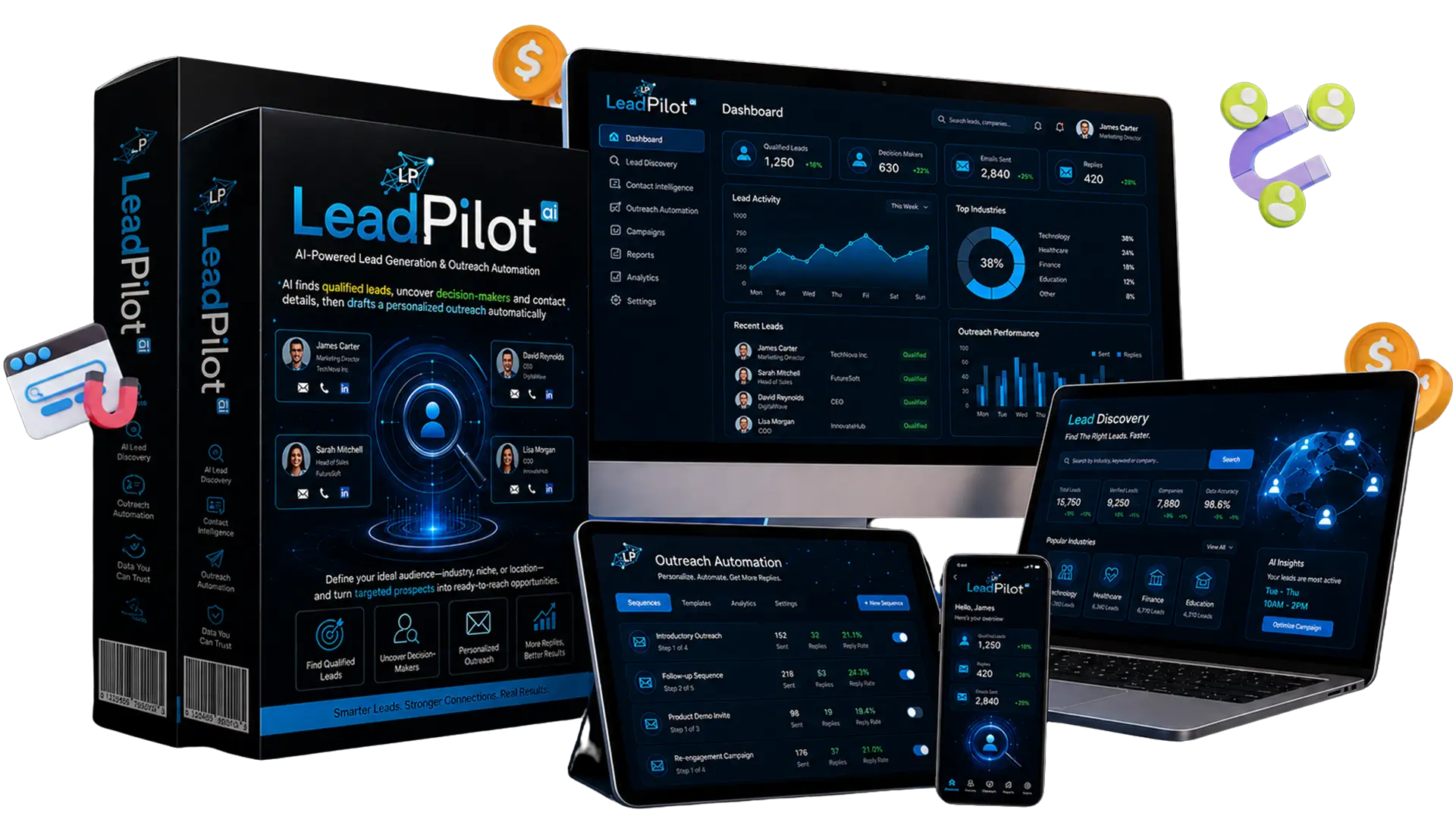
Making money online often starts with finding the right prospects, yet that step can consume hours every day. Marketers, freelancers, and agency owners usually jump between directories, websites, social platforms, spreadsheets, and outreach tools just to build one usable contact list.
The bigger challenge comes after the research. Poor-quality leads, missing contact details, weak targeting, generic messages, and inconsistent follow-ups can quickly drain time and lower response rates. Many beginners also struggle to turn raw business data into real conversations and paying clients.
That is why smarter lead generation tools continue to attract attention in the MMO space. In this LeadPilot AI review, I will examine how the platform handles these common obstacles and see whether it offers practical value for people who want to grow an online service business.
What Is LeadPilot AI?
LeadPilot AI is an AI-powered lead generation and outreach platform that helps users find targeted business prospects, collect contact details, assess lead quality, and craft personalized messages from a single dashboard. It supports marketers, freelancers, agencies, consultants, and business owners who want to reduce manual research and streamline their prospecting process.
The platform combines lead discovery, qualification, campaign management, and outreach assistance in a cloud-based workspace. Users can search by niche, industry, or location, then review potential opportunities and prepare contact campaigns in less time and with less effort.
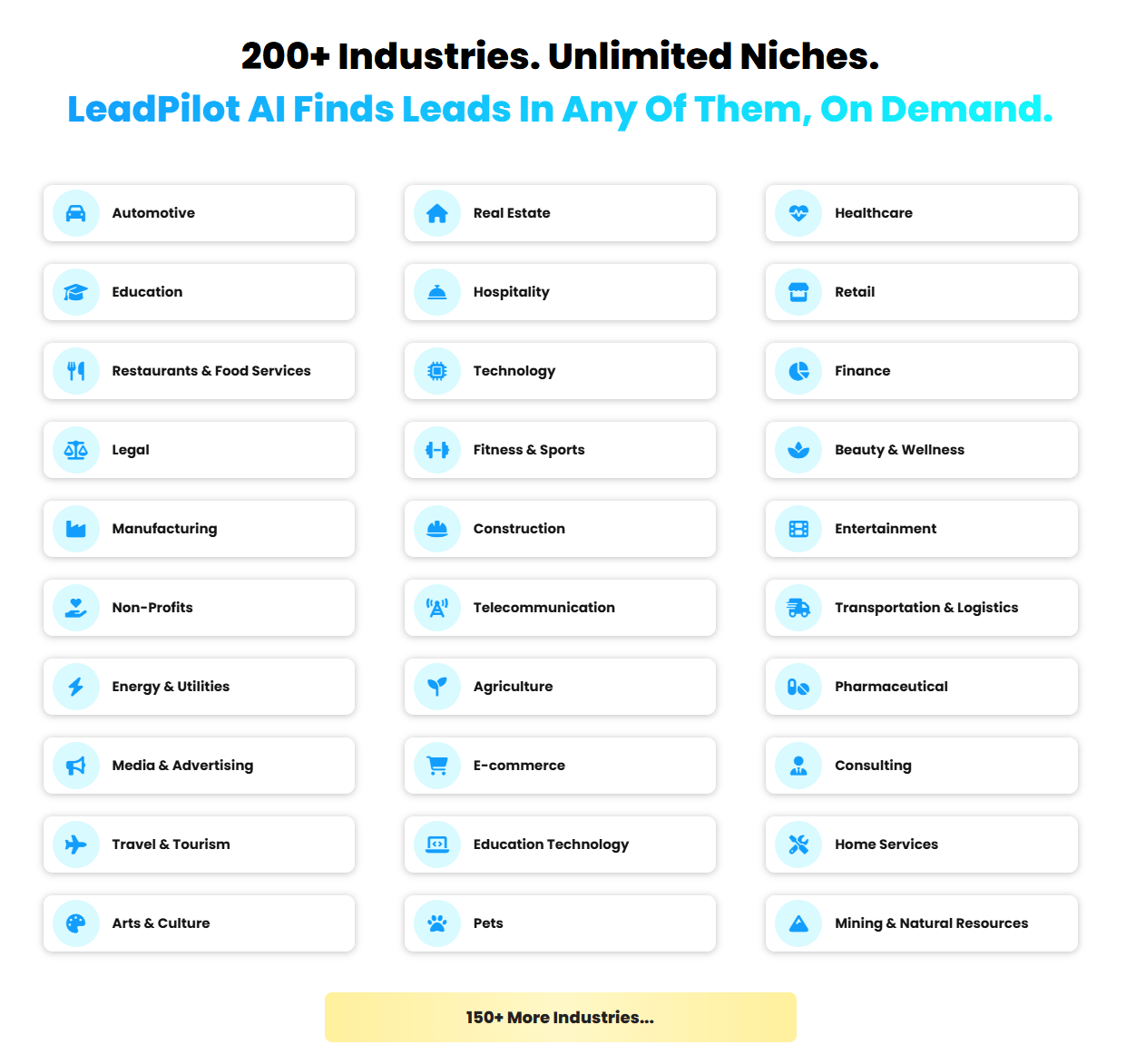
The core process contains three main stages.
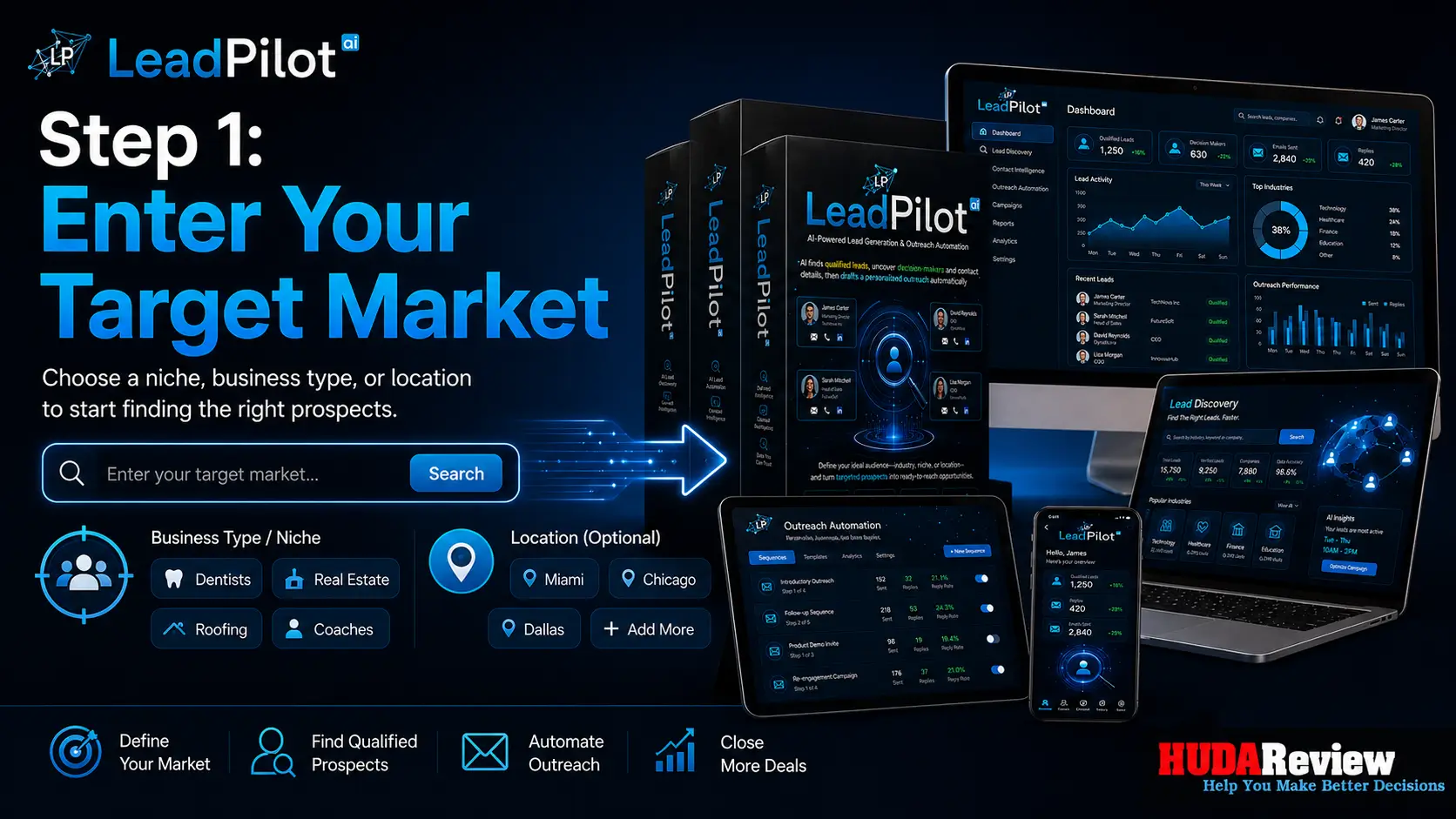
Step 1: Enter Your Target Market.
Start by entering a niche, industry, or location.
A web designer could search for “dentists with outdated websites in Miami.” A reputation management agency could target “restaurants with poor reviews in Dallas.”
Clear targeting usually produces a more useful prospect list.
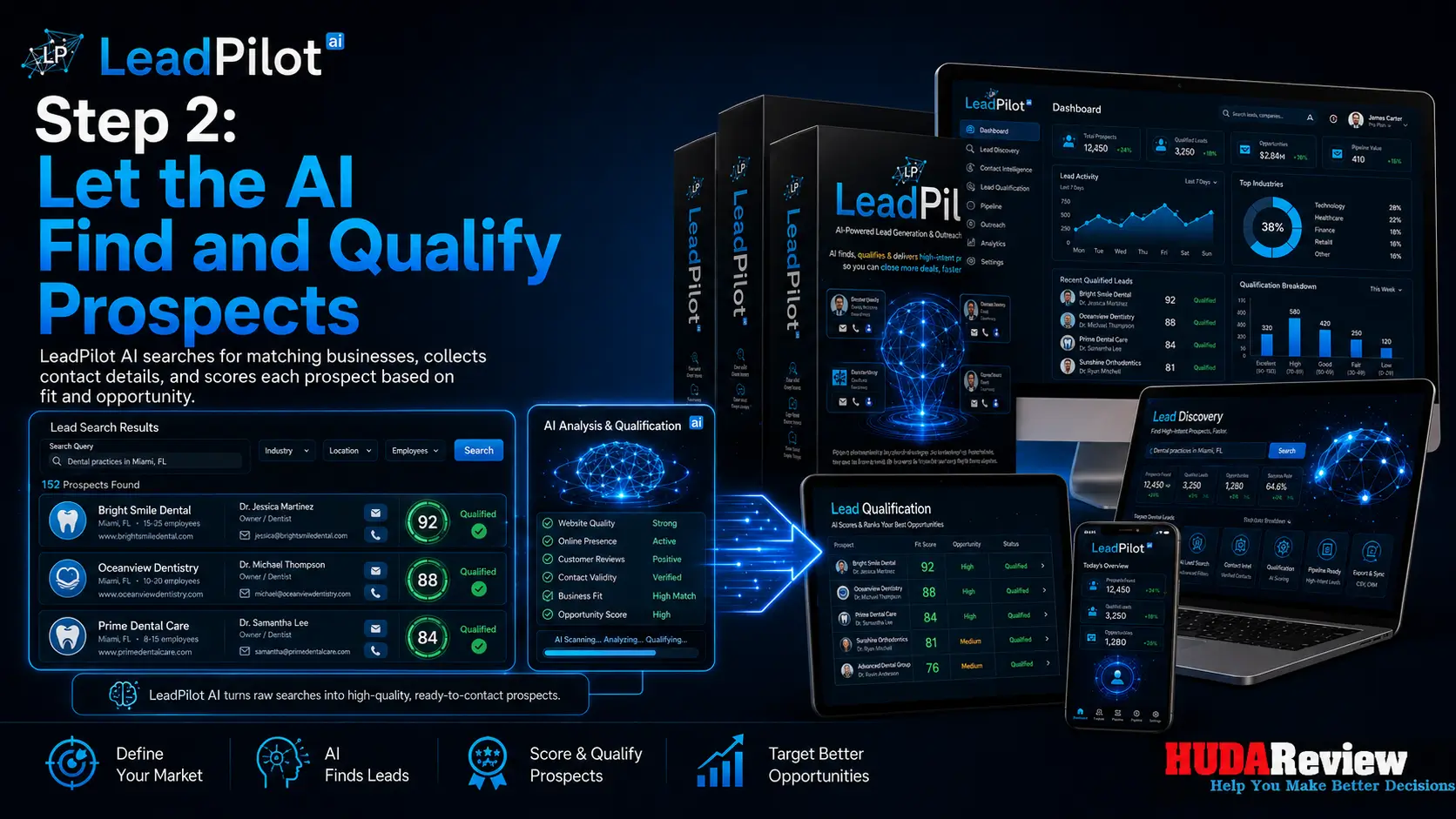
Step 2: Let the AI Find and Qualify Prospects.
LeadPilot AI searches for matching businesses, collects available contact information, evaluates the records, and ranks each prospect.
The software also looks for weaknesses that could provide a relevant opening angle.
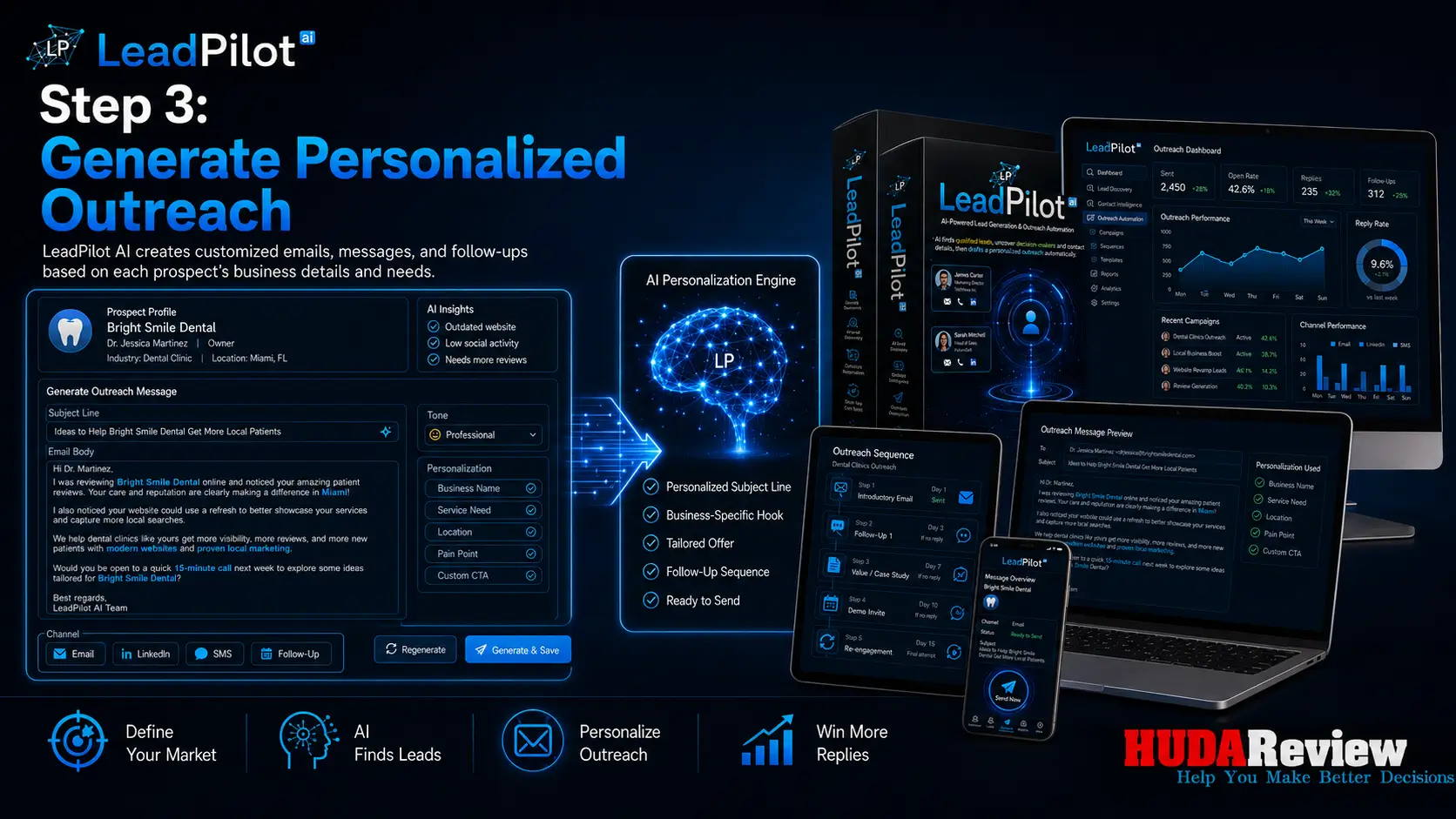
Step 3: Generate Personalized Outreach.
The AI creates a message for each lead. Users can review the draft, adjust the tone, copy the message, export the data, or move the prospect into another system.
The result is an organized pipeline containing contact details, qualification information, outreach copy, and follow-up content.
LeadPilot AI Review Overview

| Vendor | ClicksBotz Team |
| Product Name | LeadPilot AI App |
| The official page | >>>Click Here To Grab This Product |
| Product Type | AI-powered lead generation and outreach platform |
| Main Purpose | Find, qualify, organize, and contact business prospects |
| Current Front-End Price | $14 (one-time payment) |
| Discount code | Add my code “LPLOTBIG” to get 30% off any item in the funnel. |
| Commercial License | Included during the launch period |
| Access Method | Cloud-based |
| Supported Devices | PC, Mac, Android, and iOS |
| Training | Step-by-step training included |
| Guarantee | 30-day money-back guarantee |
| Support | Vendor Support Desk: https://vjtechlabs.tawk.help/
HudaReview Support Email: hudareviewbonus@gmail.com |
Key Features
LeadPilot AI combines lead research, qualification, outreach preparation, and campaign organization into a single cloud-based platform.
Here are the main features users can access:
✅ AI-Powered Lead Discovery:
Search for targeted prospects by niche, industry, business type, or location. This helps users create relevant lead lists for local marketing, B2B outreach, freelancing, and agency campaigns.
✅ Automatic Contact Information Collection:
LeadPilot AI gathers available business details, including names, email addresses, phone numbers, websites, social profiles, and locations. This reduces the time spent searching multiple directories and company pages.
✅ Advanced Prospect Filtering:
Refine lead results based on location, industry, company size, and other campaign requirements. Better filtering helps users focus on prospects that closely match their services or offers.
✅ AI Lead Scoring:
The platform analyzes each prospect and assigns a score based on potential relevance. Users can prioritize stronger opportunities and avoid treating every contact equally.
✅ Business Weakness Analysis:
LeadPilot AI checks available business information for possible marketing gaps, including outdated websites, poor reviews, weak social activity, limited online visibility, or missing digital assets.
✅ Personalized Outreach Messages:
Generate customized cold emails, LinkedIn messages, SMS scripts, and direct messages for individual prospects. Users can choose a professional, friendly, or direct tone to match each campaign.
✅ Automated Follow-Up Content:
Create follow-up messages for prospects who do not reply after the first contact. This feature helps users maintain communication without having to write every message manually.
✅ Duplicate and Invalid Lead Removal:
The system cleans prospect lists by identifying duplicate entries and removing invalid contact records. Cleaner data can improve campaign organization and reduce wasted outreach.
✅ Campaign Management Dashboard:
Organize leads into separate campaigns based on niche, service, client, or location. Users can add notes, apply tags, and keep every prospect list easier to manage.
✅ Lead Pipeline Tracking:
Track each prospect through stages such as new lead, contacted, replied, interested, and closed. This provides a clearer view of campaign progress and follow-up priorities.
✅ CSV and CRM Export Options:
Export lead data into CSV files or move records into compatible CRM and email marketing systems. This gives users more control over how they manage and contact their prospects.
✅ Multi-Client Agency Mode:
Create separate workspaces and campaigns for different clients. Agencies can manage prospect lists, outreach messages, notes, and progress without mixing client data.
✅ Commercial License Included:
The commercial rights allow users to create lead lists, outreach campaigns, and prospecting services for clients. Freelancers and agencies can charge their own fees and keep the revenue.
✅ Cloud-Based Access:
LeadPilot AI runs online, so users do not need to install software. The platform works across common desktop and mobile devices with an internet connection.
✅ Beginner-Friendly Training:
Step-by-step guidance helps new users understand the workflow, create their first prospect list, and prepare outreach campaigns with greater confidence.
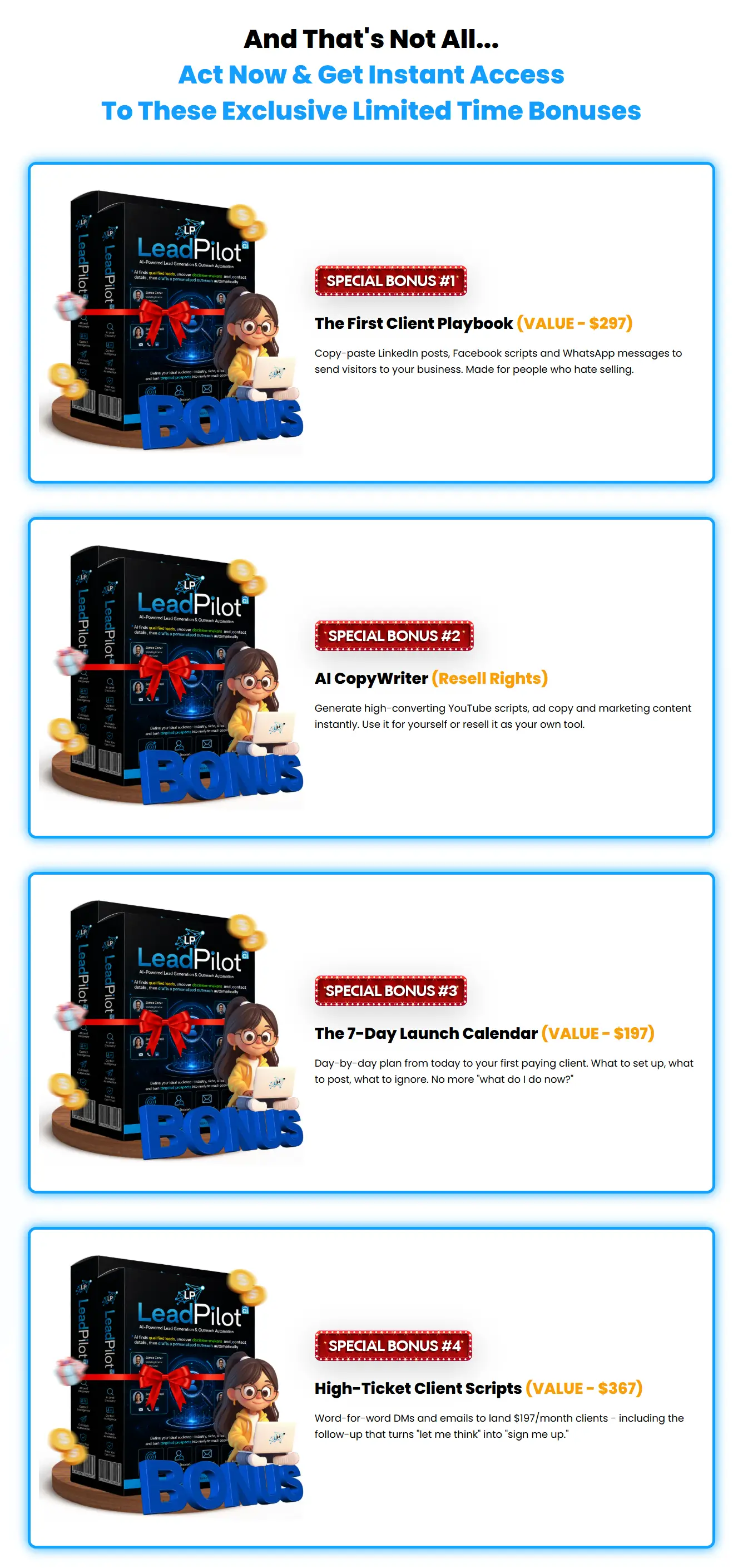
Moreover, if you purchase the LeadPilot AI today, you will also receive all exclusive bonuses below for FREE from the author team:
(Access is available inside the product’s member area.)

Add my code “LPLOTBIG” to get 30% off any item in the funnel.
LeadPilot AI Tutorial – How to Find, Qualify, Organize, Contact, and Export Business Leads
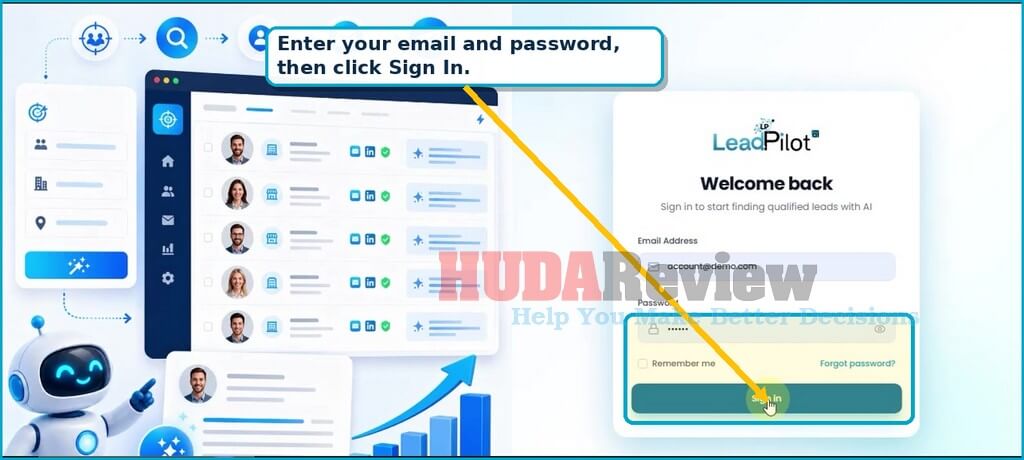
STEP 1: Sign In to Your LeadPilot AI Account.
Open the LeadPilot AI login page and enter the email address and password connected to your account. The eye icon lets you check the password before submission, while the Remember me option keeps the session active on a trusted device.
- Enter your account email address.
- Type the password supplied during registration or purchase.
- Select Remember me only on a private device.
- Click Sign In to open the main dashboard.
TIP: Protect your account. Avoid saving login details on shared computers. Use the password reset link when the current password no longer works.
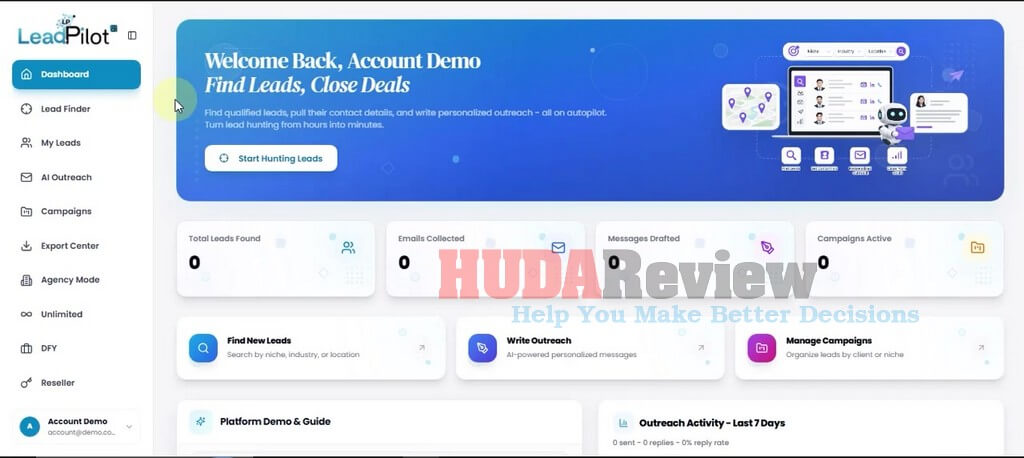
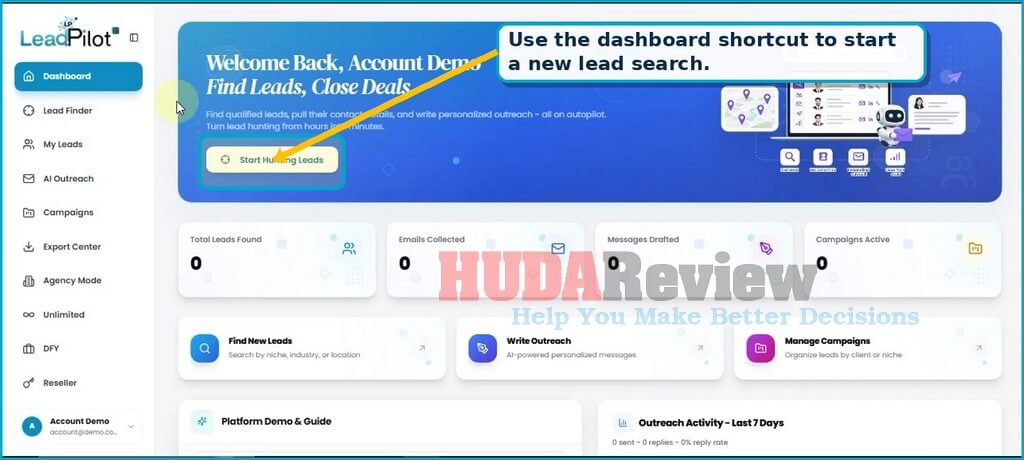
STEP 2: Review the Main Dashboard.
The dashboard acts as the central navigation point. It displays totals for leads found, emails collected, messages drafted, and active campaigns. Shortcut cards take you directly to lead discovery, outreach writing, and campaign management.
- Start Hunting Leads opens the Lead Finder.
- Find New Leads starts a new prospect search.
- Write Outreach opens the AI Outreach Writer.
- Manage Campaigns opens the campaign workspace.
- The left sidebar provides constant access to My Leads, Export Center, Agency Mode, and the available upgrades.
STEP 3: Define Your Target Market in Lead Finder.
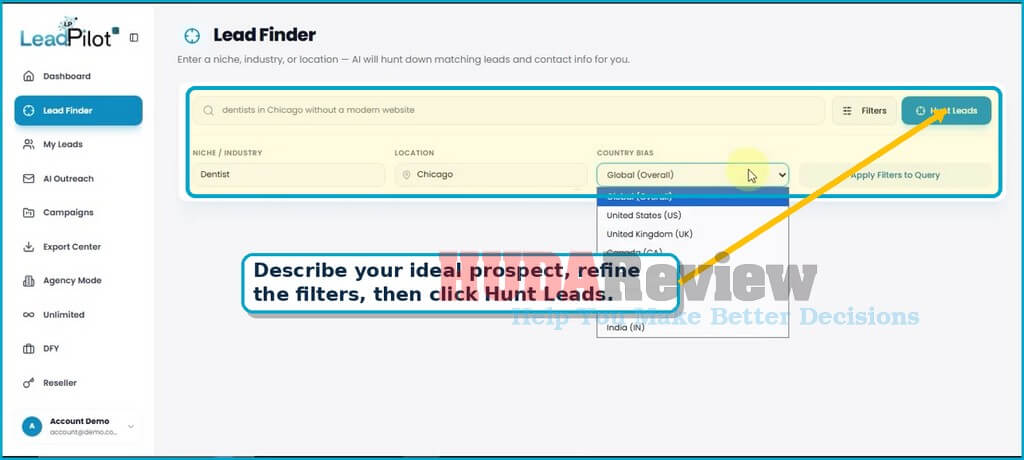
Open Lead Finder from the sidebar. Describe the type of prospect you want in the main search field. A focused request normally performs better than a broad keyword.
The demo uses “dentists in Chicago without a modern website.” That wording includes the industry, location, and a visible business need, giving the system a clear qualification angle.
Complete the Search Fields:
- Search query: Describe the ideal business and the problem you want to solve.
- Niche / Industry: Enter a category such as Dentist, Restaurant, Realtor, Coach, or Roofing Contractor.
- Location: Add a city, state, region, or country.
- Country Bias: Choose Global or one of the listed countries to guide the search.
- Apply Filters to Query: Use this option to combine the structured fields with the written search request.
- Hunt Leads: Start the AI-assisted search.
TIP: Use problem-aware searches. Combine the target market with a practical need, such as “restaurants with weak reviews,” “roofers with outdated websites,” or “coaches with limited social activity.”
STEP 4: Review, Qualify, and Save the Results.
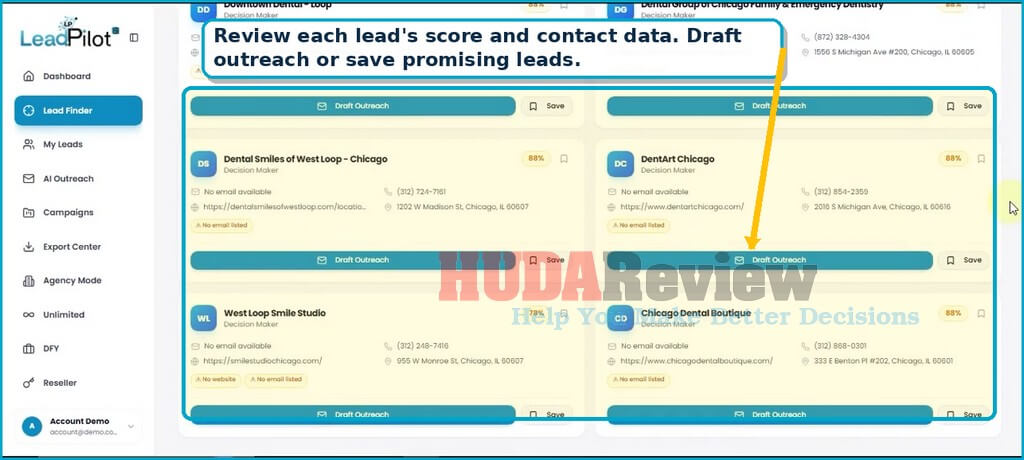
LeadPilot AI displays the search results as individual business cards. Each card can include the business name, decision-maker label, phone number, website, address, email status, and a lead score.
Evaluate Each Result:
- Check the lead score to prioritize stronger opportunities.
- Open the website and confirm that the business matches your offer.
- Review the listed phone number, address, and available email information.
- Note warning tags such as “No email listed” or “No website”.
- Click Draft Outreach to prepare a message for that lead.
- Click Save to keep the lead in your account.
Save Multiple Leads to a Campaign:
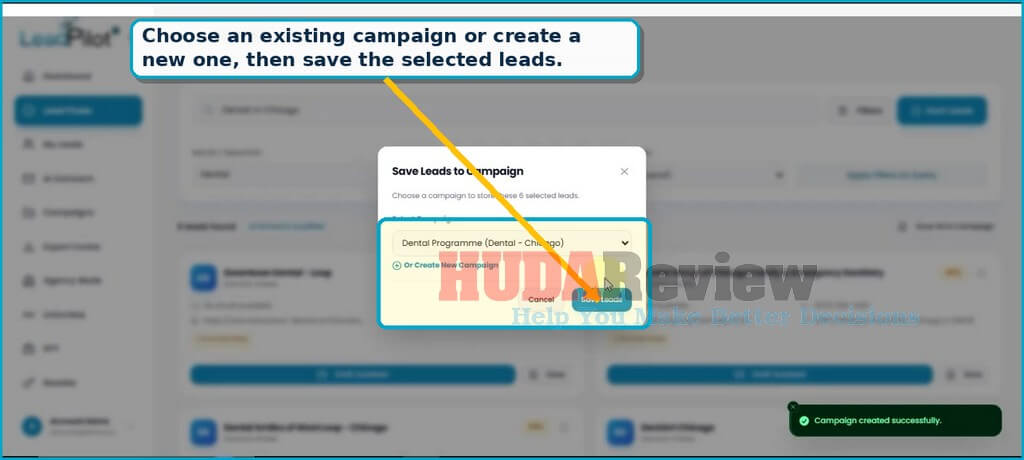
Select several relevant leads, then place them inside a campaign. The Save Leads to Campaign window lets you choose an existing project or create a new campaign without leaving the results page.
- Select the leads you want to keep.
- Open the save-to-campaign action.
- Choose a campaign from the Select Campaign menu.
- Use Create New Campaign when no suitable project exists.
- Click Save Leads.
STEP 5: Manage the Pipeline in My Leads.
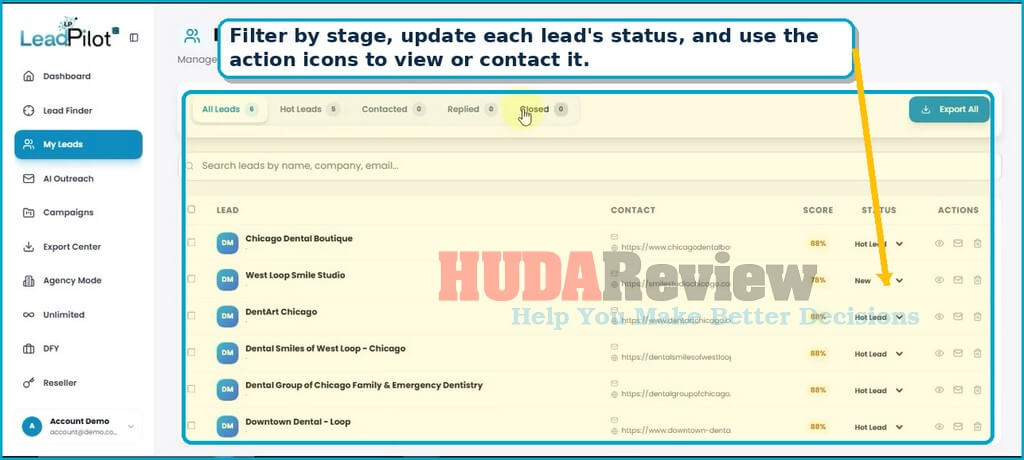
My Leads stores the prospects saved from Lead Finder. The screen separates them into pipeline stages and provides controls for search, export, status, view, message, and delete.
Use the Pipeline Tabs:
- All Leads display the complete saved list.
- Hot Leads highlights prospects with stronger potential.
- Contacted track businesses that already received outreach.
- Replied collects prospects that responded.
- Closed records completed opportunities.
The table shows each lead, available contact information, score, current status, and action icons. Use the status menu to move a prospect through the pipeline as the conversation progresses.
Open the Lead Details Panel:
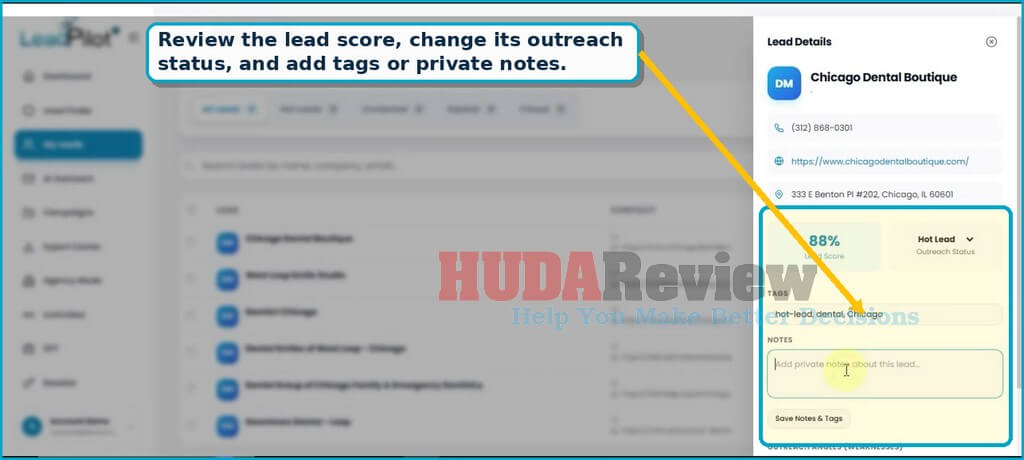
The eye icon opens a detailed panel for the selected business. This view brings together the phone number, website, location, score, outreach status, tags, and private notes.
- Change the outreach status to match the current stage.
- Add descriptive tags such as hot-lead, dental, and Chicago.
- Record private notes about the offer, contact attempt, or next action.
- Save Notes & Tags before closing the panel.
- Review the outreach-angle or weakness section further down the panel.
STEP 6: Generate Personalized Outreach with AI
Open AI Outreach from the sidebar or use Draft Outreach on a lead card. The writer imports the business details and uses them to create a relevant message.
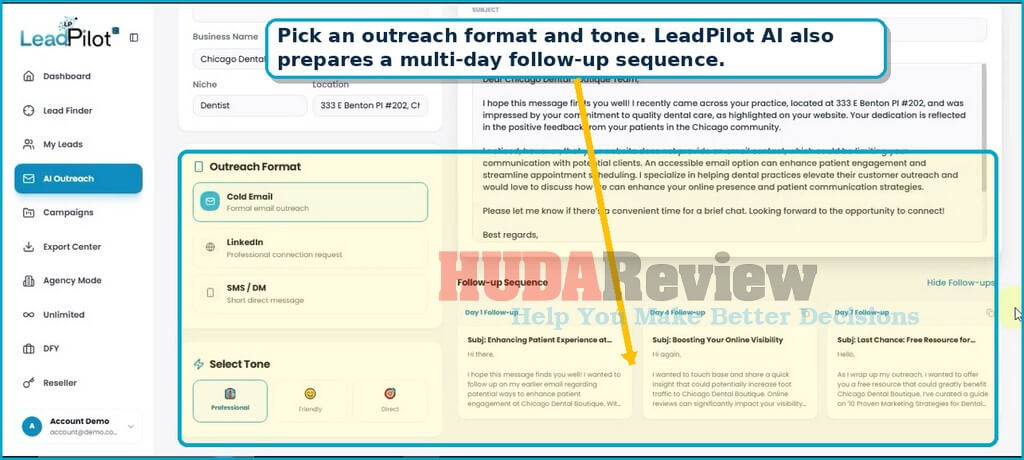
Choose the Message Format and Tone:
- Cold Email creates a formal email-style message.
- LinkedIn prepares a professional connection request.
- SMS / DM creates a shorter, direct message.
- A professional keeps the wording formal and business-focused.
- Friendly adds a warmer conversational style.
- Direct makes the request more concise and action-oriented.
The follow-up area in the demo contains messages for Day 1, Day 4, and Day 7. This sequence helps you continue the conversation without having to write each follow-up from scratch.
Review and Use the Generated Message:
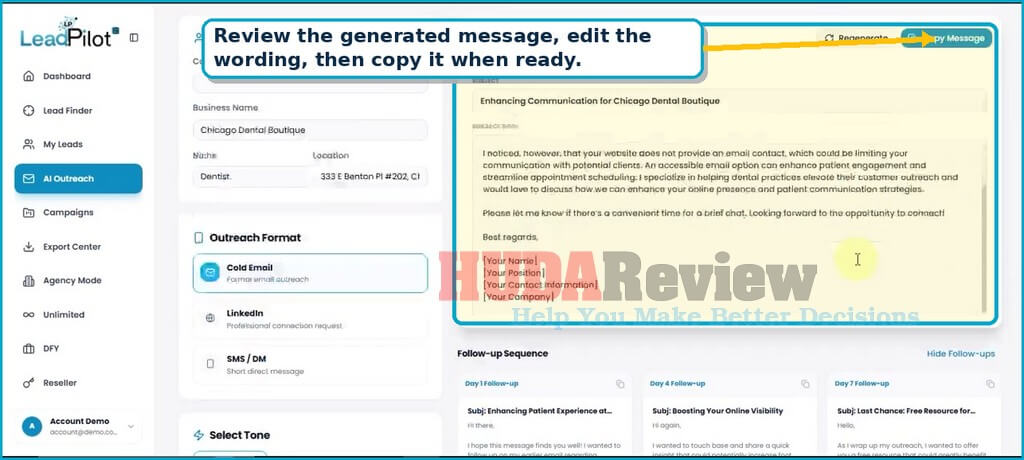
The Generated Outreach panel contains a subject line and message body based on the selected lead. Read the entire draft before using it. Correct any inaccurate details, replace placeholder signature information, and adjust the offer to match your service.
- Regenerate creates another version of the message.
- Copy Message copies the draft for use in your email platform, CRM, LinkedIn, or messaging tool.
- Edit the wording to add a genuine observation from the prospect’s website.
- Keep the call to action simple, such as asking for a short call or permission to send a quick audit.
TIP: Add a human review. Confirm names, locations, services, and business observations before sending. A quick manual edit makes the message more credible and protects your professional reputation.
STEP 7: Create and Track Outreach Campaigns.
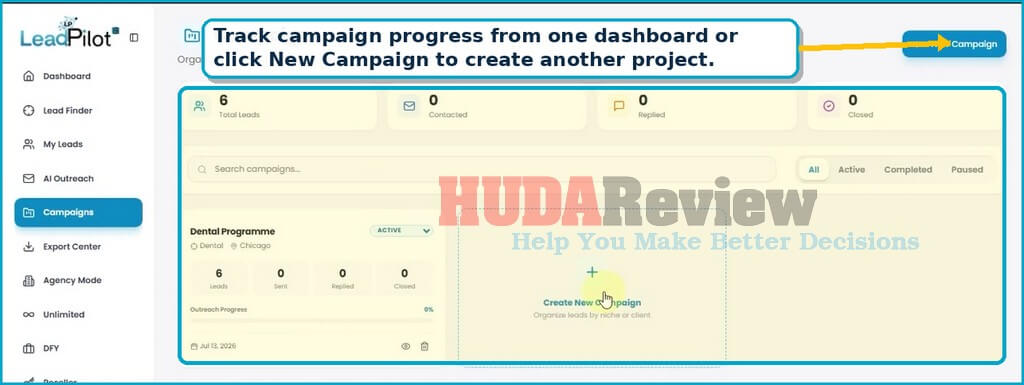
Campaigns group related leads by niche, client, location, or offer. The overview displays total leads, contacted prospects, replies, closed opportunities, and outreach progress.
- Search campaigns by name.
- Filter the view by All, Active, Completed, or Paused.
- Review each campaign’s counts of leads, sends, replies, and closes.
- Use the status menu to keep projects organized.
- Open a campaign to inspect its leads or remove an outdated project.
Create a New Campaign:
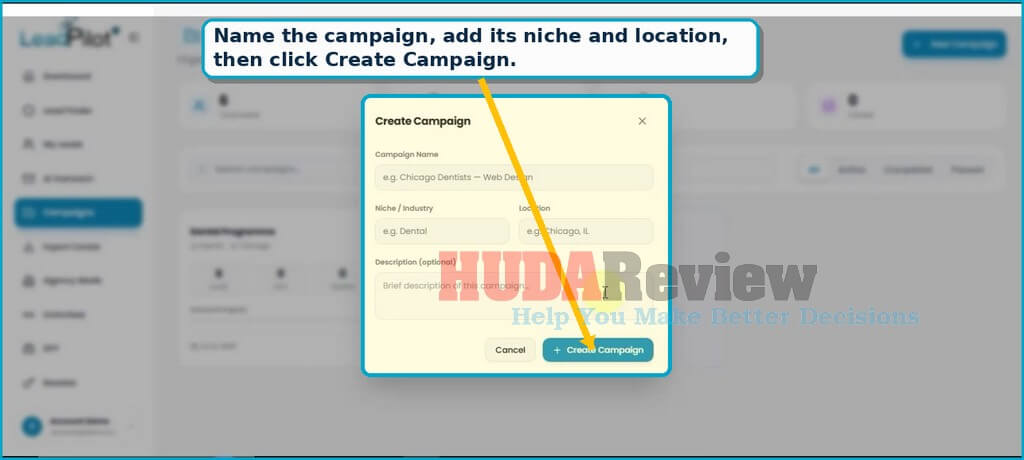
- Click New Campaign.
- Enter a clear campaign name, such as “Chicago Dentists – Web Design.”
- Add the niche or industry.
- Add the target location.
- Write a short, optional description explaining the campaign goal.
- Click Create Campaign.
STEP 8: Export Your Lead Data.
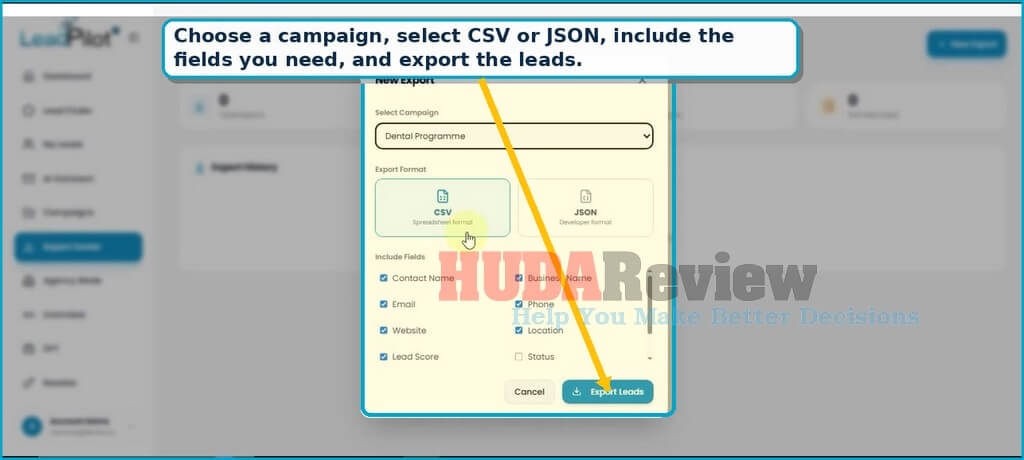
Export Center prepares campaign data for spreadsheets, CRM systems, and external workflows. The demo supports CSV and JSON.
Build an Export File:
- Open Export Center from the sidebar.
- Click New Export.
- Choose the campaign you want to export.
- Select CSV for a standard spreadsheet file or JSON for a structured, developer-friendly file.
- Select the fields you want to include.
- Click Export Leads.
The visible field options include Contact Name, Business Name, Email, Phone, Website, Location, Lead Score, and Status. Select only the data required by the next tool to keep the export clean.
TIP: Keep a clean master file. Use a consistent campaign name and status system before exporting. Clean data makes filtering, follow-up, and CRM imports much easier.
The LeadPilot AI workflow follows a clear sequence: define the market, find matching businesses, review the scores and contact data, save suitable prospects, create personalized outreach, track campaign progress, and export the results. The software can reduce repetitive research and writing work, while your targeting, judgment, message review, and follow-up strategy still shape the outcome.
Begin with one focused campaign, review the data carefully, and improve the outreach after each round of responses. That approach gives new users a manageable path from the first search to an organized prospecting routine.
LeadPilot AI Demo Video:
My Honest Experience of Using LeadPilot AI
After reviewing LeadPilot AI’s workflow and exploring how its core tools connect, I found the platform easy to understand, even for someone new to lead generation. The dashboard centralizes prospect research, contact details, lead scoring, outreach messages, and campaign tracking, reducing much of the confusion beginners often face.
The lead discovery process feels straightforward. You enter a niche, business type, or location, then review the prospects that match your campaign. I especially like how LeadPilot AI adds context to each lead by highlighting potential marketing weaknesses. This gives users a clearer reason to contact a business and helps them write a more relevant offer.
The personalized outreach feature also adds practical value. Creating emails, LinkedIn messages, SMS scripts, and follow-ups usually takes a lot of time, especially when handling several prospects. LeadPilot AI prepares a useful starting draft for each contact, although I still recommend checking every message before sending it. A few small edits can make the wording sound more natural and accurate.
New users should not expect the software to close deals automatically. You still need a clear service, careful targeting, professional communication, and regular follow-up. LeadPilot AI supports those tasks by reducing research and writing work, giving you more time to focus on conversations and client relationships.
Overall, my LeadPilot AI experience shows that it can be a helpful option for freelancers, marketers, consultants, and agency owners who want a simpler prospecting process. The low one-time price also makes it accessible to beginners who want to test AI-assisted lead generation without committing to an expensive monthly platform.

Price Plan and Its Funnel
The front-end product (FE)
LeadPilot AI currently costs $14 as a one-time payment, giving you access to its lead generation, prospect research, outreach, and campaign management tools without a monthly subscription.
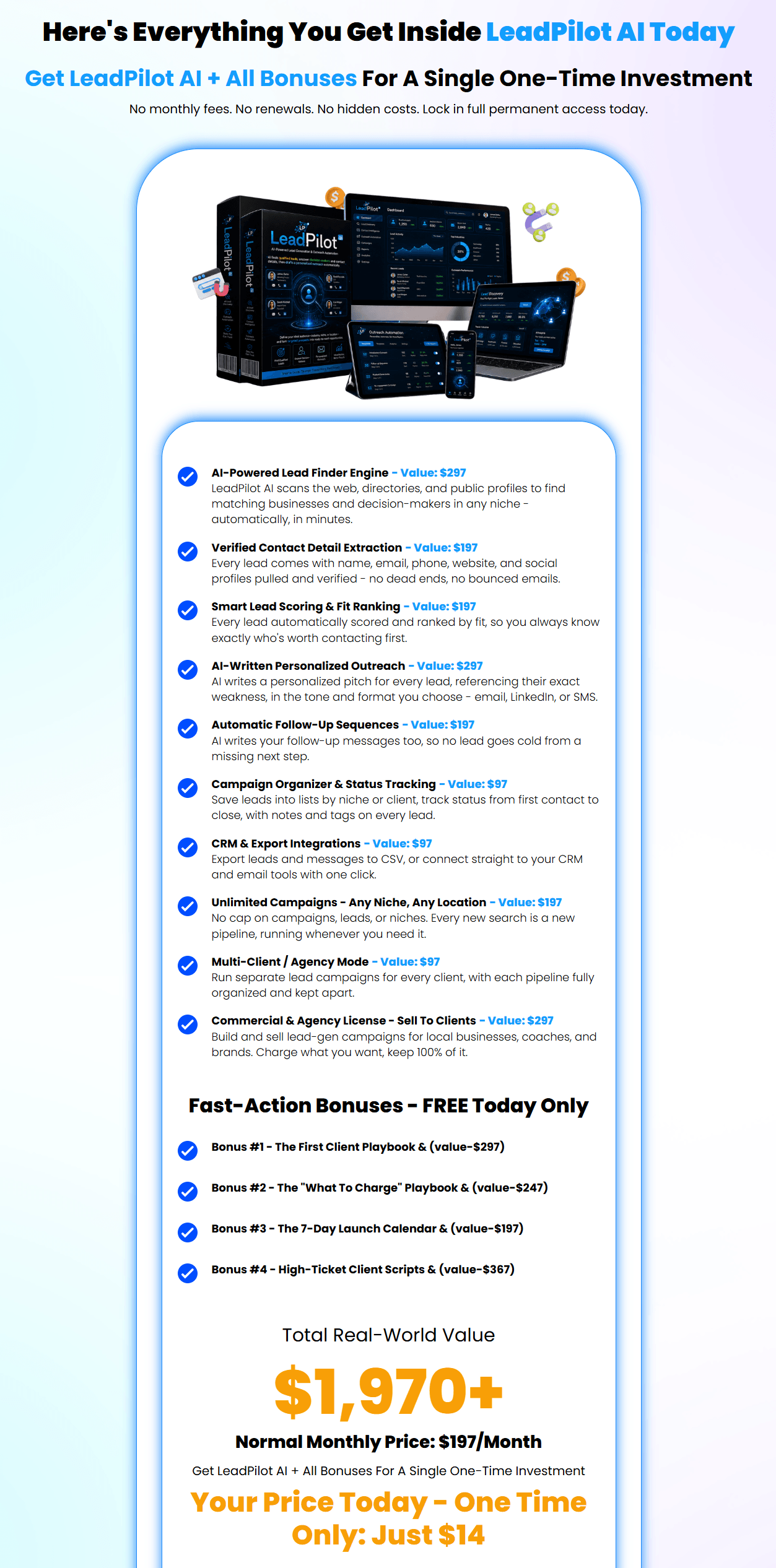
This affordable price makes it a strong deal for freelancers, marketers, agencies, and beginners who want to save time while finding potential clients. The current early-bird offer will increase soon, so purchasing during the launch period can secure the lowest available price.
A 30-day money-back guarantee also protects your purchase and gives you time to explore the platform with less risk.
Add my code “LPLOTBIG” to get 30% off any item in the funnel.
LeadPilot AI Review – The OTOs
LeadPilot AI also offers several optional upgrades that add more features, higher limits, and extra tools for users who want to expand their lead generation and outreach capabilities.
Add my code “LPLOTBIG” to get 30% off any item in the funnel. That means you can apply this code to any OTOs/Downsells below and save 30% instantly.
OTO 01: Unlimited Upgrade
2 options for you:
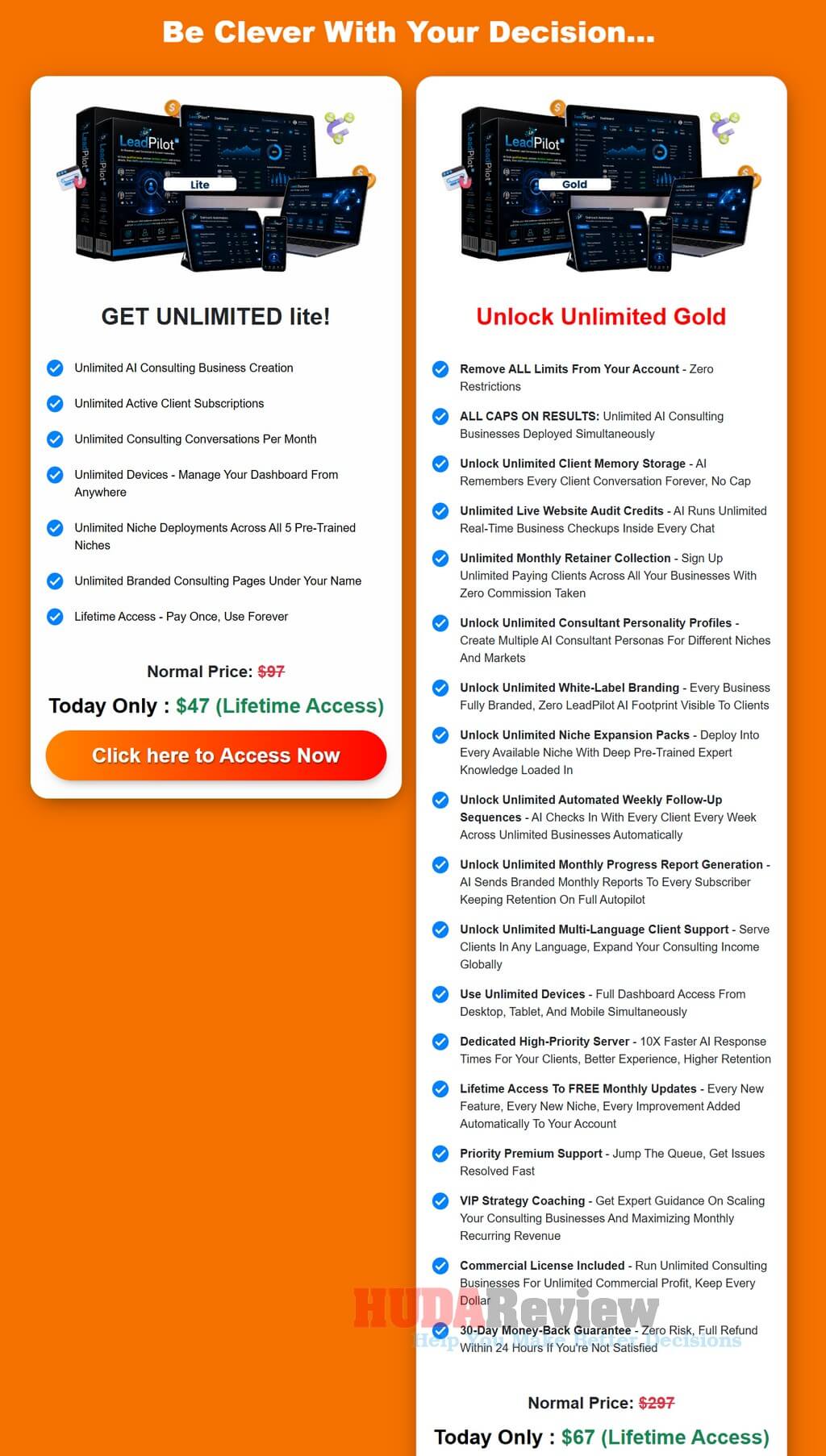
- Unlimited Lite: $47 (one-time payment)
- Unlimited Gold: $67/$37 (one-time payment)
👉 Upgrade to LeadPilot AI Unlimited Now
LeadPilot AI Unlimited suits users who plan to run larger campaigns, serve more clients, and remove the front-end account limits.
This optional upgrade expands the platform with unlimited consulting businesses, client conversations, niche deployments, branded pages, commercial projects, follow-up sequences, reports, and multi-language support.
It also adds advanced customization, white-label branding, client memory, premium support, faster processing, and lifetime updates on the higher Gold plan.
Let’s recap everything that you will receive with this purchase:
OTO 02: Done-For-You Upgrade
Price: $67/$62 (one-time payment)
👉 Upgrade to LeadPilot AI DFY Now
LeadPilot AI DFY is a practical upgrade for buyers who want the vendor’s team to handle the main setup work and prepare their account for faster use.
It removes much of the technical configuration, niche research, content planning, audience targeting, and marketplace preparation that beginners often find difficult.
This option can save valuable time and help customers start with a more complete foundation, although results still depend on the offer, market, outreach quality, and follow-up.
Here is what customers receive with the DFY Upgrade:
- Complete LeadPilot AI account setup.
- Device and system configuration.
- Profitable niche selection and research.
- Premium content created around popular topics.
- Marketplace setup with content already added.
- Relevant offer selection and monetization setup.
- Target audience research and configuration
- Important account settings fine-tuned.
- Technical setup completed by the vendor’s team.
- A ready-to-use business foundation with no monthly fee.
- 30-day money-back guarantee.
OTO 03: Automation Upgrade
Price: $47/$37 (one-time payment)
👉 Upgrade to LeadPilot AI Automation Now
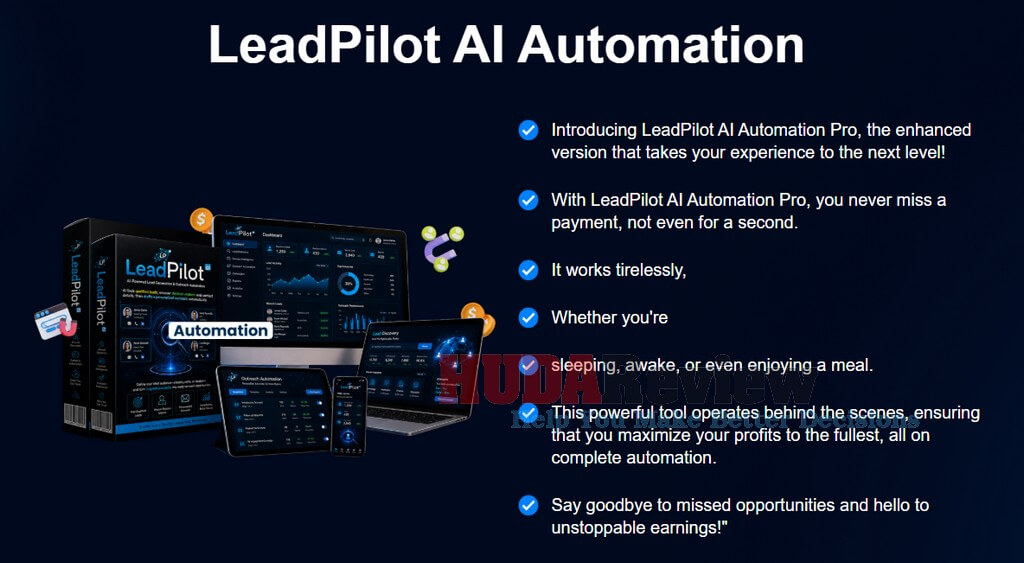
Automation helps users reduce repetitive work by adding automated content publishing, marketplace activity, payment handling, and ongoing account management.
This upgrade suits marketers who want their LeadPilot AI setup to run with less daily attention, though sales and commissions still depend on traffic, offers, targeting, and campaign quality.
Here is what customers receive:
OTO 04: Traffic Upgrade
2 options for you:
- Traffic Lite: $67 (one-time payment)
- Traffic Gold: $97/$47 (one-time payment)
👉 Upgrade to LeadPilot AI Traffic Now
Traffic adds a ready-made traffic source for customers who want to send more visitors to their pages, funnels, affiliate links, and online offers.
This upgrade targets marketers who prefer a faster traffic solution without spending hours on manual promotion. Traffic volume and income results will vary, so buyers should focus on the practical benefit: wider exposure across multiple platforms and lifetime access without recurring fees.
Here is what customers receive:

OTO 05: Income Stream Upgrade
Price: $27/$22 (one-time payment)
👉 Upgrade to LeadPilot AI Income Stream Now
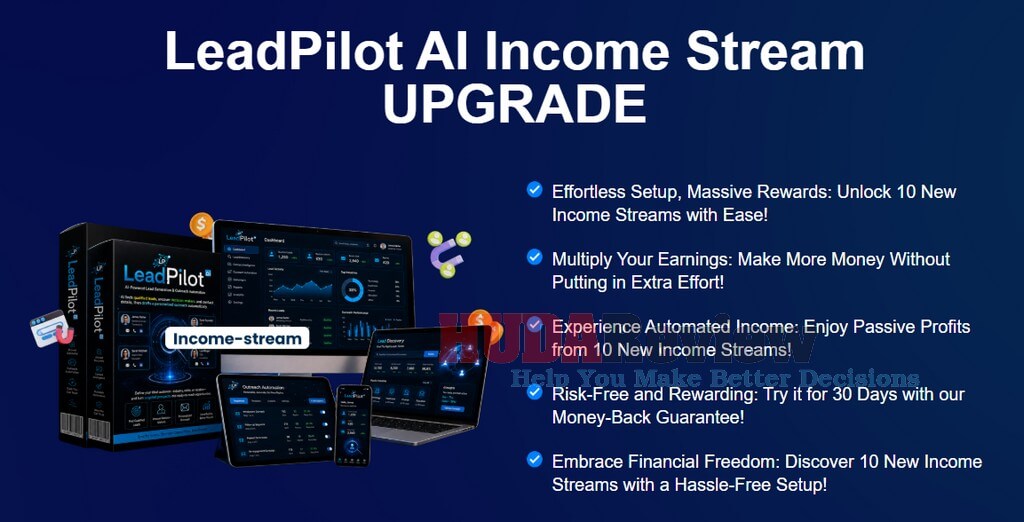
Income Stream gives customers access to 10 additional online income-stream opportunities they can add alongside their main LeadPilot AI business.
This upgrade focuses on diversification, helping users explore more markets, develop new skills, and reduce their dependence on a single revenue source. The included automation features can also reduce the ongoing workload once each stream is properly configured.
Here is what customers will receive:
OTO 06: Agency Upgrade
2 options for you:
- Agency Lite: $97 (one-time payment)
- Agency Gold: $147/$67 (one-time payment)
👉 Upgrade to LeadPilot AI Agency Now
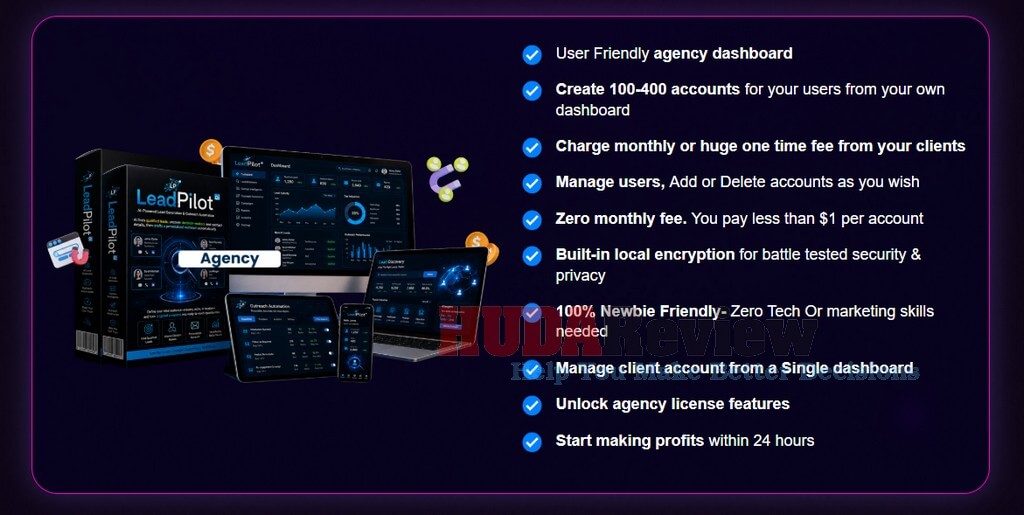
Agency turns the software into a client-management opportunity for users who want to sell LeadPilot AI access to business owners, marketers, and service providers.
This upgrade gives you a dedicated agency dashboard where you can create and manage customer accounts, charge monthly or one-time fees, and control every user from one central workspace. It offers strong value for freelancers and agencies planning to add a software-based service without paying recurring platform fees.
Here is what customers will receive:
OTO 07: Franchise Upgrade
2 options for you:
- Franchise Lite: $97 (one-time payment)
- Franchise Gold: $147/$67 (one-time payment)
👉 Upgrade to LeadPilot AI Franchise Now
Franchise gives customers reseller rights to sell the software and keep up to 100% of the commissions, including earnings from the wider funnel under the Gold option.
The vendor handles product delivery, hosting, technical setup, and customer support, while users promote the provided sales pages and marketing materials. This upgrade suits marketers who want a ready-made software business without having to develop their own product, payment system, or support department.
Here is what customers will receive:

OTO 08: Whitelabel Upgrade
Price: $297/$247 (one-time payment)
👉 Upgrade to LeadPilot AI Whitelabel Now
WhiteLabel enables serious marketers and software entrepreneurs to launch LeadPilot AI under their own business identity. You can replace the original branding with your logo, domain, and company name, choose your own selling price, and retain 100% of the revenue from customer sales.
The vendor also handles the technical installation and sets the platform up on a dedicated VPS, making this upgrade especially attractive to buyers who want to enter the software market without developing an application from scratch.
Here is everything customers receive:

Practical Ways to Use LeadPilot AI
LeadPilot AI supports several realistic business models.
👉 Find Clients for Your Own Services:
Freelancers can locate businesses that may need:
- Website development
- SEO
- Reputation management
- Social media management
- Video production
- Graphic design
- Advertising
- Copywriting
- Automation services
The weakness-detection feature can help connect the service to a visible problem.
👉 Sell Targeted Lead Lists:
Users can prepare lists for selected niches and sell them to businesses that need potential customers.
The value of a list depends on relevance, accuracy, freshness, exclusivity, and legal compliance. A carefully reviewed list usually provides more value than a large collection of unqualified contacts.
👉 Offer Monthly Lead Generation:
Agencies can deliver fresh prospects to clients each month. A recurring service may include lead research, qualification, campaign organization, message preparation, and reporting.
👉 Provide Done-For-You Outreach:
Some business owners need more than contact data. They also need outreach copy and follow-up messages.
LeadPilot AI can support a package containing prospect research plus personalized email, LinkedIn, or SMS scripts.
👉 Support Affiliate Campaigns:
Affiliate marketers can find companies, partners, publishers, or decision-makers connected to a relevant offer.
Every affiliate program has its own promotional rules, so marketers should confirm that direct outreach complies with the program’s terms.
👉 Create Niche Lead Packages:
Users can combine prospect data with personalized pitches and package the material as a niche-specific service.
For example, a package for roofing companies could include targeted property-management prospects, contact details, outreach angles, and follow-up scripts.
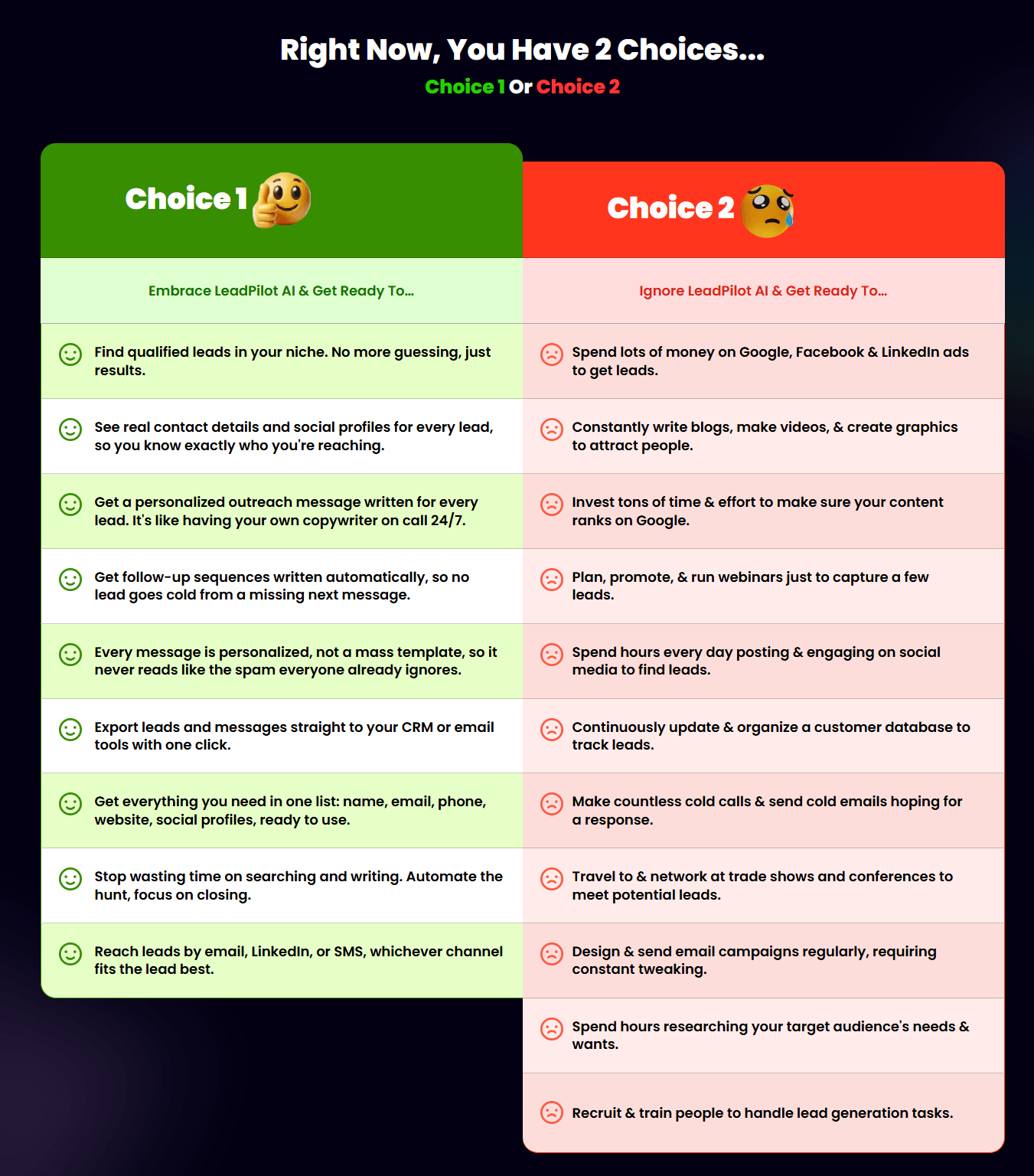
Who Should Consider LeadPilot AI?
LeadPilot AI suits users who want to reduce manual prospecting, organize outreach campaigns, and create more targeted conversations with potential clients.
Perfect for:
- Freelancers searching for new clients.
- Digital marketing agencies.
- Lead generation service providers.
- SEO professionals and web designers.
- Social media managers.
- Reputation management agencies.
- Coaches and consultants.
- Local business marketers.
- Affiliate marketers exploring direct outreach.
- Small business owners.
- B2B sales professionals.
- Real estate marketers and recruiters.
- Beginners starting a client-based online business.
- Agencies managing prospecting campaigns for several clients.
- Users who want lead research, qualification, and outreach tools in one place.
LeadPilot AI is not ideal for:
- Users expecting guaranteed leads, replies, or sales.
- Large sales teams that already use advanced enterprise prospecting systems.
- Businesses requiring highly specialized CRM integrations.
- People are unwilling to review AI-generated messages before sending them.
- Users who prefer fully automated outreach with no personal involvement.
- Companies that need perfect contact accuracy without additional verification.
- Anyone planning to send mass, untargeted messages.
- Marketers who do not want to handle follow-ups or client conversations.
LeadPilot AI offers the most value to freelancers, marketers, and agencies prepared to combine its automation features with careful targeting, personalized outreach, and active follow-up.
Pros and Cons
Pros:
- Finds prospects across many industries and locations.
- Collects contact details from one dashboard.
- Scores and ranks potential leads.
- Detects possible business weaknesses.
- Generates personalized outreach.
- Creates follow-up messages.
- Supports email, LinkedIn, and SMS copy.
- Organizes leads by campaign.
- Tracks prospect status.
- Provides CSV and CRM export options.
- Supports separate client pipelines.
- Includes commercial rights during launch.
- Requires no software installation.
- Works across common desktop and mobile devices.
- Comes with step-by-step training.
- Offers a low one-time introductory price.
- Includes a 30-day refund period.
Cons:
- Contact information may still require manual verification.
- AI-generated messages need human review.
LeadPilot AI Review – Conclusion
LeadPilot AI offers a practical way to find targeted prospects, organize lead data, and prepare personalized outreach from one dashboard. Its affordable one-time price, commercial license, and beginner-friendly workflow make it appealing to freelancers, marketers, agencies, and service providers who want to reduce manual research.
The platform still requires careful targeting, message review, and consistent follow-up, but it can save valuable time and support a more organized client acquisition process. At the current early-bird price of $14, LeadPilot AI delivers strong value, especially with the added protection of a 30-day money-back guarantee.
LeadPilot AI Frequently Asked Questions
❓ Does LeadPilot AI require a monthly subscription?
No. The front-end version currently comes with a one-time payment, which means users do not need to pay a recurring monthly fee for the main platform.
❓ Do I need technical skills to use LeadPilot AI?
No advanced technical knowledge is required. The platform uses a simple cloud-based dashboard and includes step-by-step training to help beginners create lead lists and prepare outreach campaigns.
❓ Can LeadPilot AI find leads in different niches?
Yes. Users can search for prospects by niche, industry, business type, or location. This flexibility supports campaigns for local businesses, B2B services, agencies, consultants, freelancers, and many other markets.
❓ What contact details can LeadPilot AI collect?
The platform can gather available information such as business names, email addresses, phone numbers, websites, locations, and social media profiles. The amount of data may vary from one prospect to another.
❓ Does LeadPilot AI qualify and score prospects?
Yes. It evaluates potential prospects and assigns scores based on their relevance. This feature helps users prioritize stronger opportunities and organize their outreach more effectively.
❓ Can LeadPilot AI create personalized outreach messages?
Yes. The software can generate customized emails, LinkedIn messages, SMS scripts, direct messages, and follow-up content. Users should review each message before sending it to confirm accuracy and tone.
❓ Can agencies use LeadPilot AI for client campaigns?
Yes. Agency Mode allows users to organize separate campaigns, lead lists, notes, and outreach materials for different clients. This makes the platform useful for lead generation and marketing service providers.
❓ Does LeadPilot AI include commercial rights?
Yes. The launch offer includes a commercial license, allowing users to create lead lists, run outreach campaigns, and provide prospecting services to paying clients while setting their own prices.
❓ Does LeadPilot AI come with a refund guarantee?
Yes. LeadPilot AI includes a 30-day money-back guarantee. Buyers can explore the platform during this period and, if it does not meet their needs, contact the vendor for a refund in accordance with the stated terms.















Moreover, if you purchase at least 1 OTO/Upsell, you will get all the bonus packages below:
New Bonus Package #5:
Amazing WordPress Plugins With PLR
New Bonus Package #4:
Materials To Grow Your Online Business
New Bonus Package #3:
New Bonus Package #2:
New Bonus Package #1:
***3 STEPS TO CLAIM THESE BONUSES***
Step 1: Buy LeadPilot AI on my website by clicking the button below:

Add my code “LPLOTBIG” to get 30% off any item in the funnel.
Step 2: After completing the transaction, forward the receipt to my email at hudareviewbonus@gmail.com
Final Step 3: You will receive the bonuses within 24 hours.
Thanks a lot for reading my review to the end. Send my best wishes to you and your family.

Tags:Agency Lead Generation, AI lead finder, AI Lead Generation Software, AI Outreach Software, AI Prospecting Tool, HudaReview, Lead Generation Tool, LeadPilot AI, LeadPilot AI Agency, LeadPilot AI App, LeadPilot AI Automation, LeadPilot AI Bonuses, LeadPilot AI Commercial License, LeadPilot AI Demo, LeadPilot AI DFY, LeadPilot AI Features, LeadPilot AI Franchise, LeadPilot AI OTO, LeadPilot AI OTOs, LeadPilot AI Pricing, LeadPilot AI Review, LeadPilot AI Software, LeadPilot AI Traffic, LeadPilot AI Tutorial, LeadPilot AI Unlimited, LeadPilot AI WhiteLabel, MMO Software Review, Online Business Software, Personalized Outreach Tool





Leave a Reply